

Best Aged Care Software in Australia
Compare the best aged care software in Australia for 2026. Explore Imploy, FlowLogic, AlayaCare and ShiftCare, including features, pricing, pros and cons.

Choosing the right aged care software is about more than rostering and storing client information. In 2026, Australian providers need software that can support care delivery, workforce management, funding, compliance, billing, reporting and automation.
The introduction of Support at Home has further increased the need for efficient digital systems. Launched in November 2025, Support at Home replaced the Home Care Packages (HCP) Program and Short-Term Restorative Care Programme.
So, which aged care software is worth considering in 2026?
This guide compares four platforms: Imploy, AlayaCare, CareVision and ShiftCare.
What Is Aged Care Software?
Aged care software is a digital platform that helps providers manage care delivery and day-to-day operations.
Depending on the platform, it can include:
- Client records and care plans
- Rostering and scheduling
- Mobile care documentation
- Shift and progress notes
- Incident management
- Funding and budget tracking
- Billing and invoicing
- Payroll and workforce management
- Compliance and reporting
- Government claiming
- AI and automation
By bringing these functions together, software can reduce manual administration and give office teams and frontline workers access to up-to-date information.
Why Aged Care Software Matters in 2026?
The Support at Home program has introduced new requirements around funding, service delivery, documentation and claiming.
Modern software should therefore help providers:
- Match workers to clients and shifts
- Track services delivered
- Monitor funding and budgets
- Maintain accurate care records
- Manage incidents and compliance
- Handle billing and claiming
- Monitor workforce and business performance
The goal is to connect these processes rather than manage them across multiple spreadsheets and systems.
What to Look for in Aged Care Software?
The right platform depends on your organisation's size, services and operational needs. Key features to consider include:
1. Care Management
Centralised client records, care plans, services and documentation help staff work from the same information.
2. Rostering and Scheduling
Look for recurring shifts, worker availability, shift matching, cancellations, attendance tracking and scheduling automation.
3. Mobile Access
A mobile app allows care workers to access schedules, client information and documentation while working in the field.
4. Funding and Budget Management
Software should help providers track services, expenditure and available funding, particularly under Support at Home.
5. Billing and Invoicing
Useful features include automated and bulk invoicing, claiming functionality, accounting integrations and financial reporting.
6. Compliance
Look for tools for incident management, care notes, staff documentation, document expiry tracking and audit-ready records.
7. Workforce Management
Timesheets, attendance tracking, payroll integrations and award-related functionality can reduce administrative work.
8. Reporting
Dashboards can provide visibility into service delivery, workforce utilisation, funding, revenue, compliance and incidents.
9. AI and Automation
AI can assist with areas such as worker matching, roster optimisation, note enhancement, risk identification and repetitive administrative tasks. Always assess what the AI actually does rather than choosing software based on the label alone.
Top 4 Aged Care Software in Australia
1. Imploy
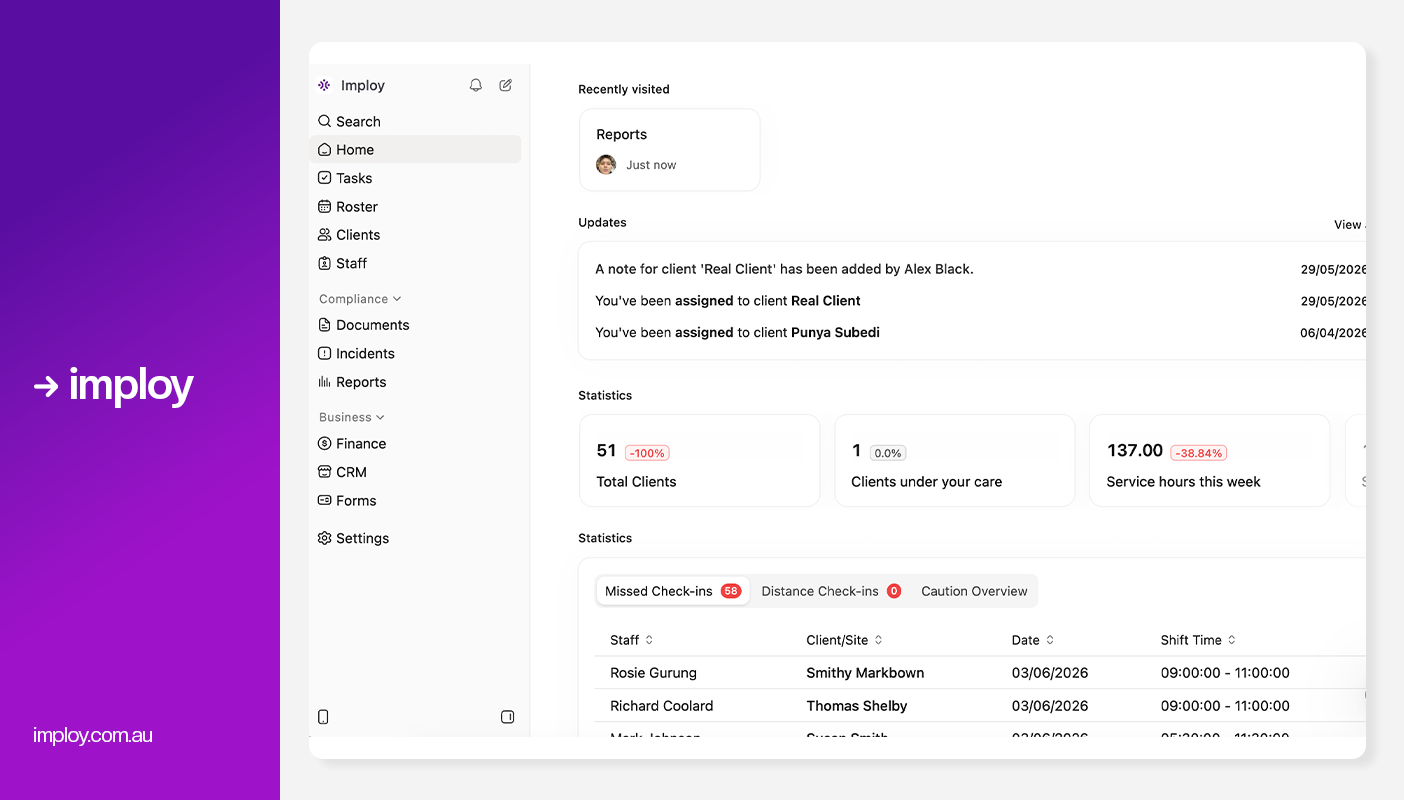
Imploy is an Australian care management platform designed to help aged care and home care providers manage care, rostering, workforce, compliance and administration in one place. It combines everyday provider workflows with AI-powered tools to reduce manual work and improve operational efficiency.
Key Features
- Smart Rostering: Helps providers create efficient rosters and match workers with suitable clients and shifts.
- Care Management: Centralises client information, care plans, shift notes and service records.
- Mobile Workforce Tools: Enables care workers to access schedules, record notes and manage shifts from their mobile devices.
- Invoicing & Payroll: Supports billing, invoicing, payroll and integrations to reduce administrative tasks.
- Client Budgets & Funding: Track budgets in real time, align services to the right funding categories, and reduce claim errors with transparent, compliant spending controls.
- E-Signature Integration: Authorise client documents directly within Imploy using built-in eSignatures - eliminating the need for third-party subscriptions and streamlining approvals.
- CRM and document management: Centralises client communication, records (like - medication record, nutritional risk screening, cognitive assessment), and important documents for easy access.
- Billable task management to turn every support action into a billable event.
- Custom Forms: Imploy's Custom Forms builder enables providers to create digital forms that automatically populate records, streamlining documentation and reducing manual data entry.
- Reporting & Compliance: Imploy's advanced reporting suite provides real-time dashboards and custom reports for service delivery, compliance, workforce performance, finances, and NDIA claims.
- SIL Management: Imploy includes dedicated SIL Management with site-based oversight, occupancy tracking, house documentation, and reporting for Supported Independent Living providers.
- Mobile app for staff and providers: Imploy’s mobile app gives support workers access to upcoming shifts, client information, clock-in/out, shift notes and active-hour recording while working in the field.
- Flexible Shift Types: Imploy supports flexible shift types, including sleepover and group shifts, making it easier to manage overnight support, multiple staff and shared client sessions within the same roster.
- Split Billing: Imploy simplifies split billing by allowing shifts to cover multiple service types, with separate billables and timesheets automatically created for each segment.
- Share Forms by Email: Imploy makes it easier to collect information by letting providers email forms directly to participants, staff or other recipients, with options to prefill details and track completion.
- AI Features:
- Smart Shift Matching: Uses AI to assign the most suitable support worker based on the client’s needs, staff location, availability, skills, and previous interactions -helping reduce travel time and boost consistency.
- Intelligent Note Enhancement: Refines rough shift notes into clear, well-structured summaries by improving tone, grammar, and extracting key insights -enhancing compliance and communication.
- AI Powered Risk Identification: Uses AI to analyze shift notes for key phrases, rating risk from 0 to 10, with plans to allow converting high-risk notes into incidents.
- AI Chatbot (Enterprise only, on request): Provides role-based access to company data, including shifts, client information, and financial data, available exclusively for enterprise customers upon request.
Pros:
- True all-in-one platform (no extra tools needed)
- Support at Home ready
- SCHADS Award support
- Bulk invoicing and claims
- End-to-end care management
- Strong automation reduces admin time
- Advanced AI features
- Scales easily as you grow
Cons:
- More features than basic tools (learning curve for beginners)
- Starter Plan: Free for up to 5 users - includes essential features like care management, rostering, and mobile access
- Premium Plan: $20 per user/month - includes SCHADS Awards, Bulk Client Invoicing AI Scheduler, Human Resources Module, Accounts Module, Unlimited Users
- Enterprise Plan: Provided on request from the Sales Team
2. FlowLogic
.webp)
FlowLogic is an Australian care management platform designed for aged care and community care providers. Its aged care solution focuses on Support at Home, care management, rostering, compliance, billing and financial management, with tools designed to help providers manage their operations in line with the new Aged Care Act. FlowLogic is currently optimised for home-based and community care delivery.
Key Features:
- Support at Home Management: Helps providers manage Support at Home services, budgets and care delivery.
- Bulk Claiming: Supports bulk Support at Home claims to streamline the claiming process.
- Quarterly Budget Tracking: Helps providers create, monitor and manage individual quarterly budgets.
- Care Plans & Rostering: Connects personalised care plans with rostering and service delivery.
- Compliance & Reporting: Provides audit trails, automated workflows and reporting tools to support compliance.
- Split Invoicing: Allows providers to manage and separate invoices across different funding sources, services or payment arrangements.
Pros:
- Strong Support at Home focus
- Includes tools for ongoing compliance and audit preparation.
- All-in-one platform.
- Budget and claiming tools.
- Scalable as you grow.
Cons:
- Primarily focused on home and community care
- No transparent pricing.
- No advanced AI features.
- Implementation can take time.
Pricing:
- FlowLogic uses tailored pricing based on the organisation's size and requirements rather than publishing a fixed per-user subscription price.
3. AlayaCare
.webp)
AlayaCare is a cloud-based, end-to-end care management platform supporting home, community, disability and residential aged care providers across Australia and New Zealand. It combines clinical documentation, rostering, billing, payroll, mobile care and reporting in one platform.
Key Features:
- Support at Home Management: Helps providers manage budgets, fund rollover rules, pooled care management and the no-worse-off guarantee.
- Rostering & Scheduling: Provides real-time scheduling and caregiver matching based on factors such as availability, skills and compatibility.
- Clinical Documentation: Supports configurable care plans, clinical forms, progress notes and secure documentation through web and mobile applications.
- Mobile Care Worker App: Gives workers access to schedules, client information, time tracking, medication records and care documentation while in the field.
- Billing & Financial Management: Supports billing, payroll and revenue-cycle workflows, including Support at Home claims and invoice statements.
Pros:
- Comprehensive platform: Covers both care delivery and back-office operations.
- Strong Support at Home capabilities: Includes dedicated budget, claiming and forecasting tools.
- Suitable for larger providers: Its scalable platform supports home, community, disability and residential care.
- Advanced mobile functionality: Provides extensive tools for frontline care workers.
- AI capabilities: Includes Layla, an AI assistant designed for home and community care workflows.
Cons:
- May be more than smaller providers need: Its broad functionality can be better suited to organisations with complex operations.
- Implementation can be complex: A comprehensive platform may require more configuration, training and change management.
- Custom pricing: There is no simple public per-user price, making upfront cost comparisons more difficult.
Pricing:
- AlayaCare uses custom pricing based on an organisation's requirements
4. ShiftCare
.webp)
ShiftCare is a cloud-based care management platform designed for Australian aged care and NDIS providers. Its aged care solution focuses on care management, rostering, funding, compliance, invoicing and workforce management, with dedicated functionality for Support at Home.
Key Features:
- Support at Home Management: Supports funding classifications, quarterly budgets, co-contributions and bulk subsidy claiming.
- Rostering & Smart Matching: Helps providers schedule shifts and match care workers based on operational requirements.
- Care Management: Includes care plans, progress notes, client records and mobile tools for frontline workers.
- Funding & Compliance: Provides funding visibility, balance alerts, audit trails and compliance documentation.
- Billing & Integrations: Supports invoicing and integrates with accounting and payroll platforms such as Xero, MYOB, QuickBooks and Employment Hero.
Pros:
- Strong rostering: Scheduling and workforce management are core strengths.
- Support at Home ready: Dedicated tools cover classifications, budgets, co-contributions and claiming.
- Mobile-first: Workers can access care plans, clock in/out and work offline through the mobile app.
- AI capabilities: Includes AI tools for note enhancement, billing intelligence, workforce insights and risk detection.
- Quick implementation: ShiftCare states that most providers can be live within three to four weeks with specialist onboarding.
Cons:
- Costs increase as user numbers grow.
- Some advanced features require higher plans: Features such as care plans, advanced incident management and funding management are included in the higher-tier Intelligence plan.
- Minimum user requirement: All plans have a minimum of five staff.
- Advanced customisation may be limited compared with more complex systems.
- Basic AI features: AI and automation features may not be as advanced as newer platforms.
Pricing:
- Basic Plan: $9 per user/month
- Professional Plan: $15 per user/month
- Premium Plan: $25 per user/month
Comparison Table
Why Imploy Is a Strong Choice for Aged Care Providers?
For aged care and home care providers, choosing software that understands Australian aged care requirements is just as important as having good rostering or care management tools. Imploy is built specifically for Australian aged care, home care and NDIS providers, bringing care management, compliance, rostering and workforce administration together in one platform.
1. Built Around Australian Aged Care Workflows
Imploy is designed to support home care providers with care records, support plans, incident reporting, compliance documentation and audit-ready records. This can help providers keep important aged care information organised and accessible across their teams.
2. Support for Support at Home Providers
For providers operating under the changing home care environment, Imploy provides tools for managing client records, budgets, service delivery, compliance and reporting in one system. This reduces the need to manage aged care operations across disconnected spreadsheets and applications.
3. SCHADS Award Automation
Workforce compliance is particularly important for home care providers. Imploy's Premium plan includes an Award Interpretation Engine designed to interpret SCHADS rules and calculate overtime, allowances and penalties, helping connect rostering and payroll processes.
4. AI That Supports Day-to-Day Care Operations
Imploy's AI features are particularly relevant to aged care providers managing large numbers of shifts and care records. Smart Shift Matching can help match workers based on factors such as skills, location and availability, while Intelligent Note Enhancement and risk identification can help reduce documentation and monitoring workload.
5. One Platform for Care and Administration
Rather than using separate systems for rostering, care management, compliance, payroll and invoicing, Imploy brings these workflows together. This can give aged care providers greater visibility across clients, workers, shifts, documentation and administrative operations.
Overall, Imploy is a strong option for Australian aged care and home care providers looking for software that combines aged care workflows, workforce compliance, AI-powered rostering and day-to-day administration in one platform.
Final Thoughts
The best aged care software depends on your provider's size, services and operational needs. FlowLogic, AlayaCare and ShiftCare each offer strong capabilities for Australian home care providers, while Imploy stands out as an all-in-one option combining care management, AI-powered rostering, workforce management, compliance, payroll and invoicing.
Before choosing a platform, compare its Support at Home capabilities, integrations, pricing, ease of use and ability to scale with your organisation.
Frequently Asked Questions
1. What is the best aged care software in Australia in 2026?
There is no single solution for every provider. Imploy, FlowLogic, AlayaCare and ShiftCare are four leading options to consider, with different strengths across care management, rostering, Support at Home, compliance and workforce management.
2. Does Imploy support aged care providers?
Yes. Imploy is designed for Australian aged care, home care and NDIS providers, offering care management, rostering, compliance, workforce and administrative tools in one platform.
3. Does Imploy support Support at Home?
Imploy provides tools to help home care providers manage client information, care delivery, budgets, compliance and reporting. Providers should confirm the latest Support at Home functionality and claiming requirements with Imploy before implementation.
4. Does Imploy support SCHADS Award requirements?
Yes. Imploy includes SCHADS Award support and award interpretation functionality, helping providers manage applicable overtime, allowances, penalties and payroll requirements.
5. Does aged care software include AI?
Many modern platforms do. Imploy includes AI-powered features such as smart shift matching, AI rostering, note enhancement and risk identification, while AlayaCare and ShiftCare also offer various AI capabilities.
6. How much does aged care software cost?
Pricing varies between providers. Some platforms offer per-user pricing, while others provide customised quotes. Imploy offers a free plan for up to five users, with paid plans available for larger teams.


.webp)
