
Best NDIS Software for Sole Traders (2026)
Starting an NDIS business? Discover the best software for sole traders in 2026, including free and all-in-one tools to simplify your operations.


Running an NDIS business as a sole trader means managing much more than participant support.
You may need to manage participant records, care plans, rosters, shift notes, invoices, claims, documents and everyday administration.
When these tasks are handled across spreadsheets, emails and separate systems, administration can quickly become difficult to manage.
The right NDIS software can bring these workflows together in one place. It can help you manage participant information, organise support, record notes, handle billing and keep important records accessible.
In this guide, we explore what sole traders should look for in NDIS software, how the right platform can support everyday operations, and why choosing software that can grow with your business matters.
Why NDIS Software is Essential for Sole Providers?
Running an NDIS business as a sole provider isn’t just about delivering support - it also involves managing compliance, finances, scheduling, and client communication on your own. Without the right systems in place, this can quickly become overwhelming.
NDIS software is essential because it helps you stay organised, reduce manual work, and operate professionally, even as a one-person business.
1. Reduces administrative burden
Automates repetitive tasks like invoicing, scheduling, and record-keeping so you can focus more on participants.
2. Ensures compliance with NDIS requirements
Keeps your documentation accurate, up to date, and ready for audits without relying on manual tracking.
3. Improves accuracy and reduces errors
Minimises mistakes in billing, shift management, and reporting that could lead to payment delays or compliance issues.
4. Saves time and increases efficiency
Streamlines daily operations, allowing you to manage more clients without increasing workload.
5. Enhances professionalism and client trust
Provides structured systems for communication, reporting, and service delivery, improving the overall client experience.
6. Supports business growth
Creates a scalable foundation so you can expand from a sole trader to a larger provider without changing systems.
In short, NDIS software turns a complex, admin-heavy workload into a manageable, streamlined process - making it a critical tool for any sole provider.
How Imploy Supports NDIS Sole Traders
Imploy brings key NDIS business workflows into one connected platform. Sole traders can manage participant records, rosters, shift notes, invoicing, claims and other day-to-day tasks without relying on multiple systems.
- Manage participant records, care plans and support information
- Create and manage shifts with flexible rostering tools
- Record shift notes and other service information from the mobile app
- Manage invoices from shifts, travel, reimbursements and other billable entries
- Keep documents, forms and participant information organised
- Use custom forms and attributes to match your workflows
- Access reporting tools as your business grows
By connecting these workflows, Imploy helps sole traders reduce repetitive administration and manage their NDIS business from one platform. The same system can also support additional participants and workers as the business grows.
What Should Sole Traders Look for in NDIS Software?
The right platform should match the way you manage your business.
Some of the key features to consider include participant management, rostering, mobile access, documentation, invoicing, claims and reporting.
1. Participant Management
Look for software that allows you to manage participant information, care plans, goals, documents and other relevant records.
2. Rostering and Scheduling
A clear roster can help you organise upcoming support.
If you later work with support workers, more advanced rostering features can help manage availability, recurring shifts and scheduling changes.
Imploy's NDIS rostering software provides tools for creating and managing provider rosters.
3. Mobile Access
NDIS support is often delivered in the community or at a participant's home.
Mobile access allows relevant tasks to be completed without being tied to a desktop.
With the Imploy mobile app, users can access shifts, record notes and manage other shift-related information while working in the field.
4. Shift and Progress Notes
Support documentation provides a record of the services delivered.
Notes can include information about activities completed, participant responses, progress, observations and follow-up actions.
Imploy's mobile workflow allows shift notes to be recorded against the relevant service.
You can also use the NDIS Case Note Template to help structure documentation.
5. Invoicing
Manual invoice creation can become repetitive as the number of services increases.
NDIS invoicing software can help connect completed services with billable information.
Imploy's bulk invoicing functionality supports invoices based on shifts, travel, reimbursements and other billable entries.
6. NDIS Claims
Claims are another important part of provider administration.
Imploy supports NDIS bulk claims and can generate a PRODA-ready CSV for providers using the NDIA bulk upload process.
7. Documentation and Compliance
Providers need to maintain appropriate records and follow their responsibilities under the NDIS framework.
NDIS software can help organise participant records, service documentation and other information required as part of everyday provider operations.
Imploy can help organise records and workflows that support ndis compliance, but software does not replace a provider's own compliance responsibilities.
8. Reporting
Reporting can help providers review information across their business.
Depending on the platform, this can include service delivery, billing, participant information, workforce activity and other operational data.
How Does Imploy Support Sole Traders?
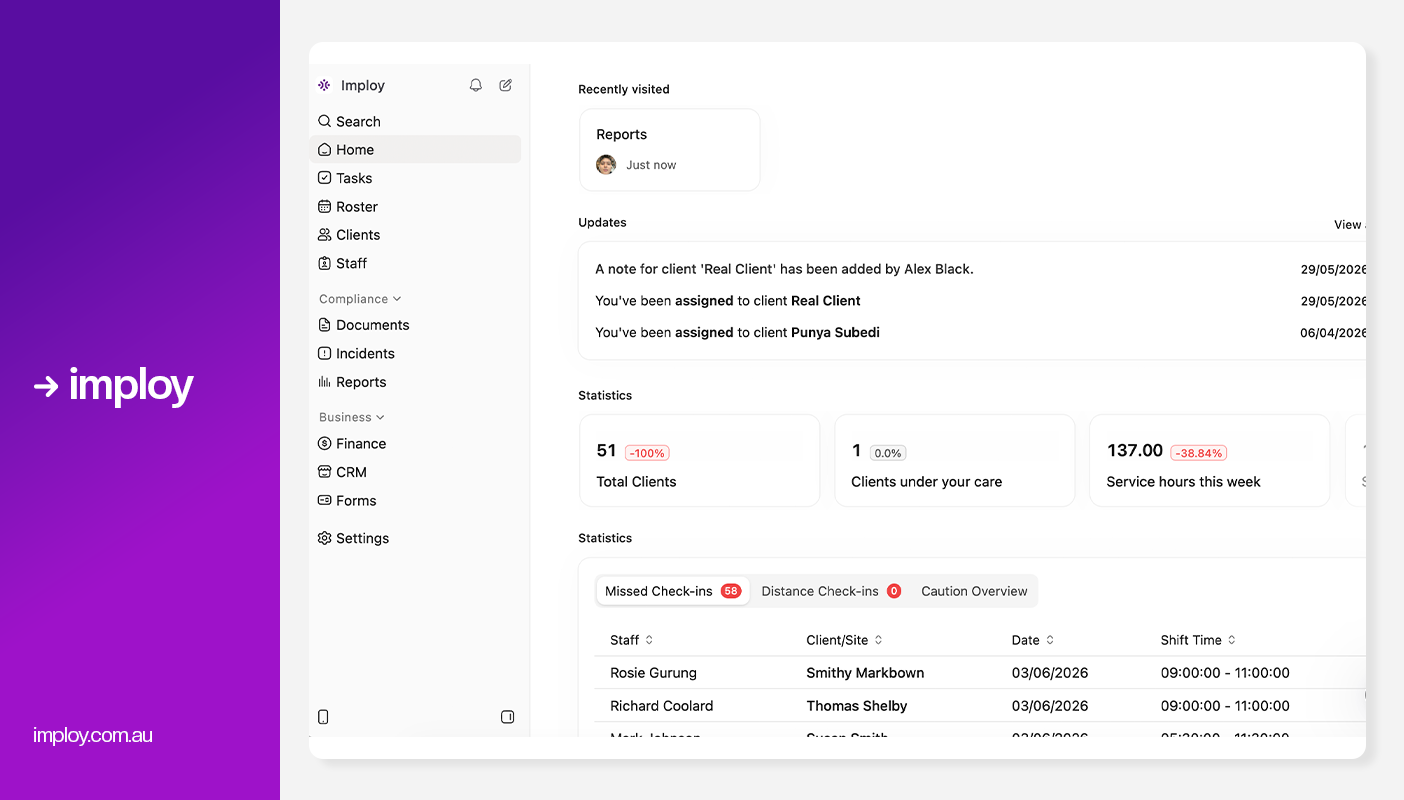
Imploy brings participant management, care management, rostering, mobile workflows, billing, claims and reporting into one platform.
This can help sole traders manage more of their everyday operations from one system.
1. Manage Participants and Care Plans
Imploy's care management features allow providers to manage participant information, care plans, budgets, progress and other relevant records.
This gives sole traders a central place to keep important participant information organised. Having these records together can also make it easier to access the right information when planning and delivering support.
Providers can update participant records as needs change and keep relevant care information connected to the wider service workflow. This can help reduce the need to manage participant information across separate documents or systems.
2. Manage Shifts and Rosters
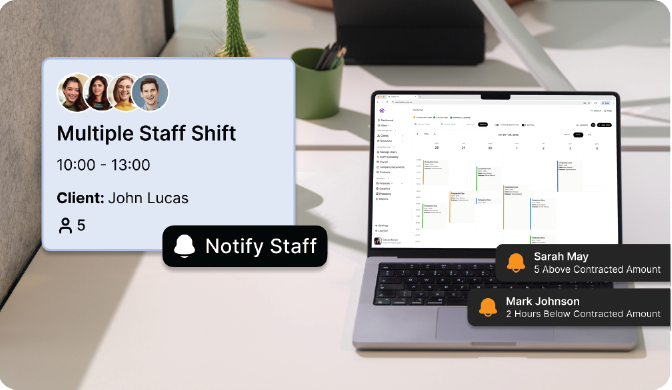
The Roster Builder provides a visual way to organise shifts. Recurring shifts can also be created for regular support arrangements.
As a provider grows, AI-powered shift matching can help identify suitable workers based on factors such as availability, skills, location and participant preferences.
3. Record Notes From the Mobile App
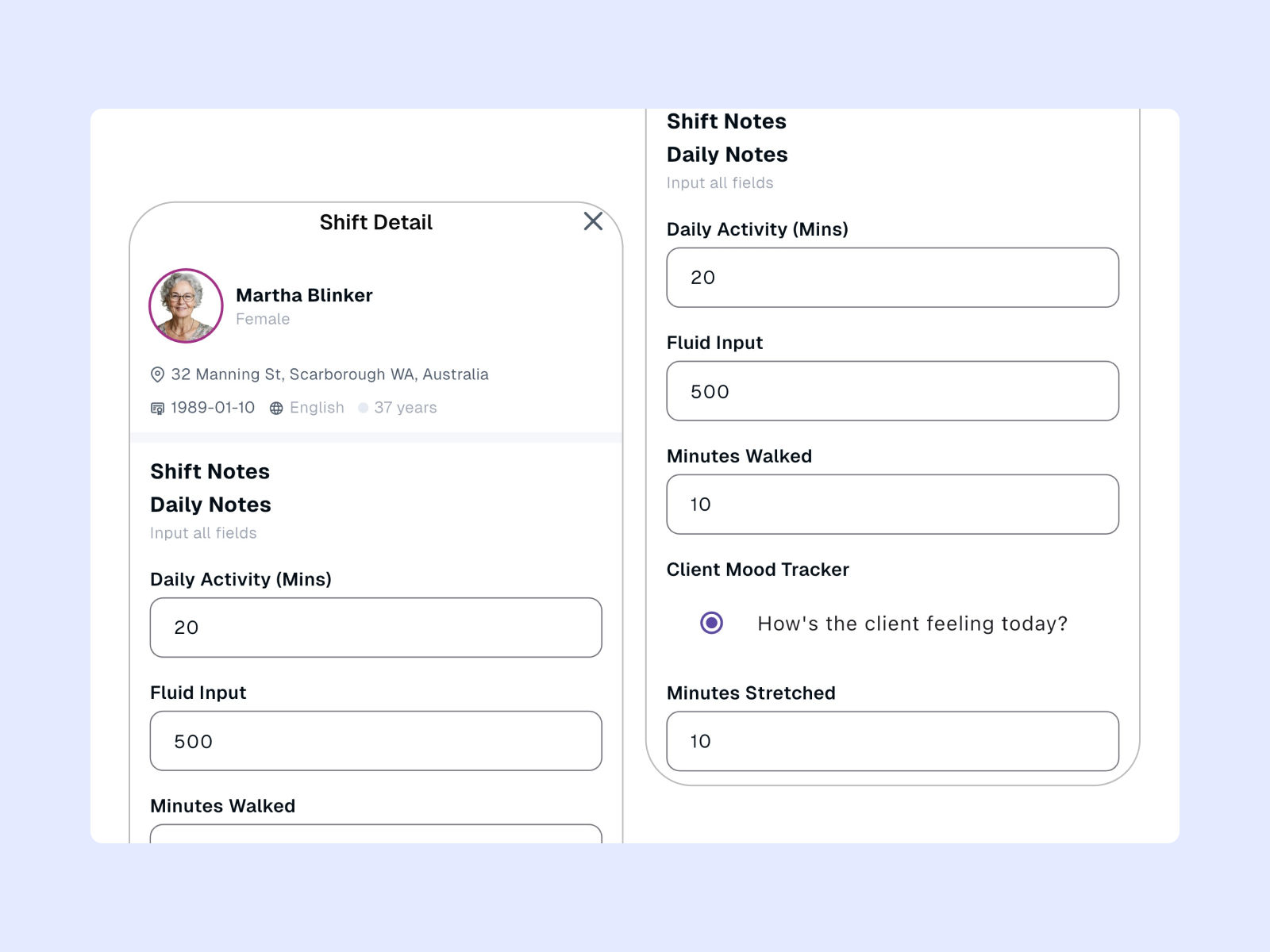
Support workers can use the Imploy mobile app to access their shifts and record notes while working in the field.
The app can also support information such as kilometres, incidents, photos, documents and reimbursements. This helps keep important shift information together instead of relying on separate records.
4. Simplify Invoicing
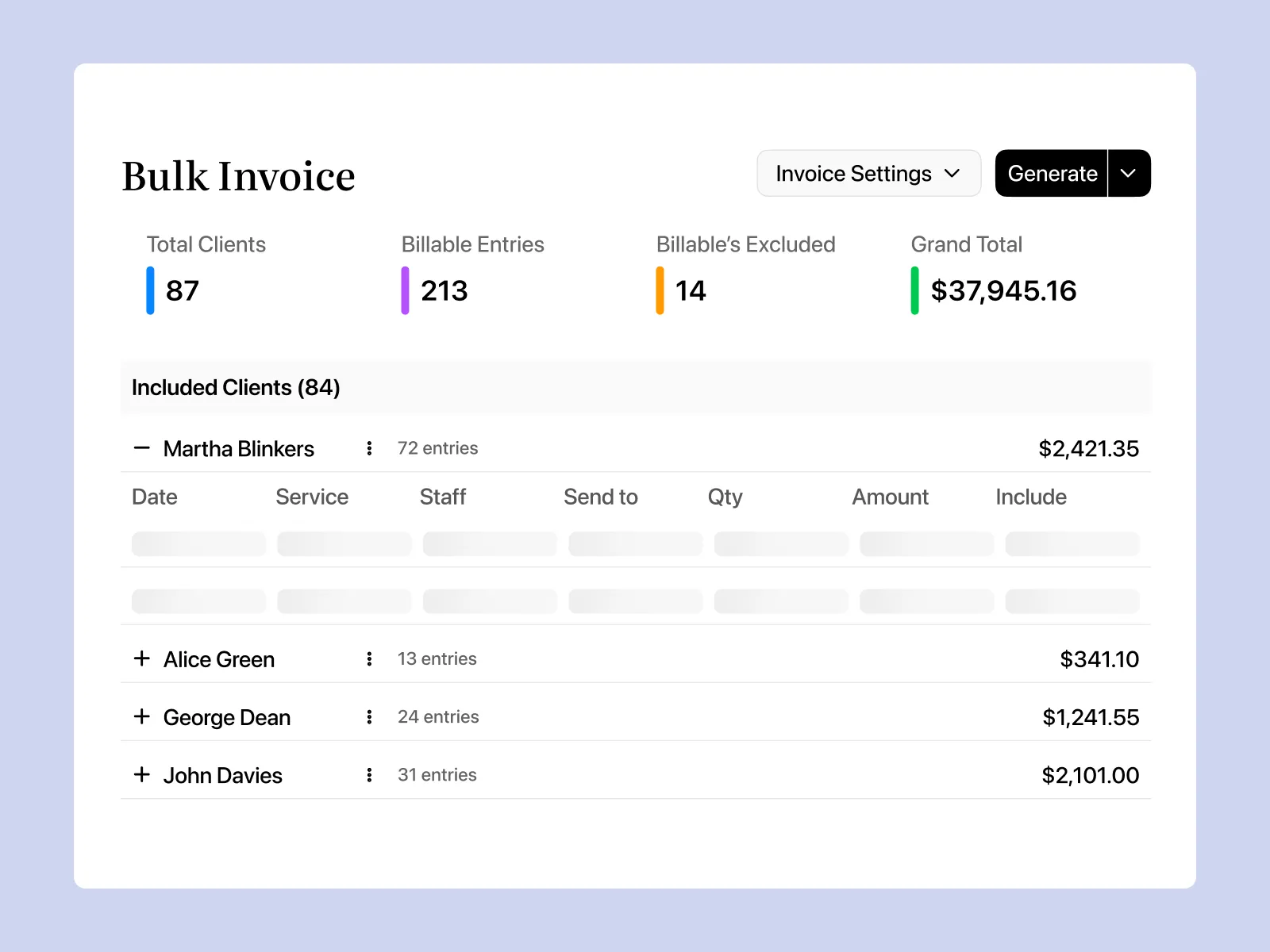
Completed services can flow into the billing process.
Imploy supports different billable entries, including shifts, travel, reimbursements and manual entries.
Bulk invoicing can help reduce repetitive invoice preparation. This can make it easier for providers to manage billing when handling multiple services or participants.
5. Manage NDIS Claims
Imploy supports NDIS bulk claim workflows.
Providers can prepare claim information and generate a PRODA-ready CSV for the relevant NDIA bulk upload process. This can help keep claim preparation connected to the wider billing workflow.
6. Manage Custom Information
Different providers may have different documentation requirements.
Imploy's Custom Forms and Custom Attributes allow providers to capture information specific to their workflows. This gives providers more flexibility when managing information that does not fit standard fields.
7. Use AI for Selected Workflows
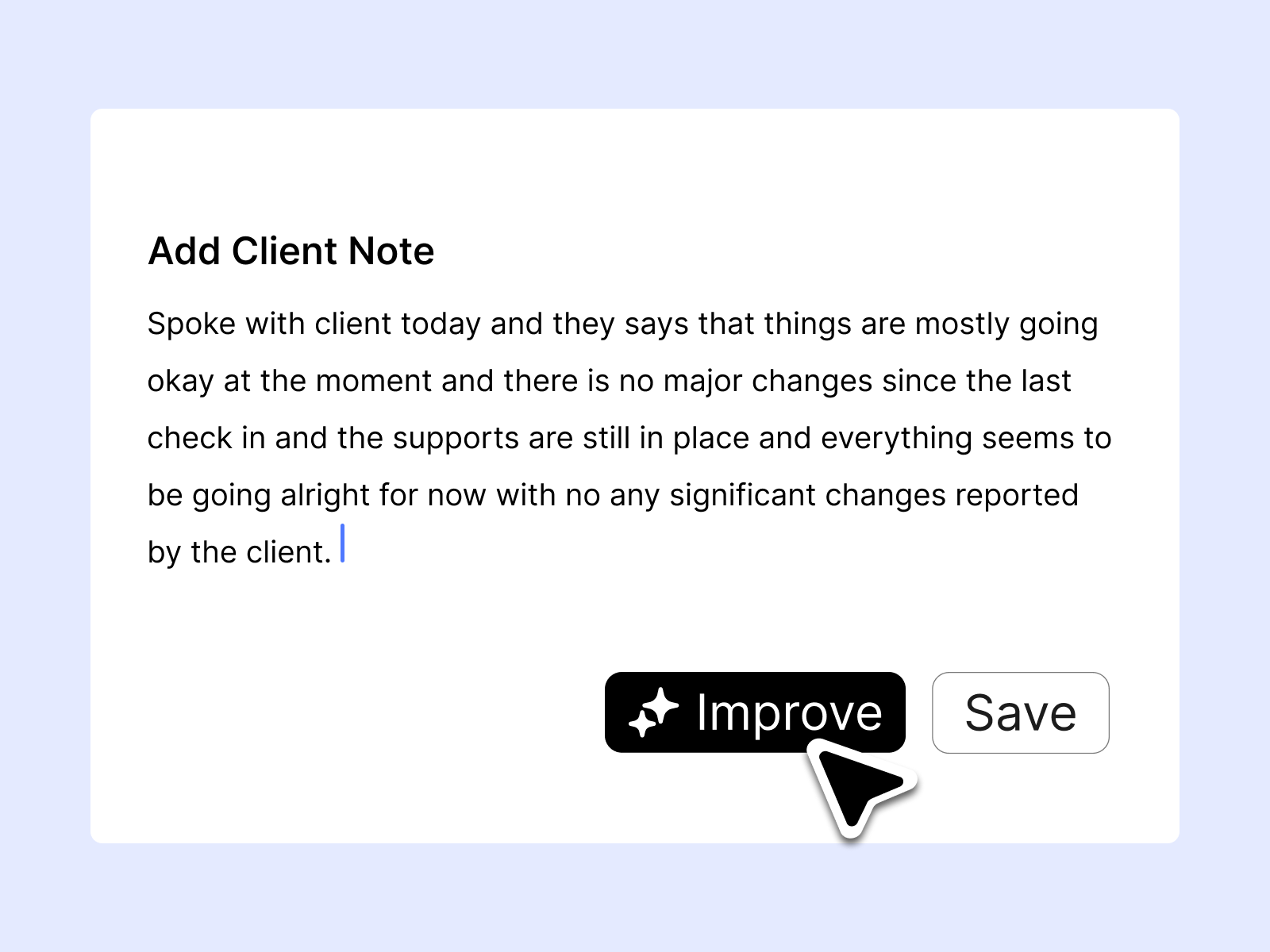
Imploy includes AI features that can assist with selected provider tasks, including:
- Smart Shift Matching
- AI Note Improvement
- AI-powered risk identification
AI Note Improvement can help refine and structure existing notes. The final record should still be reviewed to make sure it accurately reflects the support delivered.
- Starter Plan: Free for up to 5 users - includes essential features like care management, rostering, and mobile access
- Premium Plan: $20 per user/month - includes SCHADS Awards, Bulk Client Invoicing AI Scheduler, Human Resources Module, Accounts Module, Unlimited Users
- Enterprise Plan: Provided on request from the Sales Team
Choosing Software That Can Grow With Your Business
A sole trader may not need the same level of functionality as a large provider today. However, choosing a platform that can support growth can prevent unnecessary changes later.
For example, a platform that works for a sole trader may eventually need to support:
- Additional support workers
- More participants
- Recurring rosters
- Workforce management
- Bulk invoicing
- More complex billing
- Additional documentation
- Reporting
- Payroll workflows
This is why searches for the best ndis software for large providers often focus on scalability and connected workflows.
For a sole trader, the important consideration is whether the platform can support the business now while providing features that remain useful as operations become more complex.
How Imploy Simplifies the NDIS Workflow?
A typical workflow can look like this:
Step 1: Add the Participant
Participant information, care plans and relevant documents are added to Imploy.
Step 2: Schedule Support
The required shift is created and added to the roster.
Step 3: Deliver Support
The provider or support worker delivers the scheduled service.
Step 4: Record the Shift
Relevant information and notes can be recorded through the mobile app.
Step 5: Review the Record
The completed shift, participant information and documentation remain connected within the platform.
Step 6: Create the Invoice
Billable services can move into the invoicing workflow.
Step 7: Manage the Claim
Relevant claim information can be prepared as part of the NDIS claiming workflow.
The overall process becomes:
Participant → Roster → Support → Notes → Invoice → Claim → Records
This can reduce the need to move information between different systems.
How to Choose the Right NDIS Software?
Before choosing a platform, consider how you currently manage your business.
Ask yourself:
1. Can I manage participant information in one place?
A central participant record can reduce the need to maintain information across multiple spreadsheets and documents.
2. Can I manage work from my phone?
Mobile access can be particularly useful if you spend much of your time delivering support.
3. Can I manage invoices and claims?
Look for billing and claim functionality that matches your services and workflow.
4. Can I record notes against the right shift?
Connecting notes with participant and shift information can make documentation easier to organise.
5. Can the platform grow with my business?
Think about whether the system can support additional workers, participants and more complex workflows as your business grows. If you are looking for the best ndis software for large providers/growing providers, consider whether the platform also offers the features and flexibility needed to support larger teams and more complex operations over time.
6. Can I customise the system?
Custom forms and fields can be useful when standard workflows do not fully match your documentation requirements.
Why Use Imploy?
Running an NDIS business involves balancing participant support with administration.
You need to manage records, shifts, notes, billing, claims and documentation while continuing to focus on service delivery.
Imploy brings these workflows together in one platform.
Providers can use Imploy for:
- Participant management
- Care management
- Rostering
- Shift notes
- Mobile workflows
- Care plans
- Incident records
- Invoicing
- NDIS claims
- Reporting
- Custom forms
- Custom attributes
This gives sole traders one connected system for managing their day-to-day NDIS operations, while providing additional functionality as the business grows.
How Imploy Supports NDIS Sole Traders
Imploy brings key NDIS business workflows into one connected platform. Sole traders can manage participant records, rosters, shift notes, invoicing, claims and other day-to-day tasks without relying on multiple systems.
- Manage participant records, care plans and support information
- Create and manage shifts with flexible rostering tools
- Record shift notes and other service information from the mobile app
- Manage invoices from shifts, travel, reimbursements and other billable entries
- Keep documents, forms and participant information organised
- Use custom forms and attributes to match your workflows
- Access reporting tools as your business grows
By connecting these workflows, Imploy helps sole traders reduce repetitive administration and manage their NDIS business from one platform. The same system can also support additional participants and workers as the business grows.
Final Thoughts
Running an NDIS business as a sole trader involves more than delivering support.
Participant records, schedules, notes, invoices, claims and documentation all need to be managed alongside service delivery.
The right NDIS software can connect these workflows and reduce repetitive administration.
Imploy provides tools for participant management, rostering, mobile documentation, invoicing, claims and reporting in one platform.
For sole traders, this creates a central place to manage everyday operations while providing a foundation for future growth.
Frequently asked questions
What is NDIS software for sole traders?
NDIS software for sole traders helps independent providers manage tasks such as participant records, care plans, rostering, shift notes, invoicing, claims, documentation and reporting.

Do sole traders need NDIS software?
NDIS software is not required simply because you operate as a sole trader. However, it can help organise business records and reduce manual administration.
What should I look for in NDIS software?
Consider participant management, rostering, mobile access, shift notes, invoicing, claims, reporting, documentation and customisation.
Can NDIS software help with invoicing?
Yes. NDIS software can connect completed services with billable information and help providers create invoices.
Can sole traders manage NDIS claims through software?
Some platforms support NDIS claim workflows. Imploy supports NDIS bulk claims and can generate a PRODA-ready CSV for the NDIA bulk upload process.
Can I use NDIS software on my phone?
Yes. Mobile applications can allow providers and support workers to manage shifts, access relevant participant information and record notes while working in the field.
Can NDIS software support business growth?
Yes. Choosing a platform with participant management, rostering, billing, documentation and workforce features can make it easier to manage additional participants and workers as the business grows.
Does Imploy support NDIS sole traders?
Yes. Imploy provides tools for participant management, care management, rostering, mobile workflows, shift notes, invoicing, NDIS claims, reporting and documentation.
Does Imploy have a mobile app?
Yes. The Imploy mobile app supports shift management, participant information, shift notes and other field-based workflows.