

Best NDIS Software for Large Providers in Australia
Discover how Imploy supports large NDIS providers with smart rostering, bulk invoicing, claims, compliance, reporting, mobile tools and AI features.


Managing a large NDIS provider means coordinating participants, support workers, rosters, billing, compliance and reporting. Finding the best NDIS software for large providers can bring these processes together and reduce administrative work.
As the organisation grows, spreadsheets, disconnected systems and manual workflows can make it harder to maintain accurate records and manage day-to-day operations.
The right software should support complex workflows, high-volume operations and a growing workforce without adding unnecessary administration.
Here are the key areas large NDIS providers should consider when choosing software.
How Can NDIS Software Simplify Care Management for Large Providers?
As an NDIS provider grows, managing participant care becomes harder to coordinate.
More participants mean more care plans, progress notes, service records, support workers and important information to manage. When this information is spread across spreadsheets, emails, documents and different systems, it can become difficult for teams to find the right information when they need it.
For large providers, this can lead to:
- More administrative work for care teams and managers
- Information being duplicated across different systems
- Difficulty keeping participant records up to date
- Less visibility across participant care and service delivery
- More time spent coordinating information between teams
This is where NDIS software can make a difference.
A centralised NDIS platform gives teams one place to manage participant information, care plans and service records. It can also connect care management with rostering, workforce management, billing and other operational processes.
What Should Large NDIS Providers Look for in Software?
Before choosing an NDIS platform, large providers should consider whether the system can support their current operations and future growth.
Important areas to evaluate include:
1. Workforce Management
Look for smart rostering, availability management, shift allocation and mobile access for support workers.
2. NDIS Billing and Claims
The platform should support efficient invoicing and claims workflows, particularly when processing large volumes of services.
3. Participant Management
Participant information, care plans, service records and documentation should be accessible from a central system.
4. Compliance and Reporting
Look for tools that help maintain documentation, monitor compliance and provide meaningful operational reporting.
5. Automation and AI
Automation can reduce repetitive administrative work, while AI can support areas such as rostering, documentation and risk identification.
6. Integrations
Accounting and operational integrations can reduce duplicated data entry and help connect financial workflows.
7. Mobile Access
Support workers should be able to access schedules, record service information and complete essential tasks while working in the field.
8. Scalability
The platform should be capable of supporting increasing participants, staff, locations and service volumes as the organisation grows.
How Does Imploy Streamline NDIS Billing and Bulk Claims?
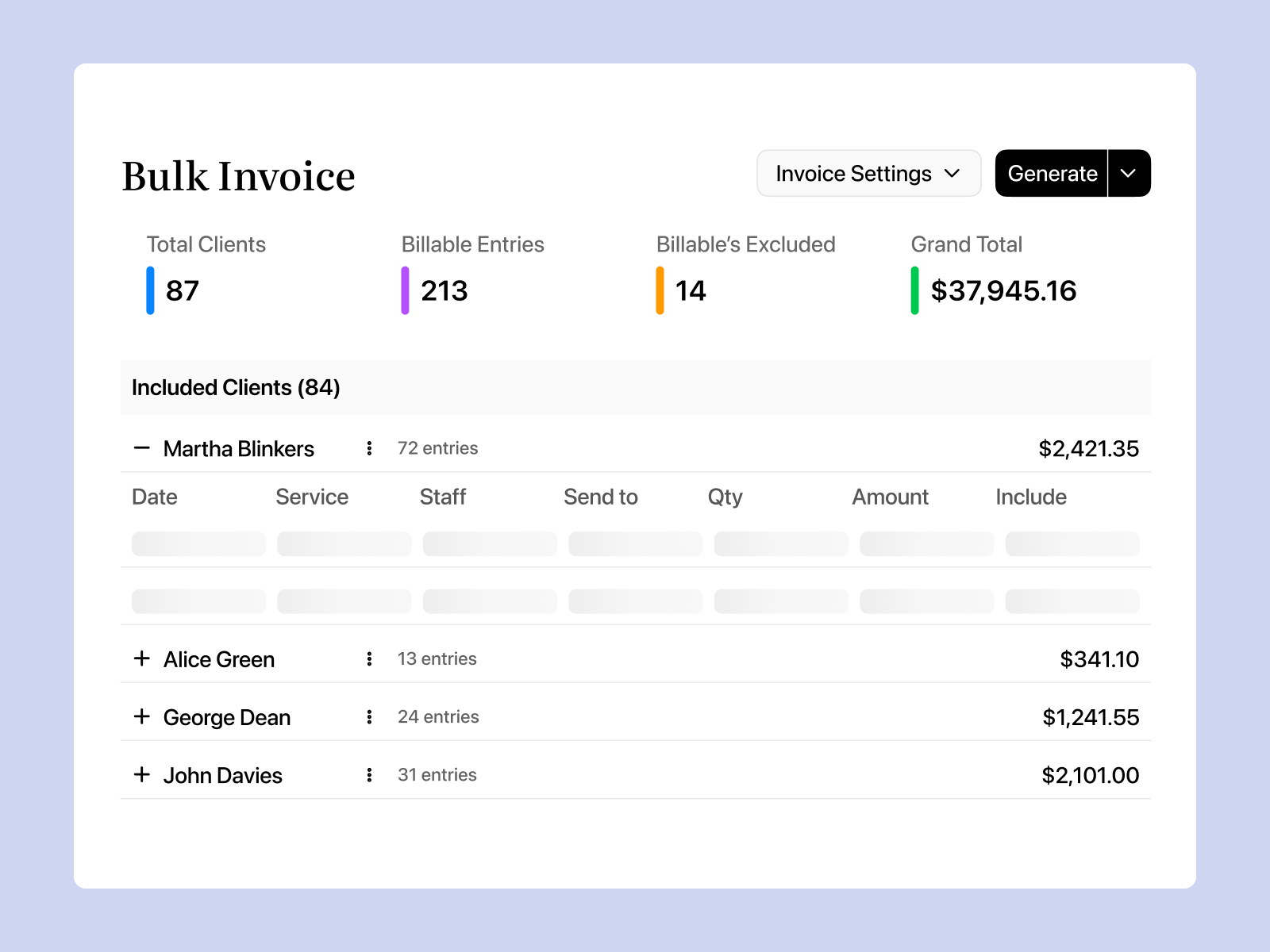
High-volume billing can become one of the biggest administrative tasks for a growing NDIS provider.
Manually preparing invoices and claims from completed shifts, tasks and service records can take significant time and create opportunities for errors.
Imploy's bulk invoicing tools allow providers to generate invoices from service delivery information and connect their financial workflows with accounting platforms such as Xero and QuickBooks.
Imploy also provides NDIS bulk claims functionality. Providers can group eligible billable entries - including shifts, tasks, travel and reimbursements - into a claim period, review the entries and export a PRODA-ready CSV for upload.
This helps providers:
- Process high volumes of billable services
- Reduce manual data entry
- Review claim information before submission
- Keep billing information organised
- Connect invoicing workflows with accounting systems
- Reduce repetitive billing administration
For providers managing hundreds or thousands of billable service entries, these workflows can make a significant difference to day-to-day administration.
How Can Imploy Help Large Providers Manage Participant Information?
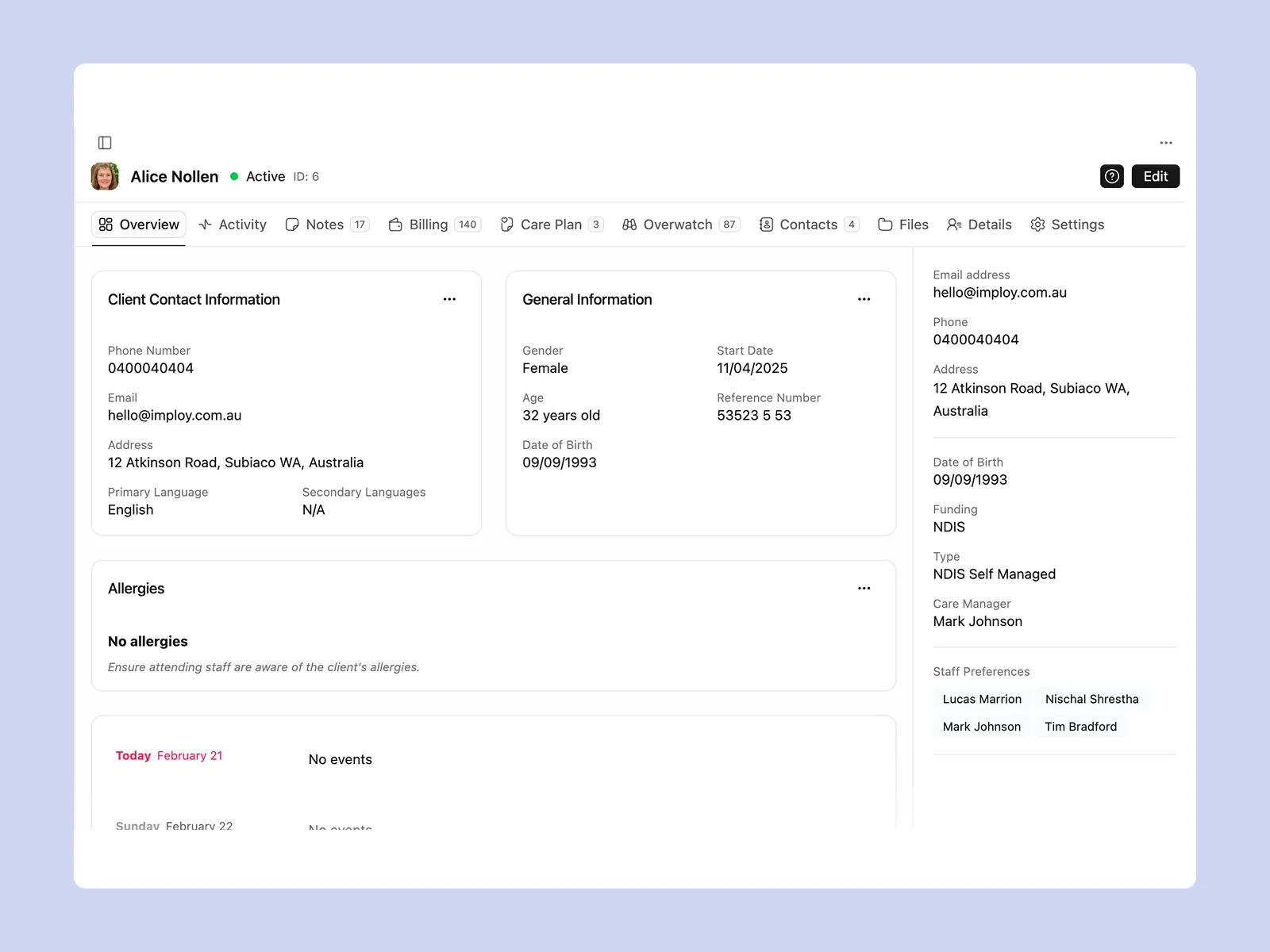
Large providers need reliable access to participant information across their teams.
Participant records, care plans, service information, communication and important documents can become difficult to manage when information is spread across multiple systems.
Imploy centralises participant and client information within its NDIS CRM software.
Providers can use Imploy to manage care plans, track client progress and support communication between carers, families and managers. The platform also provides CRM and document-management capabilities for centralising participant records and important documentation.
Custom Attributes allow providers to create fields for clients, staff, sites and incidents, helping organisations adapt the system to their own workflows.
Custom Forms can also be used to create digital forms that populate records and reduce repetitive data entry.
This gives larger providers a centralised environment for managing participant information while maintaining consistency across their operations.
How Does Imploy Support NDIS Compliance and Reporting?
Compliance becomes more important as providers grow.
Large organisations need systems that help teams maintain accurate records, monitor documentation and access information when it is required for internal reviews, reporting or audits.
Imploy provides reporting and compliance functionality designed to give providers greater visibility across their operations.
Its reporting suite can provide information across areas including:
- Service delivery
- Compliance
- Workforce performance
- Finances
- NDIA claims
Imploy also provides tools for managing documentation, incidents and other operational records.
By keeping these records within the same platform as service delivery and workforce management, providers can reduce reliance on disconnected spreadsheets and manual recordkeeping.
How Can Imploy's AI Reduce Administrative Work for NDIS Providers?
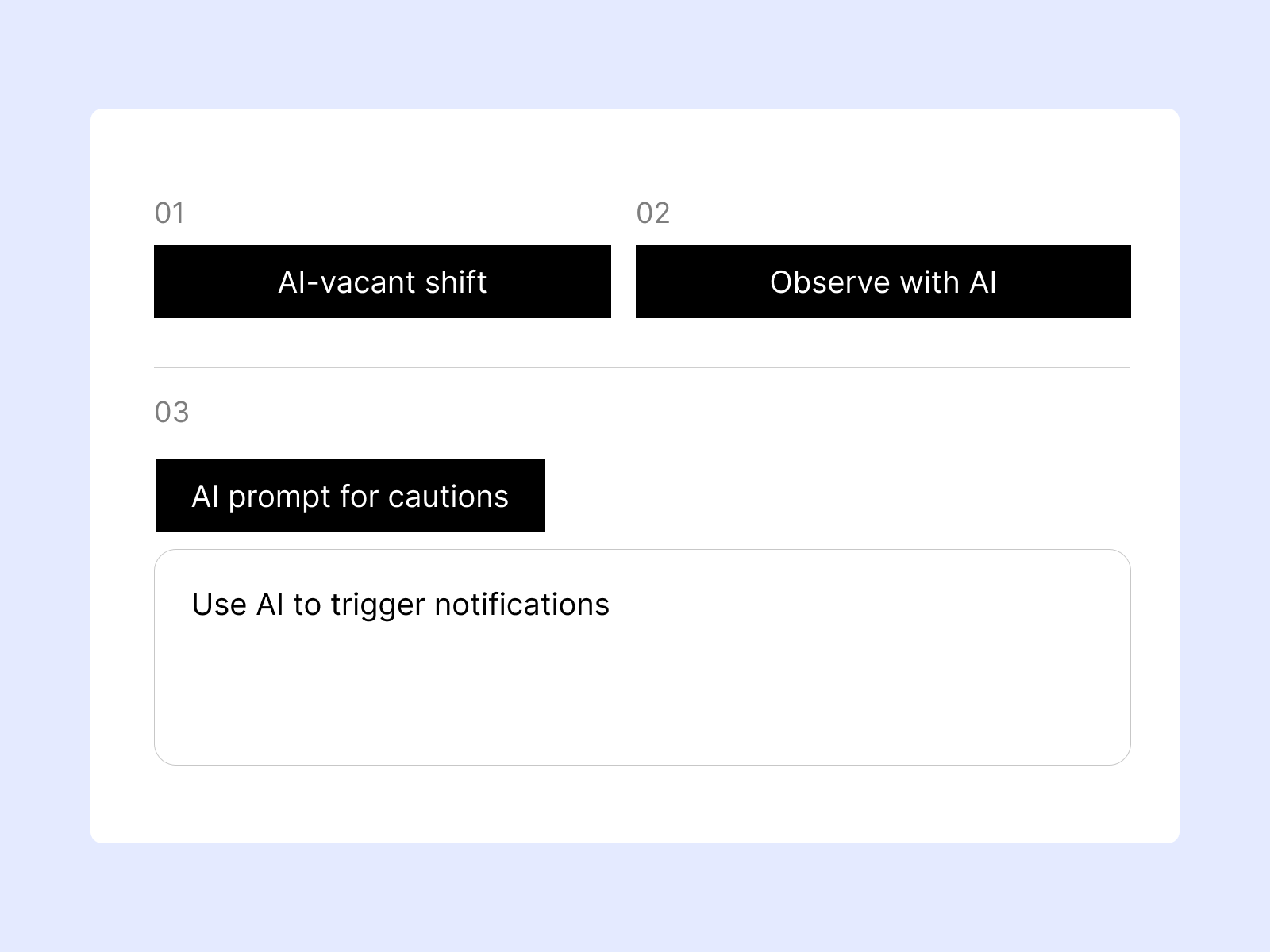
AI can be particularly useful when providers are managing large volumes of operational information.
Imploy takes an AI-first approach, with AI features designed to support rostering, documentation and risk identification.
1. Smart Shift Matching
Imploy's Smart Shift Matching uses AI to help identify suitable support workers based on participant needs, staff location, availability, skills and previous interactions.
This can help managers spend less time manually searching for suitable workers.
2. Intelligent Note Enhancement
Support workers can produce rough shift notes that may require editing before they are finalised.
Imploy's Intelligent Note Enhancement can refine notes into clearer, structured summaries while improving grammar, tone and readability.
This can help reduce the administrative effort involved in reviewing and improving routine documentation.
3. AI-Powered Risk Identification
Imploy can analyse shift notes for potential risk indicators and provide a risk score from 0 to 10.
This gives providers another way to identify notes that may require additional attention and supports more proactive risk management.
4. AI Chatbot
For enterprise customers, Imploy also offers an AI chatbot on request. It can provide role-based access to company information, including shifts, client information and financial data.
Together, these features are designed to reduce repetitive administrative work while helping managers make better use of operational information.
How Does Imploy Support Mobile Workforce Management?
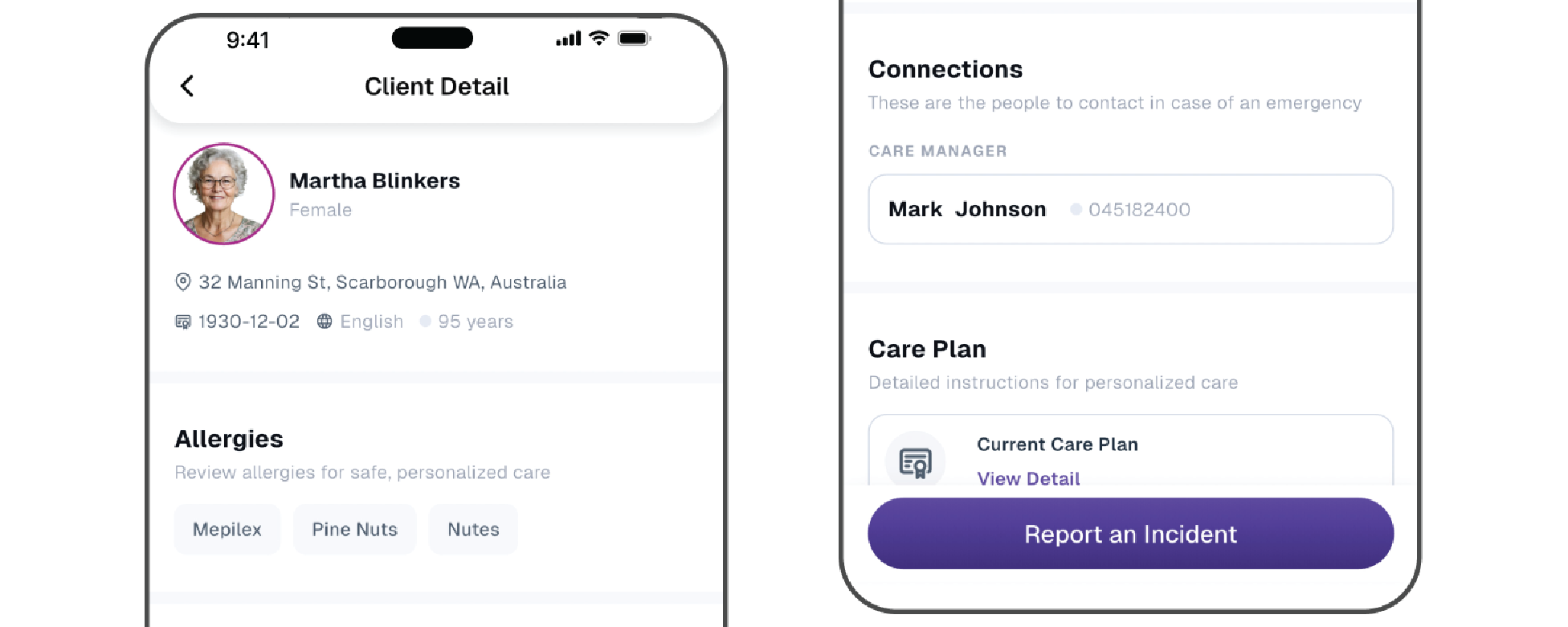
Large NDIS providers often have teams working across different participants and locations.
Support workers need access to relevant information while they are delivering services, while managers need visibility over service delivery without relying entirely on office-based systems.
Imploy's mobile app allows staff to:
- Clock in and out
- View schedules
- Submit progress notes
- Receive real-time notifications
- Manage availability
This gives support workers access to key workflows while they are working in the field and helps connect mobile service delivery with the provider's broader operational system.
How Can Imploy Reduce the Number of Systems a Large Provider Uses?
As providers grow, it is common for different departments to adopt different tools for rostering, participant management, invoicing, compliance and reporting.
The result can be duplicated information, additional logins and manual processes for transferring data between systems.
Imploy brings core provider operations together in one platform, including:
- Care management
- Rostering
- Mobile workforce management
- Bulk invoicing
- NDIS claims
- Reporting and compliance
- Billable tasks
- Payroll and timesheets
- Custom forms
- Custom attributes
- SIL management
This approach gives providers a central system for managing their operational workflows rather than relying on separate tools for every function.
Why is Imploy the Best NDIS Software for Large Providers?
Imploy brings core NDIS provider operations together in one platform.
Instead of managing separate systems for rostering, participant management, invoicing, compliance and workforce operations, providers can manage these workflows through a central platform.
For organisations with more complex requirements, Imploy also offers an enterprise NDIS software option with dedicated deployment, custom workflows, custom reporting and other enterprise capabilities.
Key capabilities include:
- Smart rostering and AI-powered shift matching
- Participant and care management
- Bulk invoicing
- NDIS bulk claims
- Xero and QuickBooks integration
- Mobile workforce management
- Compliance and reporting
- Custom forms and attributes
- SIL management
- Payroll and timesheets
- AI-powered note enhancement
- AI-powered risk identification
- Enterprise AI chatbot available on request
You can also read Imploy reviews on G2 and see Imploy reviews on Trustpilot to explore customer feedback and learn more about users' experiences with the platform.
Imploy is designed to help providers reduce manual administration, improve operational visibility and manage increasingly complex NDIS service delivery from one system.
- Starter Plan: Free for up to 5 users - includes essential features like care management, rostering, and mobile access
- Premium Plan: $20 per user/month - includes SCHADS Awards, Bulk Client Invoicing AI Scheduler, Human Resources Module, Accounts Module, Unlimited Users
- Enterprise Plan: Provided on request from the Sales Team
Final Thoughts
Large NDIS providers need software that can keep up with the complexity of modern service delivery.
Rostering, participant management, billing, claims, compliance, reporting and workforce coordination all become more difficult to manage as an organisation grows.
The right platform can reduce this complexity by connecting these workflows in one place.
Imploy combines NDIS care management, smart rostering, bulk invoicing, NDIS claims, compliance, reporting, mobile workforce tools and AI-powered features within a single platform.
For providers looking to reduce administrative workload while building a scalable operational foundation, Imploy provides an integrated approach to managing NDIS services.
Frequently Asked Questions
1. What is the best NDIS software for large providers?
The best NDIS software for large providers should support complex operations, including participant management, rostering, billing, compliance, reporting and workforce management. Imploy brings these functions together in one platform, helping large providers manage growing service volumes and teams.
2. What should large NDIS providers look for in software?
Large providers should look for software that offers scalability, centralised participant management, efficient billing and claims, workforce management, compliance tools, reporting, integrations, mobile access and automation. Imploy combines these capabilities to support the operational needs of growing NDIS providers.
3. How can Imploy help large NDIS providers manage operations?
Imploy brings core provider operations into one platform, including care management, rostering, mobile workforce management, bulk invoicing, NDIS claims, reporting, compliance, payroll and timesheets. This can help reduce duplicated data entry and the need to manage multiple disconnected systems.
4. Can Imploy support large NDIS teams?
Yes. Imploy is designed to support growing numbers of participants, support workers, locations and service volumes. Its workforce management features include rostering, availability management, shift allocation and mobile access for support workers.
5. How does Imploy help with NDIS billing and bulk claims?
Imploy provides bulk invoicing and NDIS bulk claims functionality. Providers can manage billable entries such as shifts, tasks, travel and reimbursements, review claim information and export a PRODA-ready CSV for upload.
6. How does Imploy manage participant information?
Imploy centralises participant information, care plans, service records, communication and documentation. Its CRM and document-management capabilities help large providers maintain consistent participant records across their teams.
7. Does Imploy support NDIS compliance and reporting?
Yes. Imploy provides reporting and compliance functionality covering areas such as service delivery, compliance, workforce performance, finances and NDIA claims. It also supports documentation and incident management within the platform.
8. Does Imploy offer AI features for large NDIS providers?
Yes. Imploy offers AI-powered features including Smart Shift Matching, Intelligent Note Enhancement and AI-powered Risk Identification. An enterprise AI chatbot is also available on request and can provide role-based access to information such as shifts, client information and financial data.


.webp)
