Best NDIS Rostering Software for Providers
Discover how Imploy supports NDIS rostering with smart scheduling, vacant shift matching, recurring rosters, real-time updates and workforce management.


Managing staff schedules can become increasingly complex as an NDIS provider grows. Coordinators may need to balance participant requirements, worker availability, recurring shifts, vacant services, roster changes and workforce costs.
NDIS rostering software can bring these tasks into one central system, helping providers create schedules, manage shifts, communicate updates and connect rostering with other operational workflows.
For larger organisations researching the best ndis software for large providers, rostering is an important part of the wider provider management process. A platform needs to support workforce scheduling while also connecting with participant management, billing, timesheets, compliance and reporting.
Imploy provides NDIS and home care management tools with rostering capabilities including drag-and-drop scheduling, recurring rosters, Shift Pool, AI-powered vacant shift matching, real-time notifications and mobile workforce management.
What Is NDIS Rostering Software?
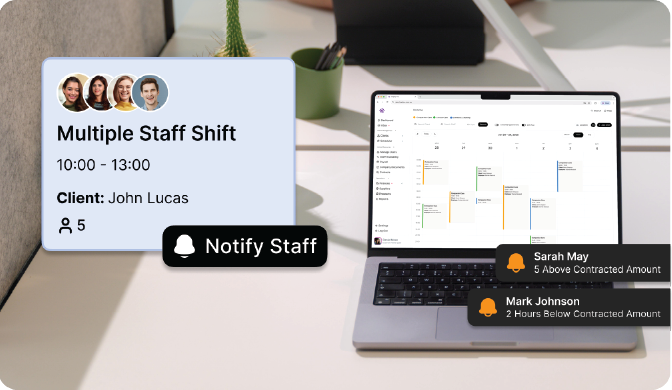
NDIS rostering software is a digital platform that helps disability service providers create, manage and update staff schedules.
Instead of relying on spreadsheets, phone calls or multiple disconnected systems, providers can use rostering software to manage activities such as:
- Creating and assigning shifts
- Managing staff availability
- Scheduling recurring services
- Filling vacant shifts
- Managing last-minute changes
- Notifying support workers
- Monitoring check-ins
- Managing group and multi-staff shifts
- Tracking workforce costs
- Connecting roster information with timesheets and billing
For NDIS providers, rostering is closely connected to service delivery. A roster needs to account for participant requirements, worker availability and the operational needs of the provider.
Why Do NDIS Providers Need Rostering Software?
Manual rostering can become difficult to manage when providers have multiple participants, support workers and services.
A spreadsheet may provide a basic scheduling system, but keeping information accurate and communicating changes can become increasingly time-consuming as an organisation grows.
1. Manage Staff Availability
Coordinators need to know which workers are available when creating or filling shifts. NDIS rostering software can bring staff availability and scheduled services together, making it easier to identify potential workers for open shifts.
2. Manage Recurring Services
Many NDIS participants receive regular support at set times. Creating each shift manually can add unnecessary administration. Recurring roster tools allow providers to schedule regular services without rebuilding the same shift repeatedly.
Imploy supports daily, weekly, fortnightly and monthly recurring shifts, with conflict and SCHADS alerts to help coordinators identify potential scheduling issues.
3. Respond to Roster Changes
Cancellations, worker availability and changes to participant requirements can affect schedules at short notice. A central rostering system allows coordinators to update shifts and communicate changes without manually updating multiple spreadsheets.
Imploy allows roster changes to be pushed to workers through real-time notifications, helping teams work from current schedule information.
4. Fill Vacant Shifts
A vacant shift can create additional administrative work for coordinators. Imploy's Shift Pool allows open shifts to be published to eligible workers. Workers are notified when shifts become available, reducing the need for repeated calls, texts and follow-up.
Imploy also provides AI-powered vacant shift matching that considers availability, skills, location and client preferences.
5. Keep Workers Updated
Roster information can change throughout the day. Real-time notifications help workers receive new shifts, changes and reminders through the mobile app.
The Imploy mobile app also gives workers access to their rosters, clock-in and clock-out tools, client information, shift notes and other workforce functions while they are on the road.
6. Improve Workforce Visibility
A central roster gives coordinators greater visibility across scheduled services, vacant shifts, changes and workforce activity. This can make it easier to identify scheduling gaps and respond before they affect service delivery.
What Key Features Must NDIS Rostering Software Have?
NDIS rostering software should help providers create schedules, manage workers, fill vacant shifts and monitor service delivery. Key features should include:
1. Visual Roster Builder
A drag-and-drop roster builder should make it easy to create and adjust shifts while identifying scheduling gaps and conflicts.
2. Recurring Rosters
The software should support recurring shifts for daily, weekly, fortnightly or monthly schedules.
3. Staff Availability and Shift Matching
Providers should be able to check worker availability and match suitable staff based on factors such as skills, location and client preferences.
4. Vacant Shift Management
The software should make it easier to publish vacant shifts and notify suitable workers when shifts become available.
5. Real-Time Notifications
Workers should receive notifications about new shifts, roster changes and reminders.
6. Mobile Workforce Access
A mobile app should allow workers to view schedules, access client information, clock in and out, record shift notes and manage reimbursements.
7. Staff Cost and Funding Visibility
Rostering software should provide visibility into staff costs, service hours and funding to help providers understand the impact of scheduled shifts.
8. Check-In and Attendance Monitoring
The software should support distance check-ins, radius warnings, late check-in alerts, reason logging, route tracking and audit trails.
9. Group and Multi-Staff Scheduling
The software should support group shifts, multiple workers, 2:1 care, saved worker groups and flexible billing arrangements.
10. Draft and Publish Controls
Roster changes should be reviewable before they are published to workers, helping providers reduce scheduling errors.
How Does Imploy Support NDIS Rostering?
Imploy brings rostering together with broader provider management workflows. The platform is designed to help NDIS and home care providers manage schedules, workers, participant services, billing information and operational processes from a connected system.
1. Drag-and-Drop Roster Builder
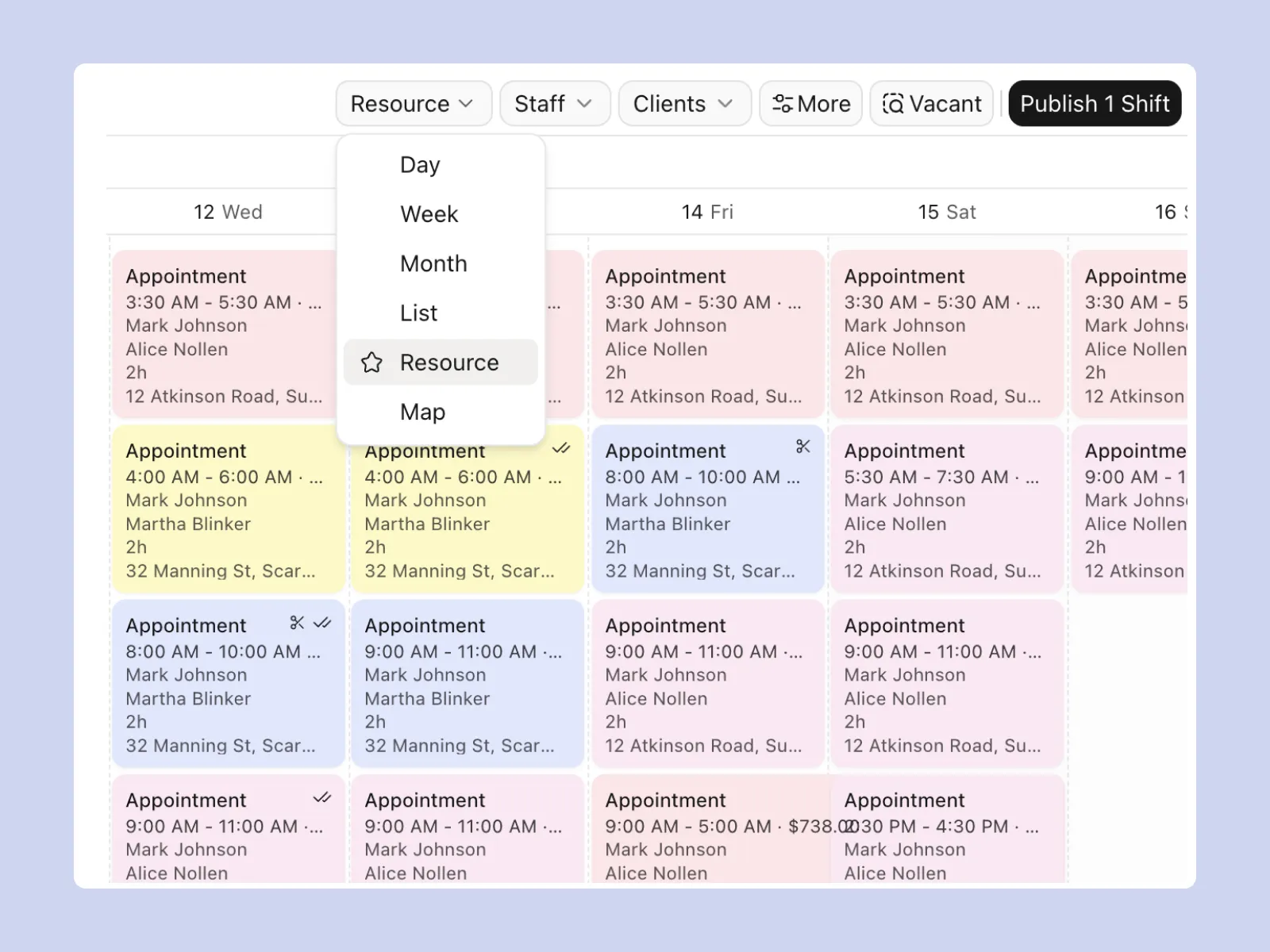
Imploy's visual Roster Builder allows coordinators to create and adjust daily or weekly schedules using a drag-and-drop interface.
The visual timeline makes it easier to see scheduled shifts and identify gaps, overlaps or changes. Coordinators can make adjustments without rebuilding the roster from scratch, helping simplify day-to-day scheduling.
2. Shift Pool for Vacant Shifts
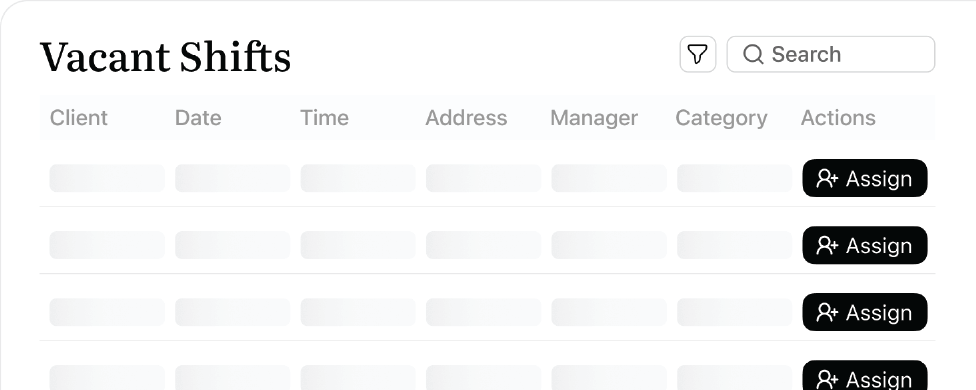
When a shift becomes available, providers can publish it to the Shift Pool. Eligible workers receive notifications when shifts enter the pool.
If a shift is still unaccepted after four hours, administrators receive an email notification so they can review the vacancy and take further action.
This can help reduce the time spent contacting workers individually when a shift needs to be filled. It also gives workers a central place to view available shifts.
3. Recurring Rosters With SCHADS Alerts
Providers can create daily, weekly, fortnightly and monthly recurring shifts. This can be useful for participants who receive regular services and have established care schedules.
Imploy also provides conflict and SCHADS alerts as recurring schedules are created. These alerts can help coordinators identify potential scheduling issues before publishing rosters.
4. AI-Powered Vacant Shift Matching
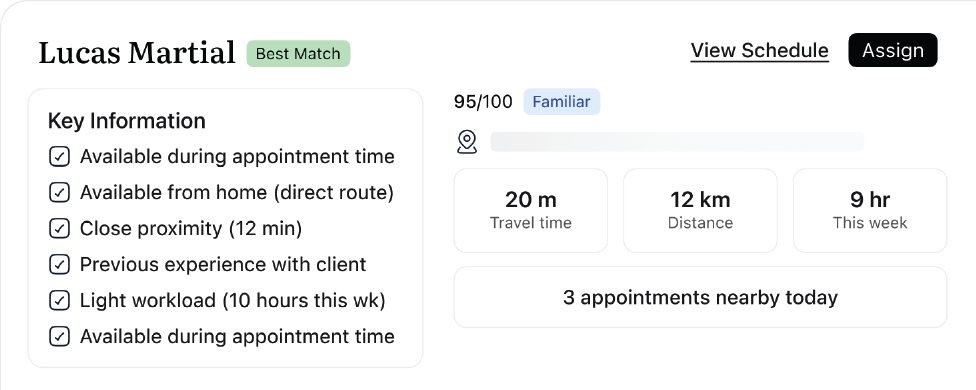
Imploy can help coordinators identify potential workers for vacant shifts using AI. The matching process considers worker availability, skills, location and client preferences.
This can reduce the need to manually review multiple worker records when looking for someone to fill an open shift. Coordinators can use the matching information to help identify workers who may be suitable for the available service.
5. Real-Time Roster Updates
When a roster changes, updates can be pushed to workers through the mobile app. This helps support workers access current schedule information rather than relying on outdated roster details.
Keeping roster information up to date can also make communication easier when shifts are changed, added or adjusted. Workers can access their schedules from the same mobile environment they use for other shift-related tasks.
6. Client Rosters
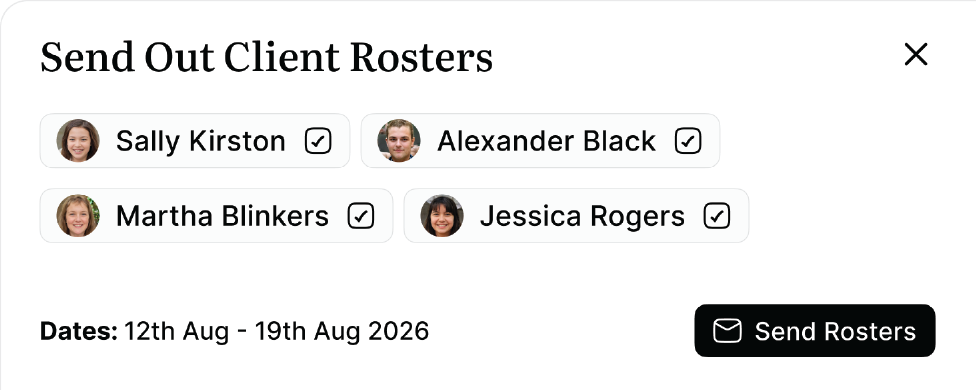
Providers can send clear schedules to clients or their representatives. Client rosters can include:
- Services
- Times
- Staff names
Weekly, fortnightly and monthly rosters can be shared from Imploy, helping clients and representatives understand upcoming services.
Providing a clear view of upcoming services can make it easier for participants and their representatives to know when support is scheduled and which workers are assigned.
7. Real-Time Financial Oversight
Imploy displays real-time staff costs and NDIS funding totals during shift creation. This can give providers visibility into the financial impact of roster decisions before schedules are finalised.
Having this information while creating shifts can help coordinators consider the cost and funding impact of different roster arrangements. It connects rostering decisions with broader financial management rather than treating scheduling as a separate process.
8. Distance Check-Ins
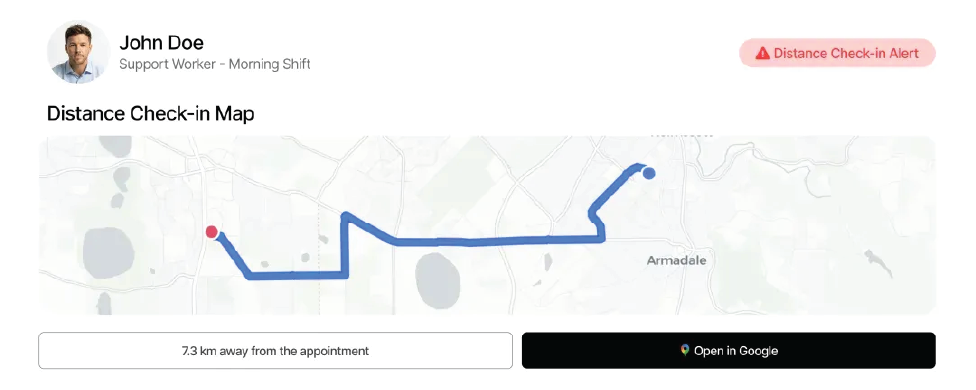
Imploy supports GPS-based distance check-ins and radius warnings. When a worker checks in outside the configured 100-metre radius, the system can flag the location and require a reason to be recorded.
Administrators can also access live route maps and audit trails. These features can provide greater visibility into attendance and help providers maintain records connected to service delivery.
9. Late Check-In Alerts
If a worker has not checked in shortly after a shift begins, Care Managers can receive web and email notifications.
This gives the provider an opportunity to identify potential attendance issues early. It can also help Care Managers follow up when a scheduled service does not appear to have started as expected.
10. Group Shifts and Multi-Client Billing
Imploy supports shared activities and group services. Providers can schedule group shifts and divide costs across participant budgets.
Flexible percentage splits can also be used for multi-client billing. This can be useful when multiple participants receive support as part of the same scheduled activity.
By connecting rostering with billing workflows, providers can reduce the need to manage service and billing information separately. Imploy also connects roster information with billable task management and NDIS bulk claims.
How Does Imploy Connect Rostering With NDIS Management Software?
Rostering is only one part of managing an NDIS organisation.
A scheduled shift can eventually become a timesheet, shift note, billable entry, invoice and NDIS claim.
This is why ndis management software can be useful for providers looking to connect workforce scheduling with other operational processes.
Imploy connects rostering with:
- Participant management
- Care management
- Rostering
- Billable tasks
- Bulk invoicing
- NDIS bulk claims
- Payroll and timesheets
- Compliance
- Reporting
- Mobile workforce management
For example, Imploy's billable task management helps providers manage billable entries that can flow into invoicing workflows.
Imploy also provides NDIS bulk claims for providers managing high volumes of NDIS claims. Connecting these processes can reduce the need to repeatedly enter the same service information across separate systems.
You can also explore Imploy reviews on G2 and Imploy reviews on Trustpilot to learn more about customer experiences with the platform.
NDIS Rostering and NDIS Compliance
Rostering is connected to workforce and operational processes that can form part of a provider's broader ndis compliance approach.
Registered NDIS providers must meet the NDIS Practice Standards relevant to the supports and services they provide. The NDIS Quality and Safeguards Commission states that the Standards cover areas including provider governance and operational management, risk management, quality management and human resource management.
The Commission also states that governance and operational management systems should be relevant and proportionate to the provider's size, scale and the scope and complexity of supports delivered.
Rostering software does not replace a provider's compliance responsibilities. However, structured workforce and scheduling processes can help providers maintain clearer operational records and visibility.
Imploy includes roster conflict and SCHADS alerts, worker scheduling, check-in monitoring and audit information as part of its broader provider management platform.
Benefits of Using Imploy for NDIS Rostering
1. Reduce Manual Scheduling
Drag-and-drop scheduling and recurring rosters can reduce repetitive roster administration.
Instead of rebuilding regular services from scratch, coordinators can create recurring schedules and adjust them when requirements change.
2. Respond to Vacant Shifts
Shift Pool and AI-powered matching give coordinators tools for responding to open shifts.
Eligible workers can be notified when shifts become available, while AI matching can help identify potential workers based on availability, skills, location and client preferences.
3. Keep Workers Updated
Real-time mobile notifications help workers access current roster information.
This is particularly useful when schedules change after a roster has already been created.
4. Improve Scheduling Visibility
A central roster gives coordinators visibility across shifts, vacancies and schedule changes.
Draft and publish controls also allow teams to review schedules before changes are pushed live.
5. Connect Rostering With Billing
Roster information can connect with timesheets, billable tasks and billing workflows.
This can help reduce duplicate data entry and keep information connected across service delivery and administration.
6. Support Complex Services
Multi-staff scheduling, 2:1 care, group shifts and multi-client billing provide tools for providers managing more complex service arrangements.
Final Thoughts
Managing NDIS rosters involves more than assigning workers to dates and times. Providers need to manage worker availability, participant requirements, recurring services, vacant shifts, roster changes and attendance while keeping other operational processes connected.
Imploy brings these scheduling activities into one platform.
With a drag-and-drop Roster Builder, recurring rosters, Shift Pool, AI-powered vacant shift matching, real-time notifications, client rosters, check-in monitoring and support for group and multi-staff shifts, Imploy provides tools for managing NDIS workforce scheduling from one system.
Frequently Asked Questions
1. What is NDIS rostering software?
NDIS rostering software is a digital platform that helps disability service providers create staff schedules, assign shifts, manage recurring services, fill vacancies and communicate roster changes.
2. What are the key features of NDIS rostering software?
Important features can include visual roster building, recurring shifts, staff availability, vacant shift management, mobile access, notifications, workforce monitoring and connections with timesheets and billing.
3. Can Imploy create recurring NDIS rosters?
Yes. Imploy supports daily, weekly, fortnightly and monthly recurring shifts, with automatic conflict and SCHADS alerts to help coordinators identify potential scheduling issues.
4. Can Imploy help fill vacant NDIS shifts?
Yes. Imploy includes a Shift Pool where open shifts can be published to eligible workers. It also provides AI-powered vacant shift matching based on availability, skills, location and client preferences.
5. Do workers receive NDIS roster updates through Imploy?
Yes. Workers can receive real-time notifications for new shifts, roster updates and reminders through the Imploy mobile app.
6. Can clients receive their rosters through Imploy?
Yes. Providers can send weekly, fortnightly or monthly rosters to clients or their representatives with service details, times and staff names.
7. Does Imploy support multi-staff NDIS shifts?
Yes. Imploy supports multi-staff scheduling, including 2:1 care. Each worker can have their own appointment type, price book and independent mobile clock-in.
8. Can Imploy manage group shifts?
Yes. Imploy supports group shifts and multi-client billing, including flexible percentage splits for shared activities.
9. Does Imploy provide real-time rostering information?
Yes. Imploy provides real-time roster updates and notifications, as well as real-time staff costs and NDIS funding totals during shift creation.
10. Can Imploy monitor worker check-ins?
Yes. Imploy provides distance check-ins and radius warnings. Care Managers can also receive alerts when a worker has not checked in shortly after their scheduled shift begins.