Best NDIS Invoicing Software for Providers of All Sizes
Explore the best NDIS invoicing software for providers of all sizes. Learn how Imploy simplifies invoicing, tracks billable entries and connects with Xero and QuickBooks.

.webp)
NDIS invoicing software helps disability service providers prepare invoices, manage billable services and keep billing records organised. The right software can reduce repetitive administration, improve invoice tracking and help providers manage billing as their organisation grows.
Imploy offers bulk invoicing software for NDIS providers, allowing teams to generate invoices from eligible billable entries, track invoice information through a central dashboard and connect their invoicing workflow with Xero or QuickBooks.
Whether you are a sole trader, a growing disability service provider or a large NDIS organisation, choosing software that fits your billing requirements can help simplify day-to-day financial administration.
Why Do NDIS Providers Need Invoicing Software?
NDIS providers need to keep accurate records of the supports they deliver, including invoices, rosters, support logs and case notes. The NDIS record-keeping requirements explain what records providers need to maintain.
Keeping these records organised can become more challenging as a provider takes on more participants, support workers and services. Preparing invoices, tracking completed services and managing billable entries can take up valuable time, especially when handled manually.
Using spreadsheets or switching between different systems can make it harder to keep billing information up to date.
NDIS invoicing software can help providers:
- Prepare invoices from eligible billable services and expenses.
- Generate multiple invoices through bulk invoicing.
- Track invoice amounts, due dates and payment statuses.
- Keep billable entries connected to invoice records.
- Reduce repetitive data entry between systems.
- Connect invoicing workflows with accounting software.
The right solution depends on your organisation's billing volume, existing accounting processes and the features you need to manage invoices efficiently.
What Features Should You Look for in NDIS Invoicing Software?
When comparing NDIS invoicing software, focus on features that address your current billing challenges and support your organisation's needs as it grows.
1. Bulk Invoicing
Bulk invoicing allows providers to prepare multiple invoices using eligible billable entries instead of handling every invoice separately.
This feature can be particularly useful for providers managing multiple participants or a high volume of services.
Look for software that can use recorded shifts, tasks, travel expenses, reimbursements and manually added entries to prepare invoice line items.
2. Invoice Tracking and Management
A centralised invoicing dashboard helps staff review invoice information without searching through multiple records.
Useful features include searchable invoice records, client details, invoice amounts, issue dates, due dates and invoice statuses.
These features help finance and administration teams monitor billing activity and find relevant information more easily.
3. Accounting Software Connections
NDIS billing software should fit into your existing accounting workflow.
Connections with accounting platforms can help reduce duplicate administration and make invoice information easier to access across systems.
Before choosing a solution, check which accounting platforms it supports and whether invoice information and status updates stay synchronised.
4. Billable Entry Management
Accurate invoicing starts with organised records of the services and expenses being billed.
Software that connects billable entries to invoices helps staff review which items have been included in the billing process.
It should also help prevent the same billable entry from being used in multiple invoices or claims at the same time.
Providers should check that their invoices reflect the supports delivered and comply with applicable NDIS pricing requirements. Refer to the official NDIS pricing arrangements and price limits for current pricing information.
5. Support for Different Provider Sizes
A sole trader may need a straightforward invoicing process, while a larger NDIS provider may manage many participants, support workers and billable entries.
Consider whether the software can handle your expected billing volume and whether its invoicing workflow fits your team's responsibilities.
You should also assess how invoicing connects with other processes, such as rostering, service delivery and financial management.
How Does Imploy's NDIS Invoicing Software Work?
Imploy's bulk invoicing feature helps NDIS providers generate invoices from eligible billable entries and manage invoice information alongside their accounting workflows.
The platform provides tools for preparing invoices, tracking invoice statuses and keeping billing records connected.
Generate Multiple Invoices with Bulk Invoicing
.webp)
Imploy's bulk invoicing workflow uses eligible billable entries from client records to prepare invoice line items.
These entries can include:
- Shifts and related billable tasks.
- Travel expenses.
- Reimbursements.
- Manually added entries.
Using existing billable records helps providers organise the information needed for invoice preparation instead of recreating each line item manually.
An active Xero or QuickBooks connection is required to generate invoices through Imploy's bulk invoicing workflow.
Explore Imploy's Bulk Invoicing Software to learn more about how the feature works.
Track Invoices from a Central Dashboard
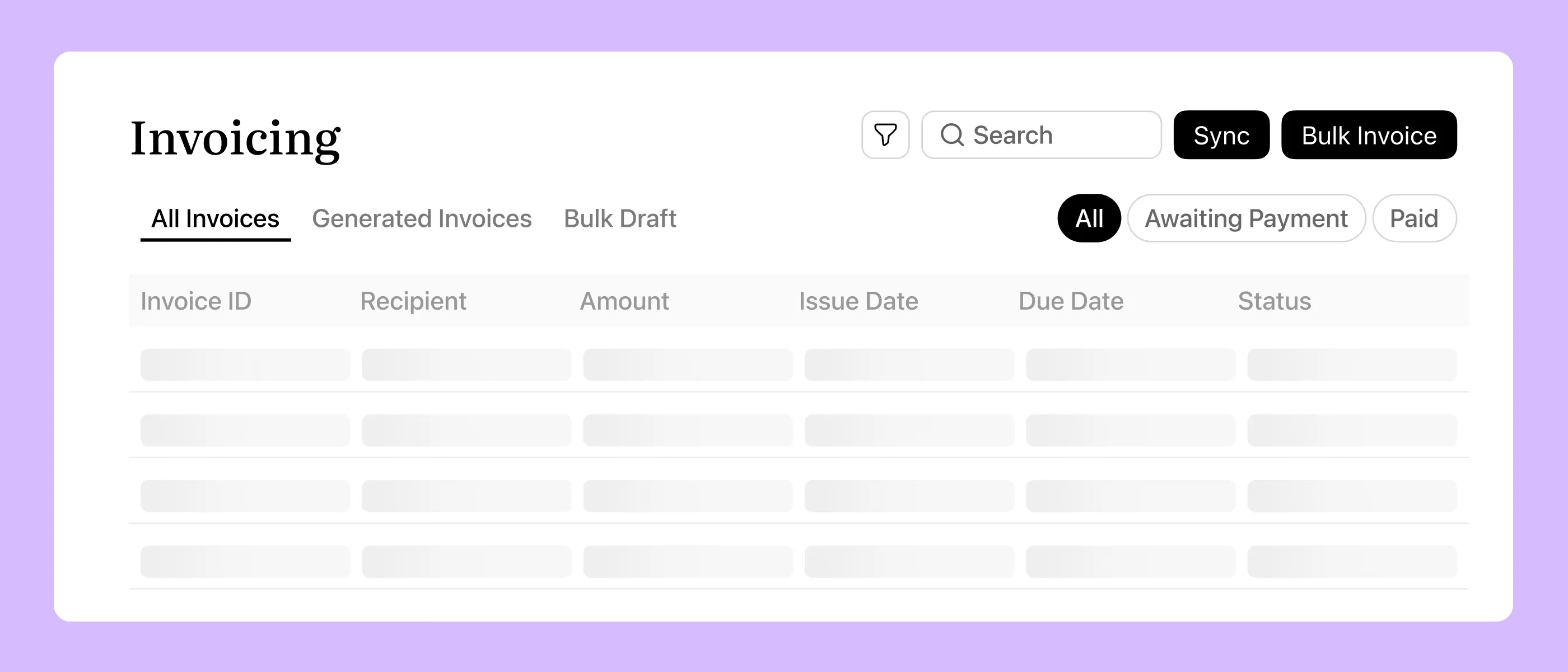
Keeping track of invoices becomes more important as billing volumes increase.
Imploy provides an invoicing dashboard where users can review client details, invoice amounts, issue dates, due dates and statuses. Search and filtering tools help users locate relevant invoice records.
This gives teams a central place to review invoice information and monitor billing progress.
For NDIS providers managing invoices across multiple participants, centralised invoice tracking can make routine billing administration easier to manage.
Keep Billable Entries Linked to Invoices
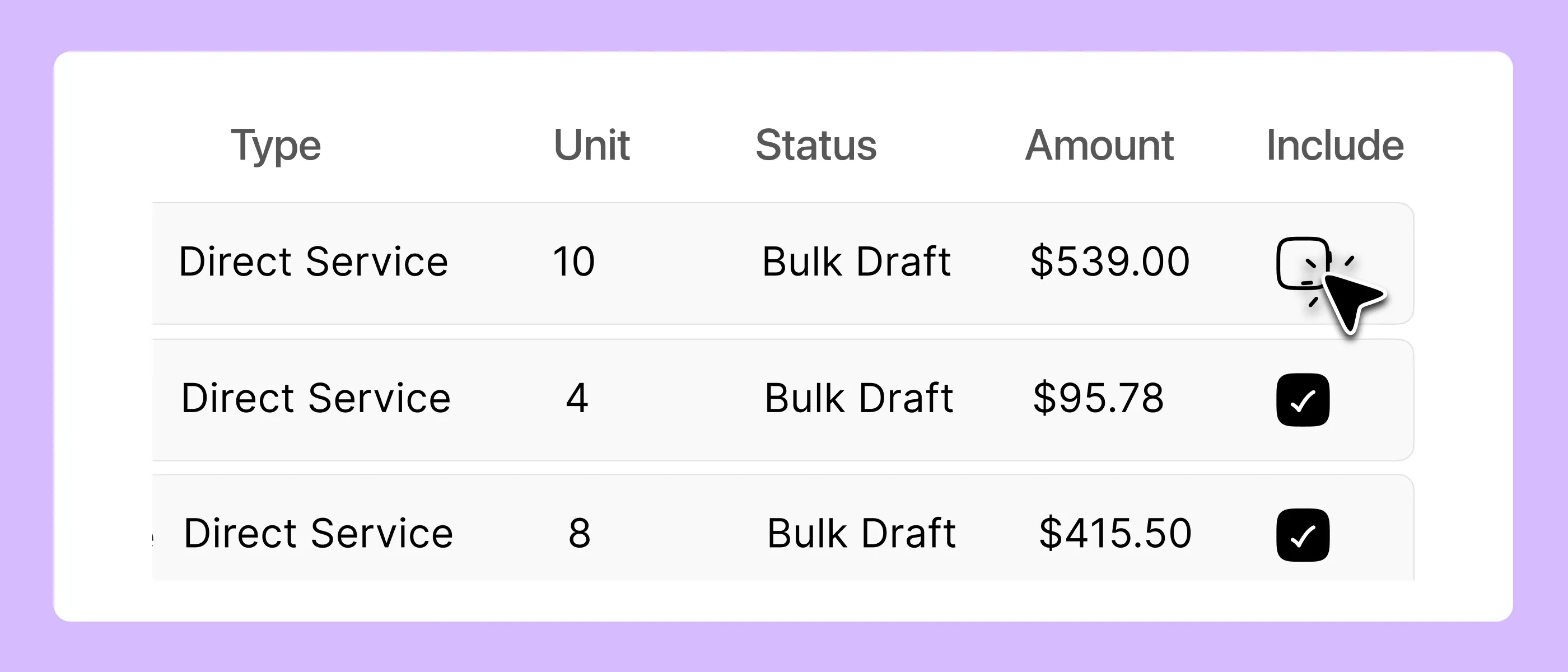
NDIS providers need to keep billing records organised to reduce the risk of duplicate charges.
Imploy connects invoices with their underlying billable entries. When an entry is attached to a bulk invoice draft, invoice or claim, it is reserved so it cannot be reused incorrectly in another billing workflow.
Linked billable entries can also reflect invoice status changes received through the accounting connection.
This helps providers maintain consistent billing records and review how services and expenses have been allocated.
Connect Invoicing with Xero and QuickBooks
.webp)
Imploy supports Xero and QuickBooks connections for its invoicing workflow.
These connections allow providers to access invoice information from their accounting systems through Imploy and move between the platform and the source accounting records.
Invoice and billable-entry status updates can also stay aligned through the connected workflow, helping teams work with consistent billing information.
Providers should review the relevant connection requirements and configuration before implementing the workflow.
Is Imploy Suitable for NDIS Providers of All Sizes?
Different NDIS providers have different invoicing requirements. The right software should match your current workload while giving you a practical way to manage billing as your organisation changes.
NDIS Invoicing Software for Sole Traders and Small Providers
Sole traders and small NDIS providers often manage billing alongside service delivery, participant communication and other business responsibilities.
A structured invoicing process can help them prepare invoices, organise billable entries and maintain clearer financial records.
Imploy's bulk invoicing and accounting connections may be useful for smaller providers who want to manage these tasks through a connected workflow.
When choosing software, consider how easily it fits your current processes and whether the available features meet your invoicing needs.
NDIS Invoicing Software for Growing Providers
As an NDIS provider takes on more participants and support workers, billing can involve more records, services and administrative steps.
Bulk invoicing can help streamline invoice preparation, while searchable invoice information makes it easier to review billing activity.
Imploy also brings invoicing into a broader care management platform, helping providers manage related workflows alongside their financial administration.
Consider how your invoicing process connects with shift records, billable tasks and accounting software as your service volume increases.
NDIS Invoicing Software for Large Providers
Large NDIS providers may need a consistent way to manage high volumes of billable entries and invoices across their teams.
Features such as bulk invoice preparation, centralised invoice tracking and accounting connections can help organise billing workflows.
Imploy provides these invoicing capabilities through its bulk invoicing feature. However, larger organisations should also assess their specific requirements for user access, approval workflows, reporting and multi-location operations before choosing a platform.
The best NDIS invoicing software is one that fits your organisation's actual processes and the capabilities available in your chosen configuration.
How to Choose the Best NDIS Invoicing Software?
Before choosing NDIS billing software, review how your organisation currently prepares, tracks and manages invoices.
Ask these questions when comparing your options:
- Billing volume: How many invoices and billable entries do we manage during a typical billing cycle?
- Bulk invoicing: Can the software prepare multiple invoices using recorded billable services?
- Invoice tracking: Can our team search for invoices and review their statuses easily?
- Billable entry management: Does the system help prevent duplicate billing?
- Accounting connections: Does the software connect with our existing accounting platform?
- Workflow compatibility: Can the invoicing process work alongside our existing service delivery and administrative tasks?
- Business requirements: Does the platform support our current needs, and are its capabilities suitable for our expected growth?
A product demonstration can help you understand how the software handles these tasks in practice. Use your current billing process as a reference when assessing whether a platform is the right fit.
Why Choose Imploy for NDIS Invoicing?
Imploy brings bulk invoicing and accounting connections together to help NDIS providers manage their billing workflows.
With Imploy, providers can:
- Prepare invoices in bulk: Generate invoices using eligible shifts, tasks, travel, reimbursements and manual entries.
- Track invoice information: Review client details, amounts, issue dates, due dates and statuses through a central dashboard.
- Manage billable entries: Keep billable records linked to invoices and help prevent duplicate billing.
- Connect accounting workflows: Work with supported Xero and QuickBooks connections.
- Manage related operations: Use Imploy's broader care management platform to support other provider workflows.
These features can help reduce repetitive invoicing administration and make billing information easier to review.
You can also explore Imploy reviews on G2 and Imploy reviews on Trustpilot to learn more about customer experiences with the platform.
Final Thoughts
The best NDIS invoicing software should help providers prepare invoices efficiently, organise billable entries and keep billing information accessible. As your organisation grows, features such as bulk invoicing, invoice tracking and accounting connections can help make financial administration more manageable.
Imploy supports these tasks through its bulk invoicing workflow, centralised invoice dashboard and connections with Xero and QuickBooks.
Whether you are a sole trader or manage a larger disability service organisation, evaluate your invoicing requirements before choosing a solution. Explore Imploy's NDIS bulk invoicing software to see whether its features suit your organisation's needs.
Frequently Asked Questions
1. What is NDIS invoicing software?
NDIS invoicing software helps disability service providers prepare invoices for eligible services, organise billable entries and track invoice information. Depending on the platform, it may also connect invoicing workflows with accounting software.
2. What is the best NDIS invoicing software for small providers?
The best option depends on your billing volume, budget, accounting system and administrative requirements. Small NDIS providers should look for software that simplifies invoice preparation, keeps billable records organised and fits their existing workflow.
3. Can Imploy generate bulk invoices for NDIS providers?
Yes. Imploy's bulk invoicing feature generates invoices using eligible billable entries, including shifts, tasks, travel expenses, reimbursements and manually added entries. An active Xero or QuickBooks connection is required to generate invoices through this workflow.
4. Does Imploy connect with Xero and QuickBooks?
Yes. Imploy supports connections with both Xero and QuickBooks for its invoicing workflow. These connections help providers access invoice information from their accounting systems through Imploy.
5. How can NDIS invoicing software help prevent duplicate billing?
NDIS invoicing software can link billable entries to invoices and help prevent the same entry from being used more than once. Imploy reserves billable entries attached to invoice drafts, invoices or claims to help prevent duplicate billing. Providers should still review their invoices and maintain appropriate billing checks.
6. What should large NDIS providers look for in invoicing software?
Large providers should assess bulk invoicing, invoice tracking, billable-entry management and accounting connections. They should also evaluate their specific requirements for user access, approvals, reporting and multi-location operations before selecting a solution.