⚠️ Prices going up soon—lock in today’s rate for 1 year!
Prices rise in
00
Days
00
Hours
00
Minutes
00
Seconds
Save Now!
Shift Note Template

Stop leaving what gets written down to memory. Define it once, get it every time.

Build reusable shift note templates with the exact fields you need then they load automatically in the mobile app the moment staff open a shift note for that client.
Built for Australian NDIS & home care providers
Updated for the June 2026 sleepover rule change
S. Nick · Home Care
Roster alert
Shift starts 10.5 hrs after previous shift ended

SCHADS requires a minimum 11-hour break between shifts

Below minimum rest — flagged before publish
Broken shift — timesheet published

First unpaid break allowance $20.82 · Second unpaid break allowance $27.56

Caught by Imploy

Trusted by leading providers

My Companionship logo
Circle of Kindness logo
Aspire Ability logo
Apex Services Australia logo
Connection Community Services logo
Crescent Care logo
Unity Aid logo
Murray Darling Supports logo
Noble Roots Support Services logo
Bynd logo
My Companionship logo
Circle of Kindness logo
Aspire Ability logo
Apex Services Australia logo
Connection Community Services logo
Crescent Care logo
Unity Aid logo
Murray Darling Supports logo
Noble Roots Support Services logo
Bynd logo
One note field, every client

A blank note field means every staff member decides what's worth writing down and what to skip.

Without a template, shift note quality depends on whoever's writing it. A template fixes that: staff fill in the same defined fields every time, for that client, whether it's their first shift with them or their fiftieth.

13 field types

Text, Select, Date, Checkbox, Phone, Checklist, Email, Multi-Select, Number, Location, Time, Rating, and URL.

3 steps

Create fields, build a template, staff fill it in the app.

Configured per client

Each client's profile carries its own shift note template.

Structured shift notes, every time

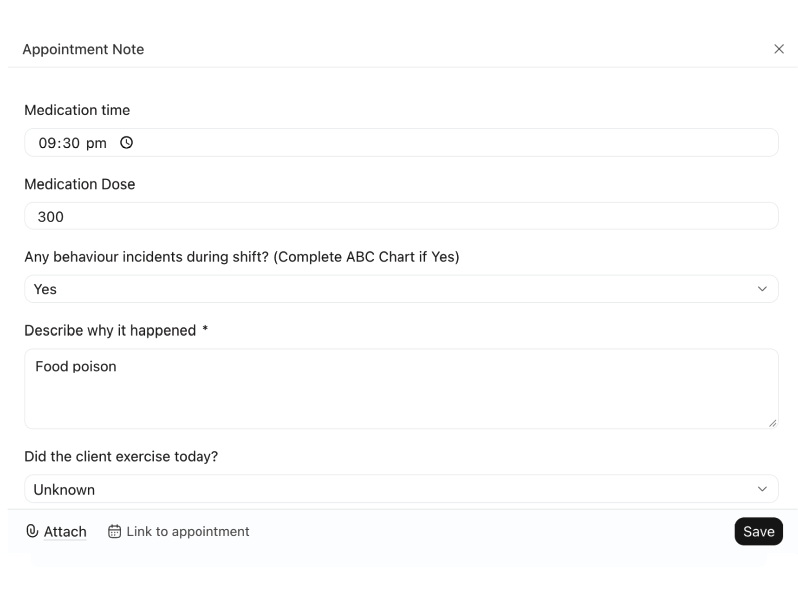
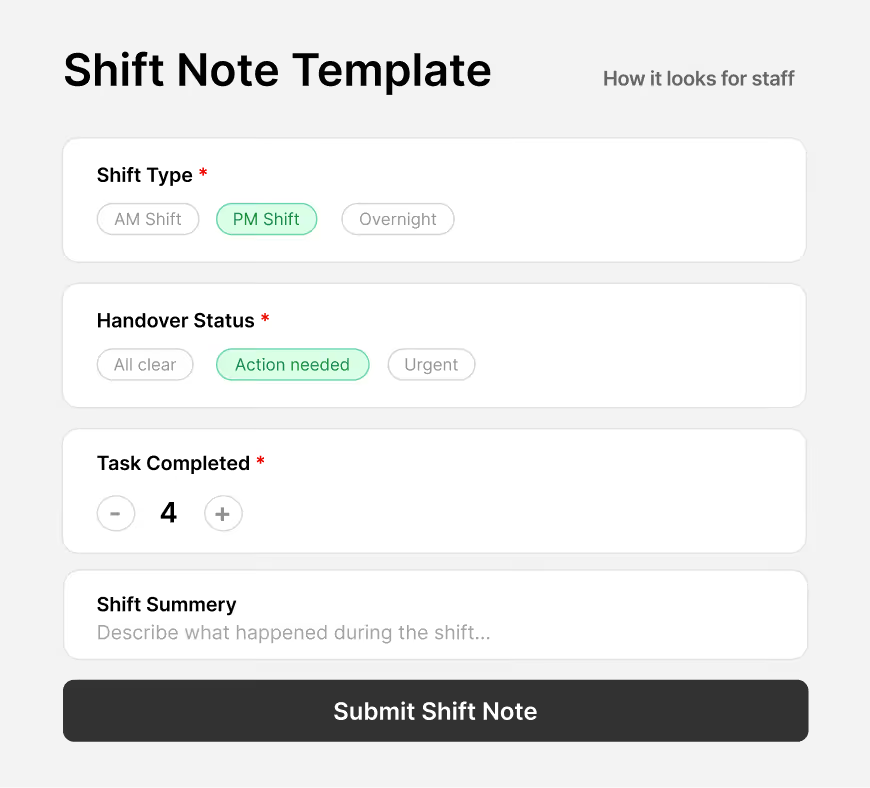
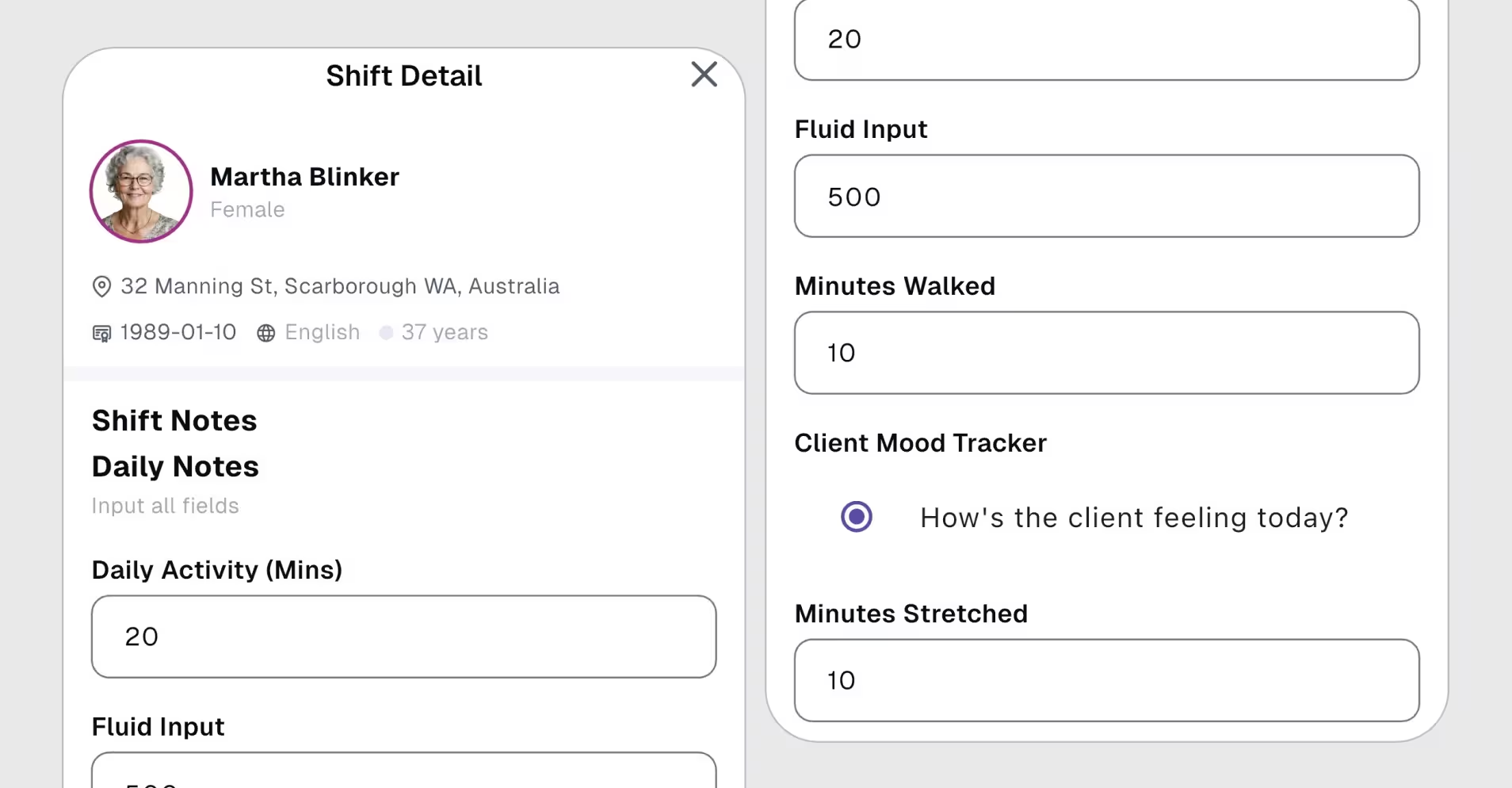
Build reusable templates that appear inside the staff mobile app when completing a shift note. Define exactly which fields staff must fill in — ensuring consistent, compliant documentation across your whole team.
How this works
Shift note templates are separate from object attributes. You build a template in settings — with any fields you choose — and when a staff member completes a shift note in the app, that template appears for them to fill in.
1
Create fields
Define reusable fields with a name, input type, placeholder, and whether they're required. Same field types as attributes.
2
Build a template
Combine fields into a named template. Drag to reorder. Publish when ready — templates can be updated any time.
3
Staff fill it in the app
When a staff member opens a shift note on their phone, the template loads automatically. Shift note template must be configured under the respective client's profile.
EXAMPLE TEMPLATES
Blood Pressure
5 fields
Medication & Health Check
7 fields
Incident & Behaviour Note
3 fields
Standard Shift Handover
9 fields
Imploy shift note template for NDIS support workers
Product showcase

The right questions, every time a note gets written.

When a staff member opens a shift note on their phone, the matching template loads automatically, no setup, no guessing which fields apply to this client.

How Imploy handles it

Built to flag risk at the roster stage, not reconstruct it later.

Compliance alerts run at the point a shift is created. Broken shift allowances are calculated the moment a timesheet is published.

Missed break alerts

Shows instantly if a rostered shift doesn't include a required break, before it's published.

See it in action

Overwork alerts

Flags automatically when a rostered shift pushes a worker over their maximum daily or weekly hours.

See it in action

Minimum rest between shifts

Flags shifts that don't leave the minimum break SCHADS requires between two rostered shifts for the same worker.

See it in action

Broken shift counting

Tracks and counts broken shifts across the roster, so they don't need to be found manually.

See it in action

Broken shift allowance at timesheet publish

First and second unpaid break allowances are calculated automatically the moment a timesheet is published.

See it in action

Sleepover & broken shift toggle

Mark a shift as a sleepover or broken shift with a simple toggle, so it's recorded correctly from the start.

See it in action
"We used to fix SCHADS errors after payroll ran. Now, Imploy flags them while we build the roster. Essential for any NDIS provider."
Operations manager, Home Care Provider Apex Allied Connect
Why owners switch

Spreadsheets don't know the award changed. Most rostering tools don't either.

Capability
Spreadsheets / manual
Generic rostering software

Imploy

Roster-stage alerts for overwork, missed breaks & rest
Save 70% instantly on every admin user.
-
Partial
Broken shift counting
-
-
Broken shift & sleepover handling
Manual
Limited
Broken shift allowance at timesheet publish
Centralised employee profiles vs Limited beyond candidates
-
Varies
Sleepover / broken shift toggle
Calculate complex penalty rates inside the platform.
-
Varies

Frequently asked questions

Does Imploy calculate penalty rates and overtime automatically?

Not yet. Imploy currently calculates base pay rate, with broken shift allowances calculated automatically when a timesheet is published. Sleepover and broken shift status is set with a simple toggle. Ask us in a demo what's next on the roadmap.

Icon - Elements Webflow Library - BRIX Templates

How does Imploy help me avoid a SCHADS breach before it happens?

The roster scheduler flags a shift as you're building it if a worker is being overworked, hasn't been given a required break, is exceeding their maximum daily or weekly hours, or doesn't have the minimum rest period SCHADS requires between shifts — so you see the risk before the roster is published, not after.

Icon - Elements Webflow Library - BRIX Templates

What happens with sleepovers and broken shifts specifically?

You mark a shift as a sleepover or broken shift with a toggle. Broken shifts are counted automatically across the roster, and the correct first and second break allowance is calculated the moment the timesheet is published.

Icon - Elements Webflow Library - BRIX Templates

How long does it take to move from our current system?

Timeframes depend on workforce size and existing data quality. In the demo, we'll map your current setup — payroll platform, award classifications, roster complexity — and give you a realistic implementation timeline before you commit to anything.

Icon - Elements Webflow Library - BRIX Templates

Is this only for large providers?

No. The compliance risk scales with roster complexity, not headcount — a small provider running split shifts and sleepovers carries the same exposure per shift as a large one. Imploy is built to work for growing providers as well as enterprise-scale operations.

Icon - Elements Webflow Library - BRIX Templates

Experience the Imploy difference with AI

Get ready to experience how AI can transform the way you work,and unlock smarter, more efficient workflows.