🏷️ Mid-Season Sale: Lock in your 1-year rate!
Deal ends in
00
Days
00
Hours
00
Minutes
00
Seconds
Save Now!

Higher standards of care made simple
Making support simpler, clearer & stress-free

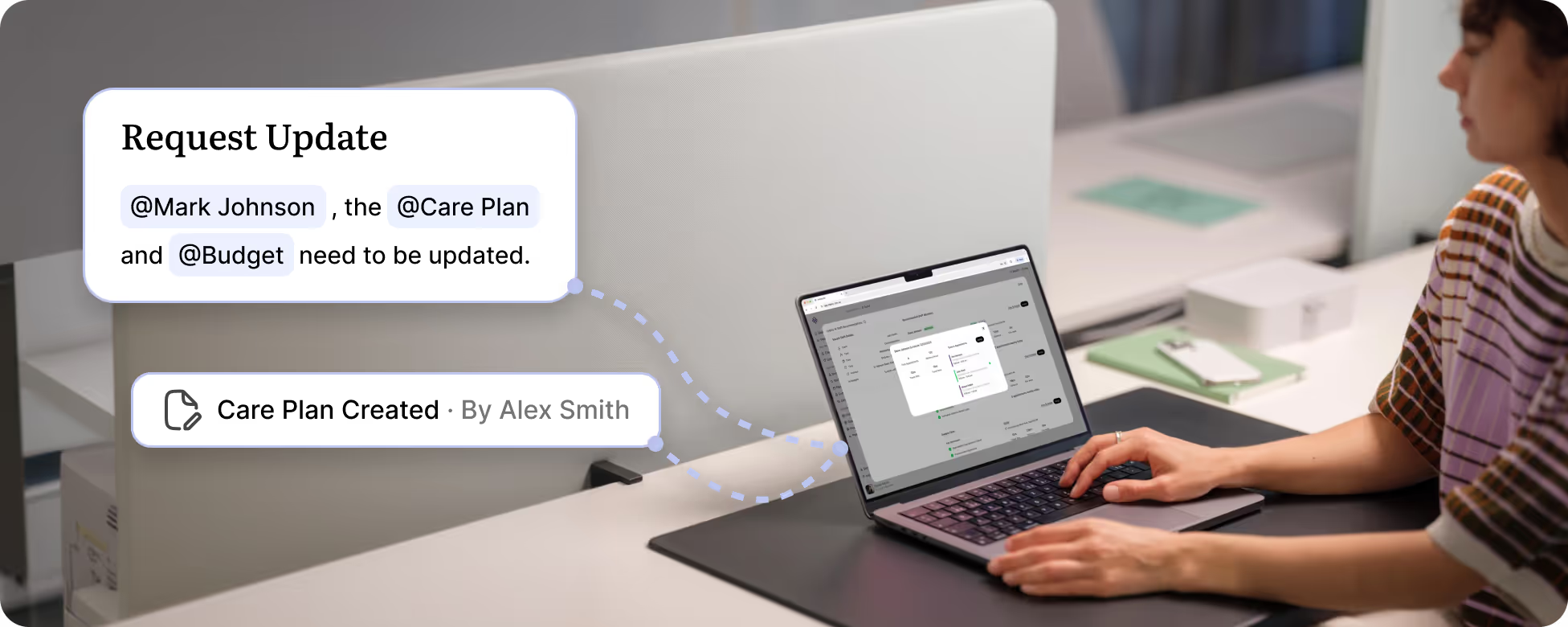
Person sitting at a desk using a laptop showing a digital interface with notifications labeled 'Request Update' mentioning @Mark Johnson, @Care Plan, and @Budget; another notification reads 'Care Plan Created by Alex Smith'.
Person typing on a laptop at a desk with an overlaid graphic showing a task update request mentioning @Mark Johnson, @Care Plan, and @Budget, and a notification that a Care Plan was created by Alex Smith.

Trusted by leading providers

My Companionship logo
Circle of Kindness logo
Aspire Ability logo
Apex Services Australia logo
Connection Community Services logo
Crescent Care logo
Unity Aid logo
Murray Darling Supports logo
Noble Roots Support Services logo
Bynd logo
My Companionship logo
Circle of Kindness logo
Aspire Ability logo
Apex Services Australia logo
Connection Community Services logo
Crescent Care logo
Unity Aid logo
Murray Darling Supports logo
Noble Roots Support Services logo
Bynd logo

Work from one screen with a central task board for your caseload

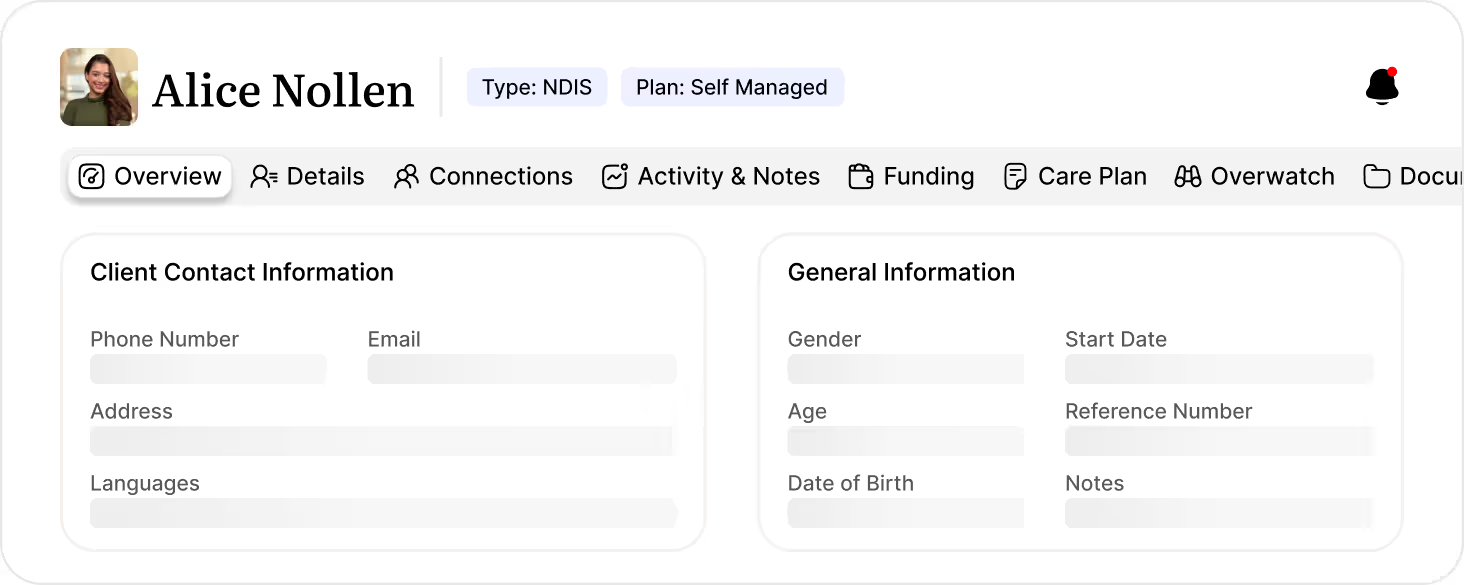
Client Records Management

Keep every client detail in one secure, central profile so your team can onboard faster, stay informed, and deliver more consistent care.

See it in action
User interface of a client profile named Alice Nollen showing her photo, type labeled NDIS, and plan as Self Managed. Navigation tabs include Overview, Details, Connections, Activity & Notes, Funding, Care Plan, Overwatch, and Documents. Two section panels display client contact information with blurred phone number, email, address, and languages, and general information with blurred gender, start date, age, reference number, date of birth, and notes fields.
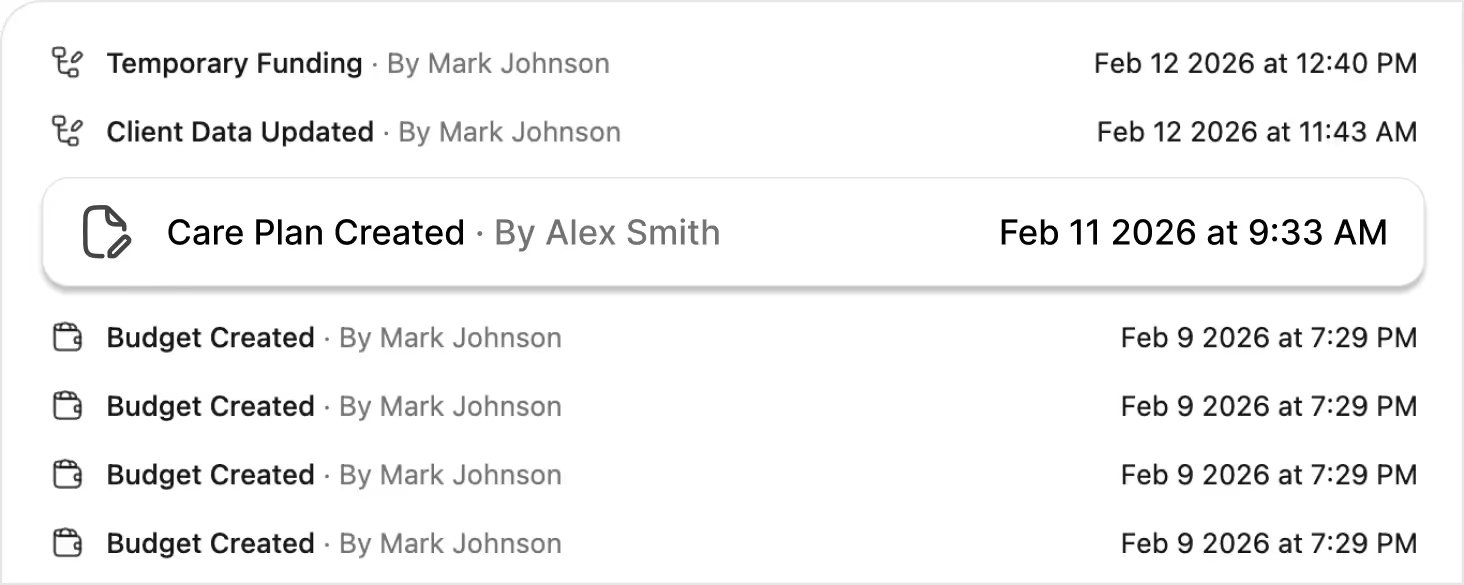
Timeline & Progress Tracking

See every visit, note, and update in a clear chronological timeline, making handovers easier and client progress simpler to understand.
See it in action
Timeline showing recent events with icons and timestamps: Temporary Funding by Mark Johnson on Feb 12, 2026 at 12:40 PM; Client Data Updated by Mark Johnson on Feb 12, 2026 at 11:43 AM; Care Plan Created by Alex Smith on Feb 11, 2026 at 9:33 AM; and multiple Budget Created entries by Mark Johnson on Feb 9, 2026 at 7:29 PM.
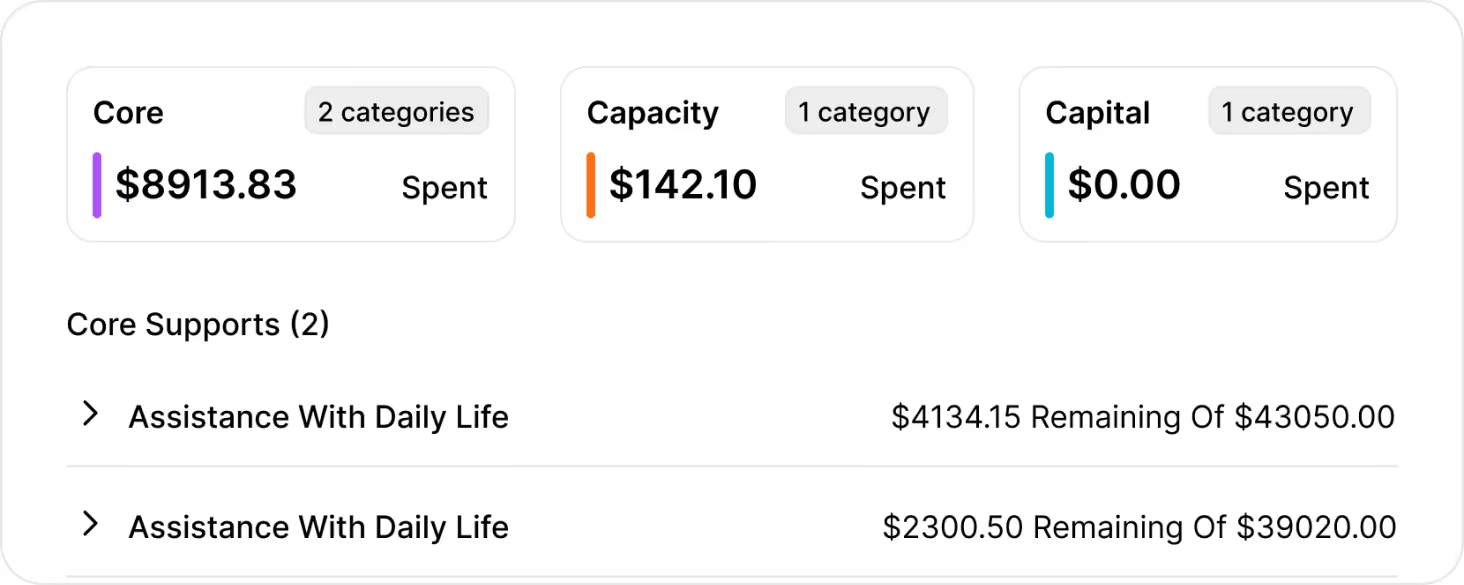
Client Budgets & Funding

Track budgets in real time, align services to the right funding categories, and reduce claim errors with transparent, compliant spending controls.
See it in action
Client funding utilization summary showing Core with $8913.83 spent across 2 categories, Capacity with $142.10 spent in 1 category, and Capital with $0.00 spent in 1 category. Core Supports section lists Assistance With Daily Life twice, with $4134.15 remaining of $43050.00 and $2300.50 remaining of $39020.00 respectively.
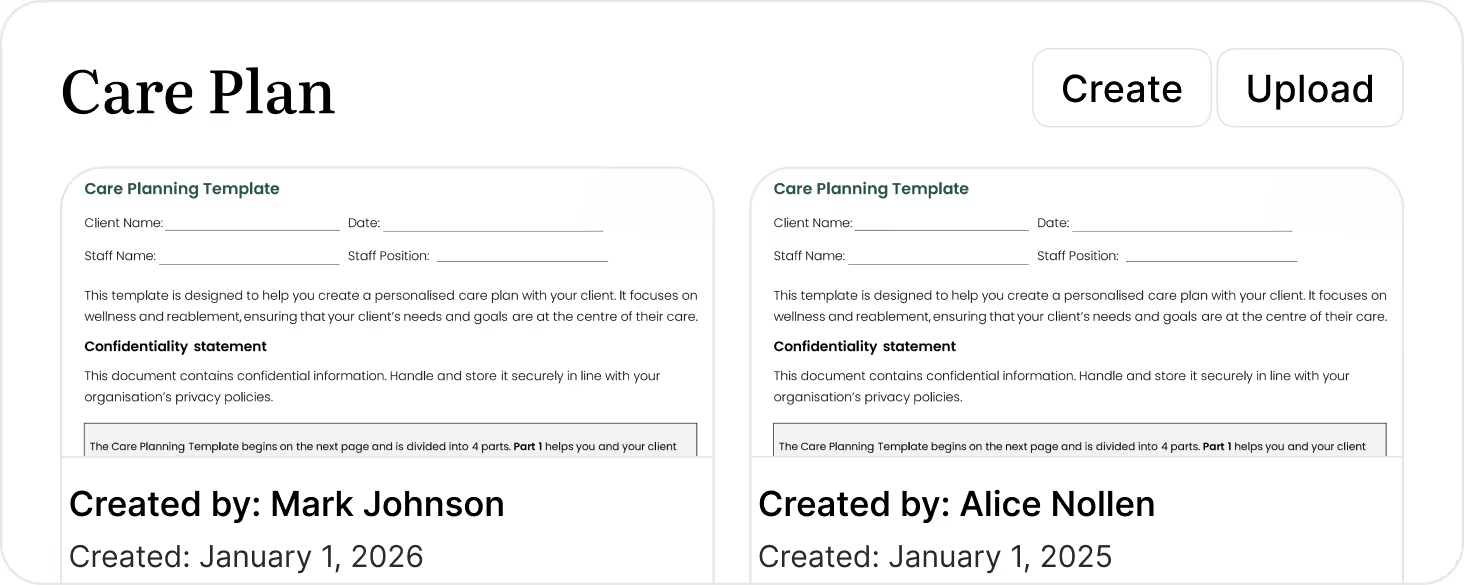
Care Plan Management

Store, update, and share care plans in one place with full version control, so staff always work from the latest, auditor-ready documentation.
See it in action
Screenshot of a digital care plan app interface displaying two care planning templates side by side, each with client and staff details, confidentiality statement, and creation info. The left template is created by Mark Johnson on January 1, 2026, and the right template by Alice Nollen on January 1, 2025. Buttons for Create and Upload appear at the top right.
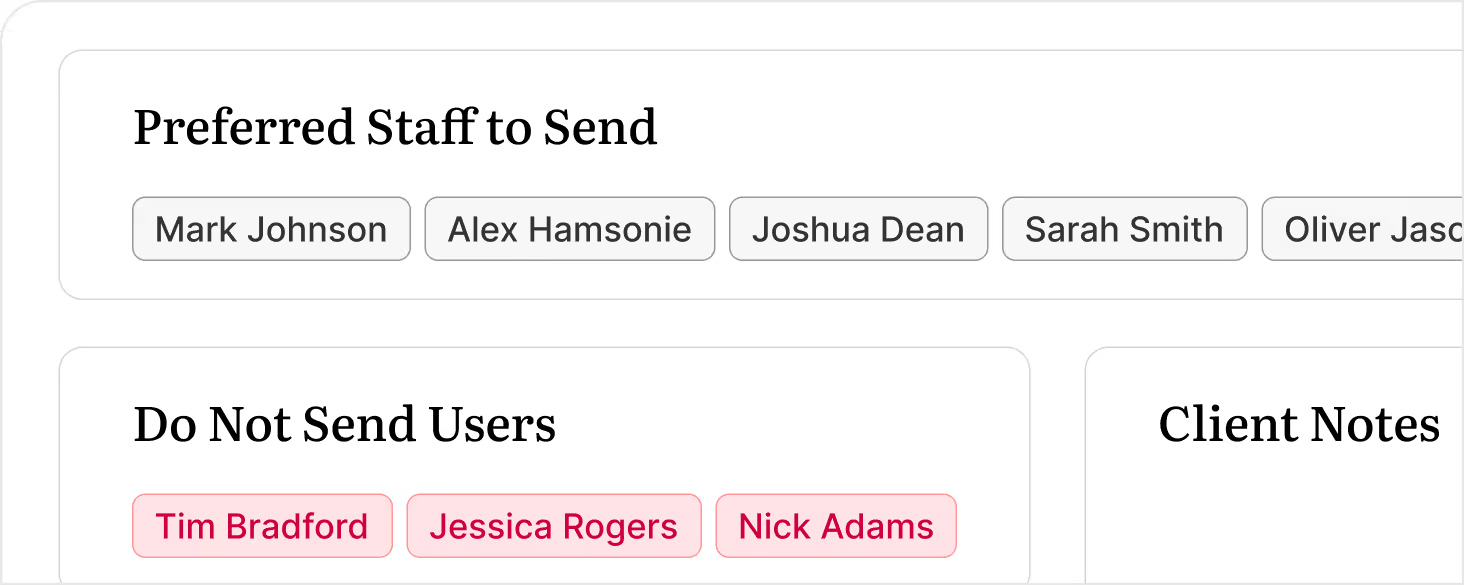
Preferences & Worker Matching

Capture client preferences and match them with the right workers to improve continuity, comfort, and outcomes for every client.
See it in action
User interface showing two sections titled 'Preferred Staff to Send' with buttons for Mark Johnson, Alex Hamsonie, Joshua Dean, Sarah Smith, and Oliver Jason, and 'Do Not Send Users' with pink-highlighted buttons for Tim Bradford, Jessica Rogers, and Nick Adams.
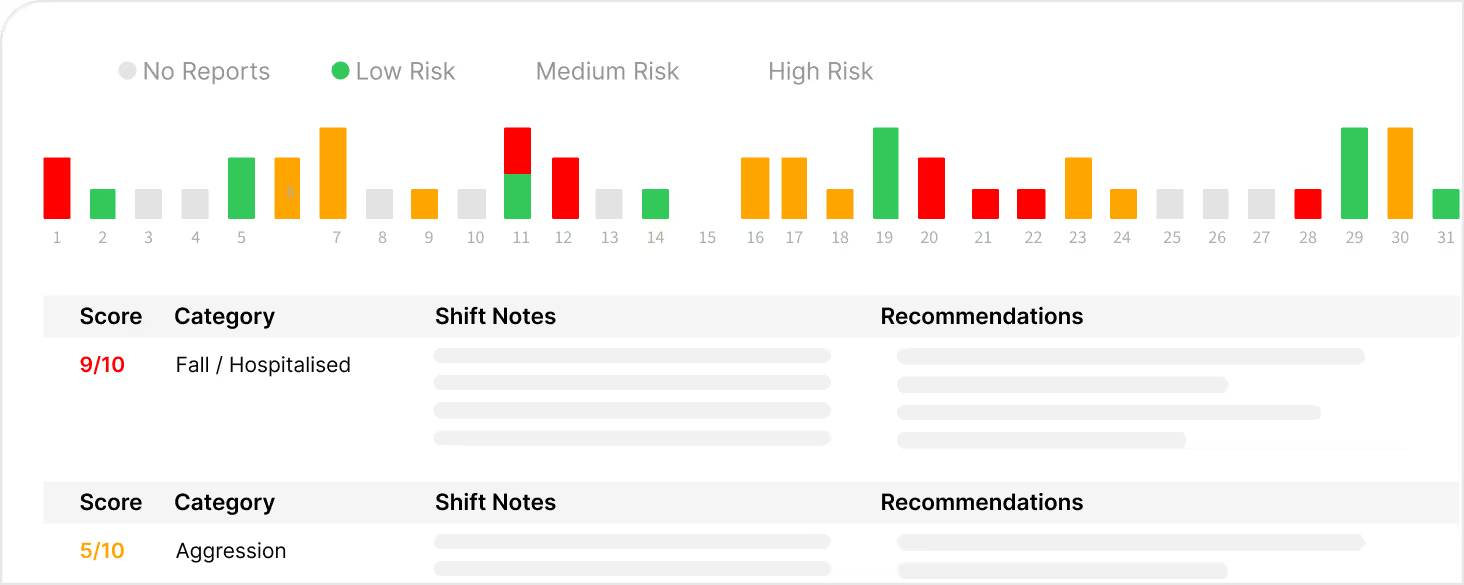
AI Overwatch

AI Overwatch keeps every client shift aligned with the service provided, and flags risks before they become problems.
See it in action
Bar chart showing daily risk levels in red, green, orange, and grey for a month, with a legend indicating No Reports (grey), Low Risk (green), Medium Risk (orange), and High Risk (red). Below are two sections: the first labeled 'Fall / Hospitalised' with a score of 9/10 in red, and the second labeled 'Aggression' with a score of 5/10 in orange, each including columns for Shift Notes and Recommendations.

Frequently asked questions

How does Imploy’s care management system help reduce admin for my team?

Imploy centralises client records, care plans, notes, and budgets in one place so staff aren’t jumping between systems. This cuts down admin and context‑switching, meaning more time is spent on billable, client-facing support.

Icon - Elements Webflow Library - BRIX Templates

Can Imploy support complex client needs and multiple funding streams?

Yes. Imploy is built for NDIS and home care providers managing diverse and complex needs. You can configure care plans, goals, and services against the right funding sources, making it easier to stay compliant while supporting higher‑needs clients.

Icon - Elements Webflow Library - BRIX Templates

How does the timeline and progress tracking work?

Every visit, note, and update is automatically time‑stamped and added to each client’s timeline. This gives you a clear, chronological view of their journey and makes handovers between coordinators or support workers far more seamless.

Icon - Elements Webflow Library - BRIX Templates

Can we track client budgets and prevent overspend?

Imploy lets you track budgets in real time, showing what’s been spent, what’s left, and where funds are going. Services can be mapped to funding categories, helping you avoid over servicing, overspend, and claim rejections.

Icon - Elements Webflow Library - BRIX Templates

How does Imploy improve continuity and quality of care?

By keeping client preferences, care plans, and history in one system, Imploy makes it easier to match the right workers, maintain consistent routines, and ensure every staff member understands the client’s goals and risks before each visit.

Icon - Elements Webflow Library - BRIX Templates

Is Imploy easy for frontline staff to use day to day?

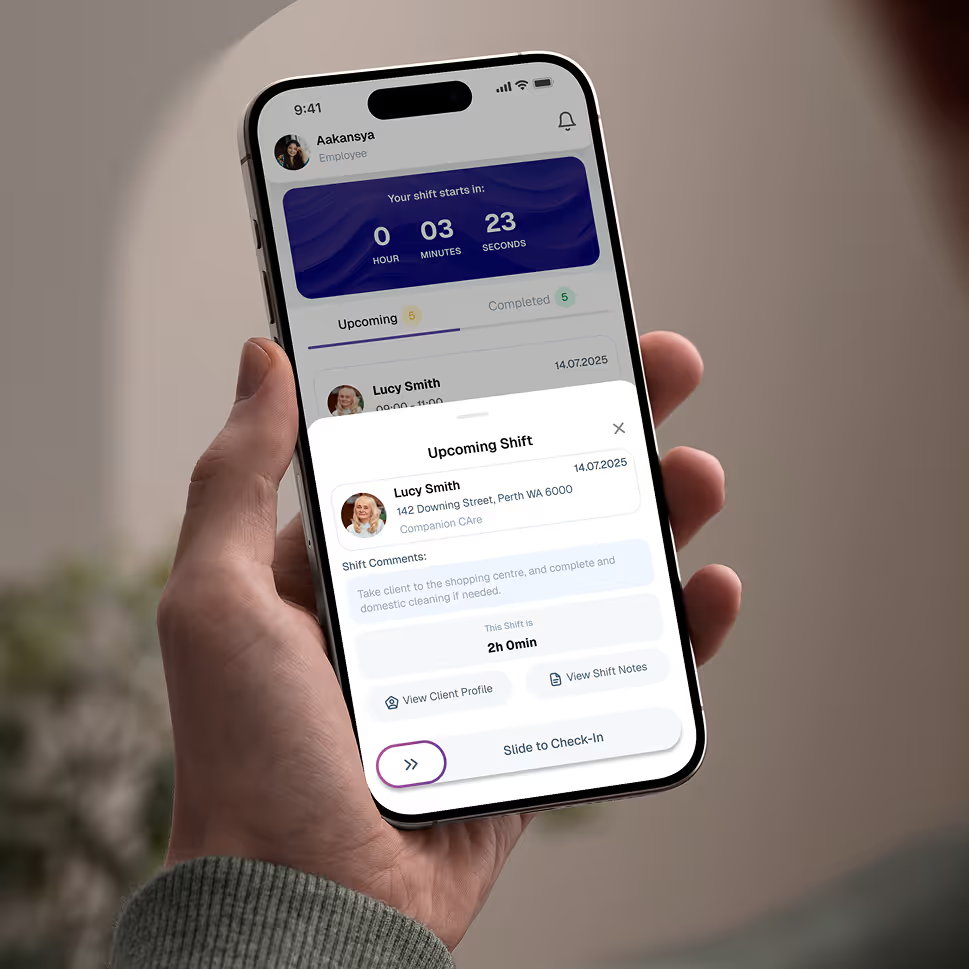
Yes. With the mobile app, workers can view shifts, access key client details, log progress notes, and report issues in real time. It’s designed for busy care environments so your team can stay compliant without extra paperwork.
Icon - Elements Webflow Library - BRIX Templates
Hand holding a smartphone displaying an employee app screen for upcoming shift at Companion Care with countdown timer, client details, shift comments, and a slide to check-in button.

Give your team the tools they need on the road, with quick access.

Empower your workforce on the go. Clock in, check schedules, and manage care notes from anywhere. Available for iOS and Android.


Experience the Imploy difference with AI

Get ready to experience how AI can transform the way you work,and unlock smarter, more efficient workflows.

Two horizontal notification bars with orange bell icons on their left side, stacked vertically on a black background.