
Enhanced Data Structure with
New Attribute Types

Stop fitting your workflow into a box. We've rebuilt the sidebar, the tables, and the data so Imploy works for you—not the other way around.
Trusted by leading providers


Every record, built for you

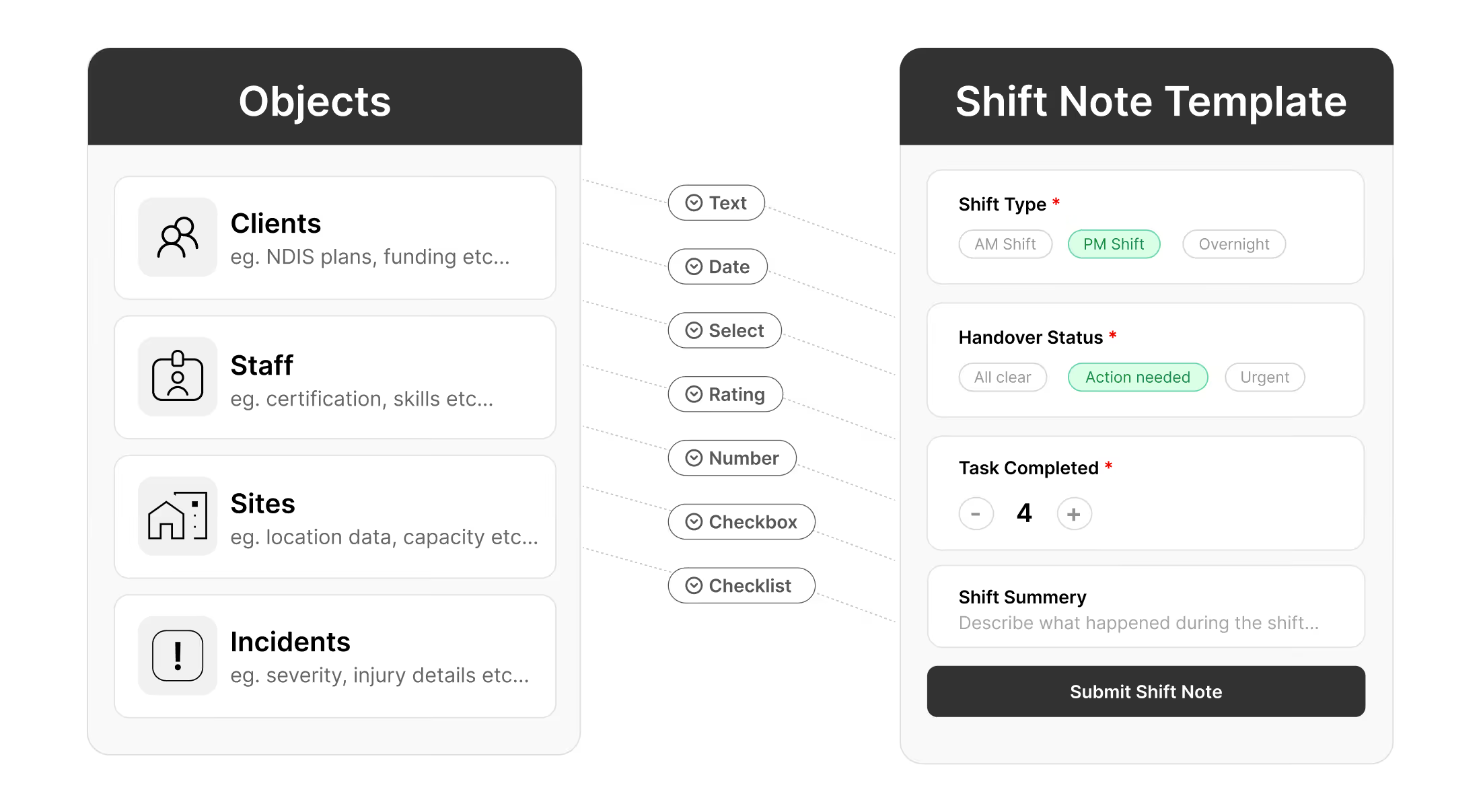
Add as many custom fields as you need to any core object in Imploy — Clients, Staff, Sites, or Incidents. Capture exactly the data your organisation requires, not just what a generic form allows.

AVAILABLE FIELD TYPES
Text
Select
Date
Checkbox
Phone
Checklist
Multi-Select
Number
Location
Time
Rating
URL
Clients — example attributes
Ndis Number
Text
Plan management type
Select
Plan start date
Date
Plan end date
Date
Primary disability
Select
Behaviour support plan
Checkbox
Cultural background
Text
Emergency contact
Phone
Support needs checklist
Checklist
Preferred contact
Staff— example attributes
Employee type
Select
WWCC number
Text
WWCC expiry
Date
First aid certified
Checkbox
First aid expiry
Date
Languages spoken
Multi-Select
Visa type
Select
VEVO check completed
Checkbox
Max hours per fortnight
Number
Emergency contact
Phone
Sites — example attributes
Site type
Select
Bed capacity
Number
Current occupancy
Number
Accessible features
Checklist
Compliance rating
Rating
Last audit date
Date
Next audit due
Date
On-call phone
Phone
Site manager
Text
Site address
Location
Incidents — example attributes
Incident category
Select
Severity level
Rating
Date of incident
Date
Time of incident
Time
Body location of injury
Text
Pain score (1–10)
Number
NDIS reportable
Checkbox
Witnesses present
Checkbox
Follow-up required
Checkbox
Follow-up due date
Date

Structured shift notes, every time

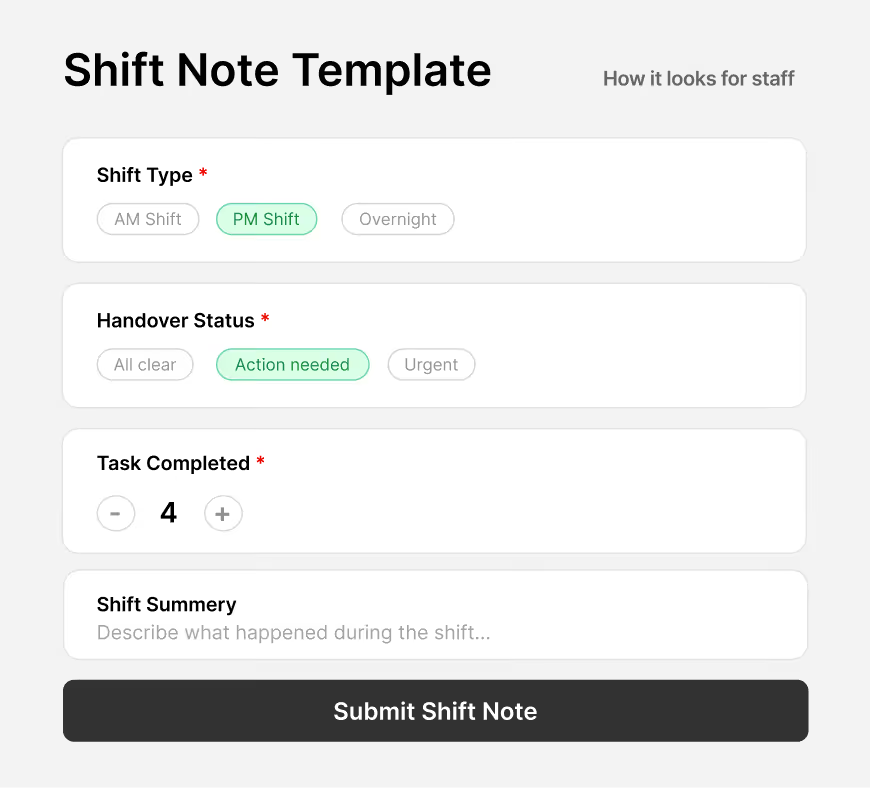
Build reusable templates that appear inside the staff mobile app when completing a shift note. Define exactly which fields staff must fill in — ensuring consistent, compliant documentation across your whole team.
How this works
Shift note templates are separate from object attributes. You build a template in settings — with any fields you choose — and when a staff member completes a shift note in the app, that template appears for them to fill in.
1
Create fields
Define reusable fields with a name, input type, placeholder, and whether they're required. Same field types as attributes.
2
Build a template
Combine fields into a named template. Drag to reorder. Publish when ready — templates can be updated any time.
3
Staff fill it in the app
When a staff member opens a shift note on their phone, the template loads automatically. Required fields must be completed before submission.
EXAMPLE TEMPLATES
Blood Pressure
5 fields
Medication & Health Check
7 fields
Incident & Behaviour Note
3 fields
Standard Shift Handover
9 fields
Coming Soon

More is on the way

Smart Workspace is expanding across more of the platform.

Incident Note Template
Coming Soon
Apply structured templates to incident reports — the same way shift note templates work today.
Goal tracking
Coming Soon
A dedicated goals object with custom milestones, target dates, and progress fields linked to client records.
Reporting on custom fields
Coming Soon
Filter, group, and export reports using any custom attribute — turning your unique data into org-wide insights.

Profiles that actually make sense

Tired of digging through endless fields? Custom tabs let you group information into dedicated spaces for funding details, compliance notes, or whatever matters to your operation.

Explore

No more infinite scrolling

Find what you need in seconds, not minutes. Your team gets faster access and zero clutter.

Structure your own way

Create tabs that match how you actually work. Hide the fields you don't use. Keep the ones that matter.

Better Experience for Your Team

Happy staff, faster workflows, and records that make sense the moment you open them.
Real-time Data Validation and Rollups

Imploy tables now feature per-column calculations, allowing you to view totals and summaries without leaving the platform.

Explore

See it instantly

View calculated summaries in any table. Financial totals, operational rollups, whatever you're tracking.

Reconcile faster

Spot discrepancies in seconds. Your numbers are always visible, always accurate.

Work stays in Imploy

No more context switching. Everything you need is right here in one place.

FULL CONTROL

Ready to build your perfect setup?

Dive into your settings and start customising your sidebars today. Your workflow is waiting.
Experience the Imploy difference with AI

Get ready to experience how AI can transform the way you work,and unlock smarter, more efficient workflows.