Best NDIS Plan Management Software
Explore how Imploy helps NDIS providers manage participant records, budgets, rostering, billing, claims, compliance, payroll and reporting in one platform.

Running an NDIS provider means managing much more than participant support.
Teams need to keep participant records up to date. They need to manage budgets, rosters, shift notes, invoices, claims, staff information and compliance documents.
When these tasks are managed across spreadsheets, emails and separate systems, everyday admin can quickly become harder than it needs to be.
Imploy brings these tasks together in one NDIS management platform. Providers can use Imploy to manage participant information, care, rostering, billing, compliance, payroll and reporting in one place.
What Is NDIS Plan Management Software?
NDIS plan management software helps providers manage the administrative work behind service delivery.
This can include participant records, funding, rostering, notes, billing, claims, payroll, compliance and reporting.
The goal is simple. Teams should be able to find the information they need and complete everyday tasks without constantly switching between different systems.
Imploy brings these workflows together so providers can manage more of their day-to-day operations from one platform.
What to Look for in NDIS Plan Management Software?
Choosing NDIS software is about more than looking at the number of features.
The software should fit the way your team works.
Consider whether it can help you manage:
- Participant records
- Budget and funding information
- NDIS rostering
- Shift and progress notes
- Mobile access
- Bulk invoicing
- NDIS claims
- Payroll and timesheets
- Compliance
- Incident management
- Custom forms
- Custom attributes
- Reporting
- AI and automation
- Xero integration
It should also make everyday tasks easier.
If staff still need to enter the same information into several systems, the software may not be solving the underlying problem.
What Can Imploy Help NDIS Providers Manage?
Imploy helps NDIS providers manage participant information, budgets, rostering, shift documentation, billing, claims, compliance and reporting in one platform. By connecting these workflows, Imploy helps providers reduce manual administration and keep important information in one place.
Participant Information
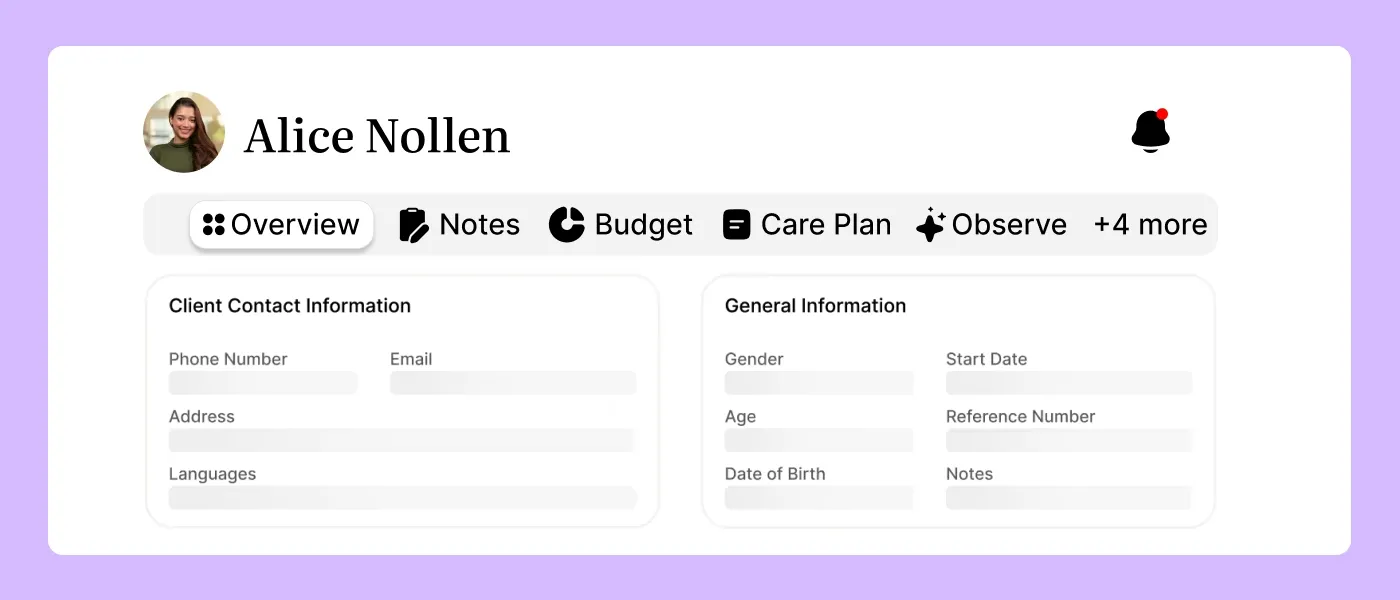
Participant information needs to be easy to find and keep up to date.
Imploy gives providers a central place to manage participant records, care plans, service information and documents. Staff can access the information they need without searching through different spreadsheets or systems.
This creates a more organised way to manage participant information and day-to-day service delivery.
Budgets and Funding
Keeping track of participant funding is an important part of NDIS service delivery.
Imploy provides visibility into participant budgets and funding usage. Providers can see how services are being delivered and manage billing against the relevant funding categories.
This reduces the need for separate manual tracking and gives managers a clearer view of participant funding.
NDIS Rostering
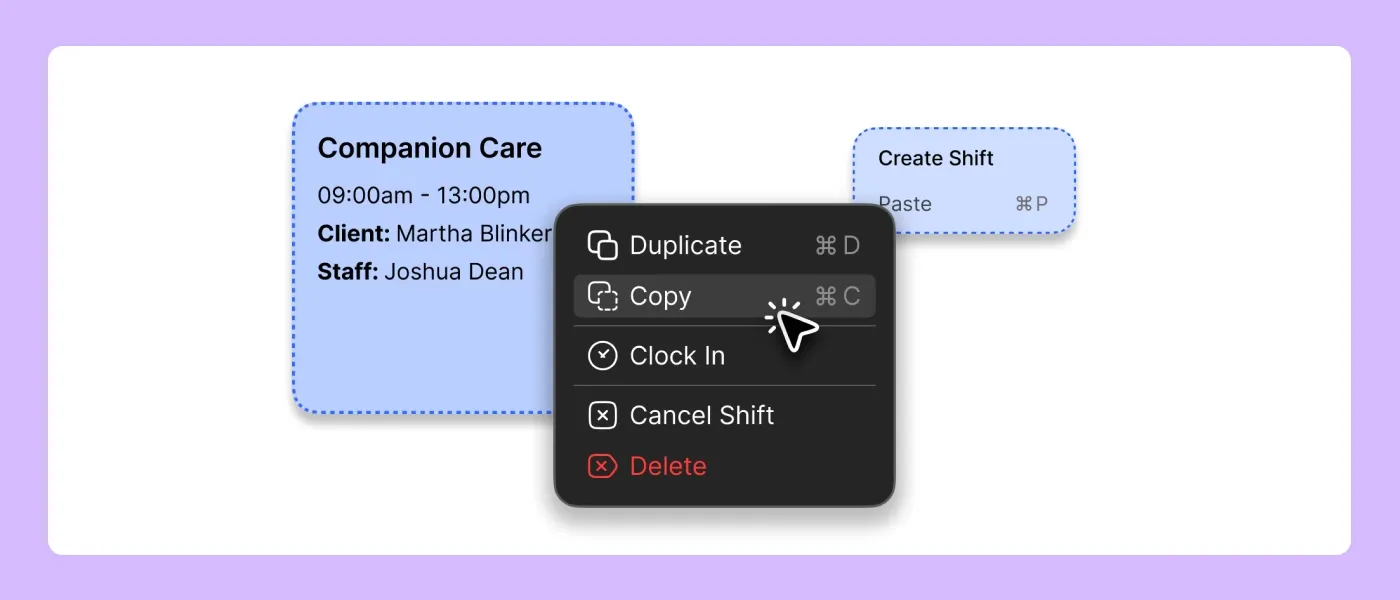
Creating and managing a roster can become difficult as a provider manages more participants, support workers and shifts.
Imploy's NDIS rostering software includes a visual roster builder that makes it easier to create and manage shifts.
Providers can manage:
- Drag-and-drop rosters
- Recurring shifts
- Staff availability
- Worker skills
- Participant requirements
- Shift conflicts
- SCHADS-related alerts
- Shift Pool notifications
- AI-powered shift matching
The visual roster gives managers a clearer view of their schedule and staffing requirements.
Payroll and Timesheets
As a provider grows, managing timesheets and payroll across a larger workforce can become more difficult.
Imploy connects shift and timesheet information with payroll workflows. Providers can review and approve timesheets before using the information for payroll.
Imploy also integrates with Xero, helping providers keep workforce and financial processes connected.
Single Touch Payroll functionality is currently listed as coming soon, so providers should not treat STP as a current Imploy feature.
Finding the Right Worker for a Shift
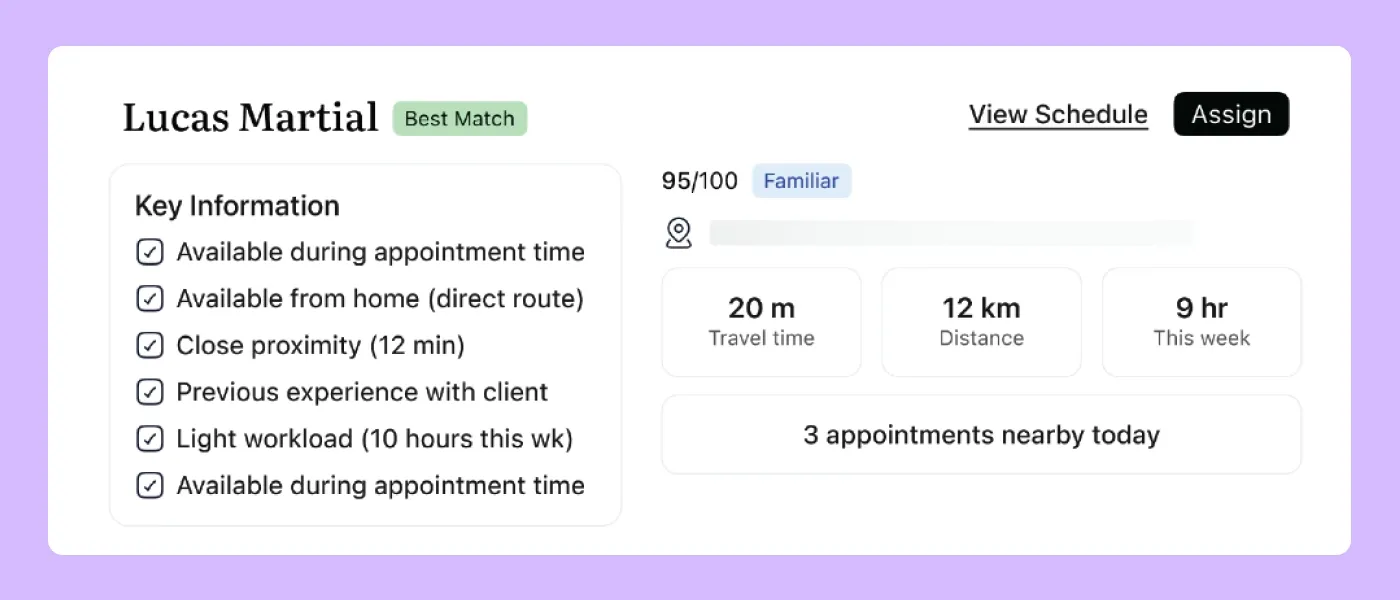
Filling vacant shifts can take time, especially when providers need to consider worker availability, skills, location and participant preferences.
Imploy uses AI-powered shift matching to help identify suitable workers for available shifts. The system can consider factors such as availability, skills, location and participant requirements.
This gives managers a quicker way to find potential matches for vacant shifts.
Shift Notes and Progress Notes
Support workers need an easy way to record what happened during a shift.
The Imploy mobile app lets workers access their upcoming shifts, participant information and shift notes while working in the field.
Imploy also includes AI Note Improvement, which can help improve the wording, grammar and structure of notes. Staff can review the suggested changes before saving the final note.
This gives support workers a simpler way to complete documentation while keeping notes connected to the participant record.
NDIS Bulk Claims
NDIS claims can become time-consuming when providers manage a large number of services and billable entries.
Imploy supports NDIS bulk claims through a PRODA-ready CSV workflow for NDIA bulk upload.
Providers can group eligible billable entries, review claim information and export the required CSV file. This can include entries from shifts, travel, reimbursements and other billable activities.
The workflow helps connect service delivery with the NDIS claims process and reduces the need to manage claim information separately.
Invoicing and Billing
.webp)
Billing needs to stay connected to the services a provider delivers.
Imploy's bulk invoicing feature allows providers to create invoices from billable entries such as shifts, travel, reimbursements and manual entries.
Providers can also connect their billing workflow with accounting platforms such as Xero.
This helps reduce repetitive data entry and keeps billing information connected to service delivery.
NDIS Compliance
NDIS providers need to keep a range of participant, worker and service records organised.
Imploy brings important operational and compliance information into one platform. Providers can manage areas such as:
- Worker records
- Qualifications and documentation
- Participant records
- Incident records
- Risk information
- Compliance documentation
- Audit trails
- Reports
By keeping these records together, teams can spend less time searching across different systems when information is needed.
Custom Forms and Attributes
Every NDIS provider has its own processes.
A standard system does not always cover every type of information a provider needs to collect. Imploy allows providers to create custom forms and attributes for areas such as participants, staff, sites and incidents.
Custom forms can help teams collect information digitally, while custom attributes allow providers to add fields that match their own workflows.
This gives providers more flexibility without relying on separate spreadsheets or manual forms.
Reporting and Visibility
Managers need a clear view of what is happening across the organisation.
Imploy provides reporting and dashboard tools that help teams review operational information in real time. Providers can use reporting to monitor areas such as:
- Service delivery
- Participant information
- Budget usage
- Staffing
- Billing
- Compliance
- Operational activity
Having this information in one platform gives managers a clearer picture of day-to-day operations and helps them identify areas that need attention.
Mobile Access for Support Workers
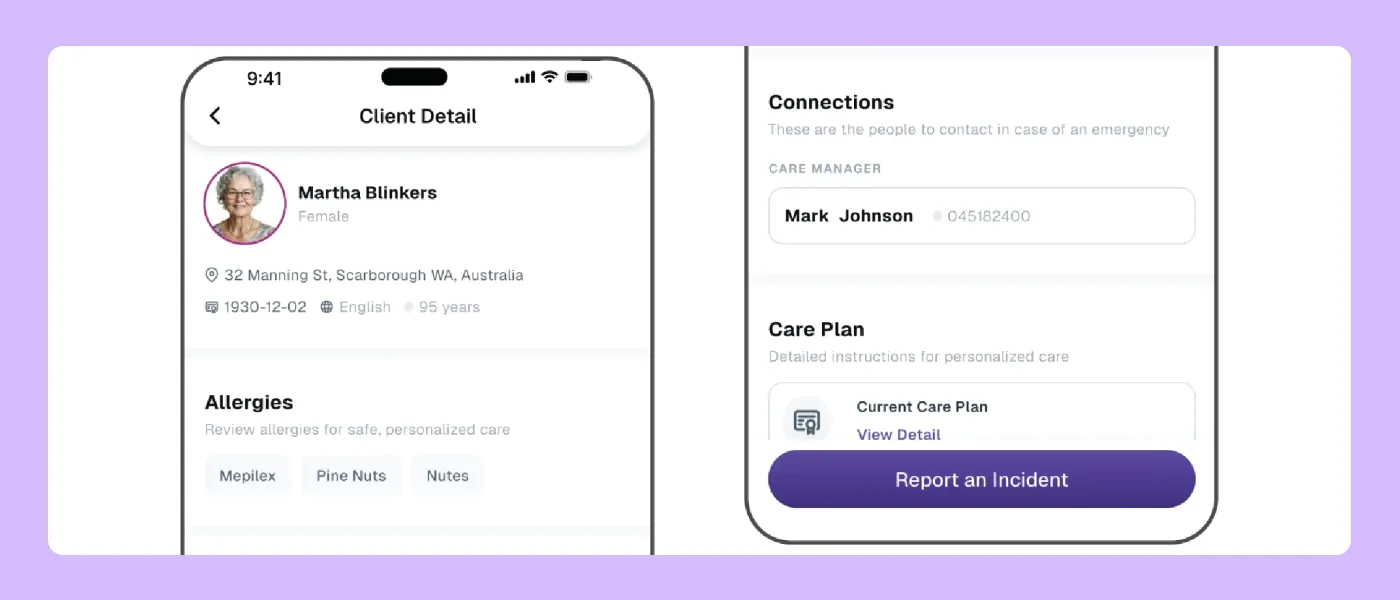
Much of NDIS service delivery happens away from a desk.
Support workers need access to relevant information while they are working with participants. The Imploy mobile app allows workers to:
- View upcoming shifts
- Access participant information
- Clock in and out
- Record shift notes
- Record active hours
- Manage availability
This means important information can be recorded closer to the time and place where the work happens.
It also gives support workers a more direct way to stay connected with their schedules and participant information while working in the community.
AI Features in Imploy
AI is built into several areas of Imploy to help reduce repetitive work.
AI Shift Matching
AI shift matching helps providers find suitable workers for available shifts.
It considers factors such as worker availability, skills, location and participant needs.
AI Note Improvement
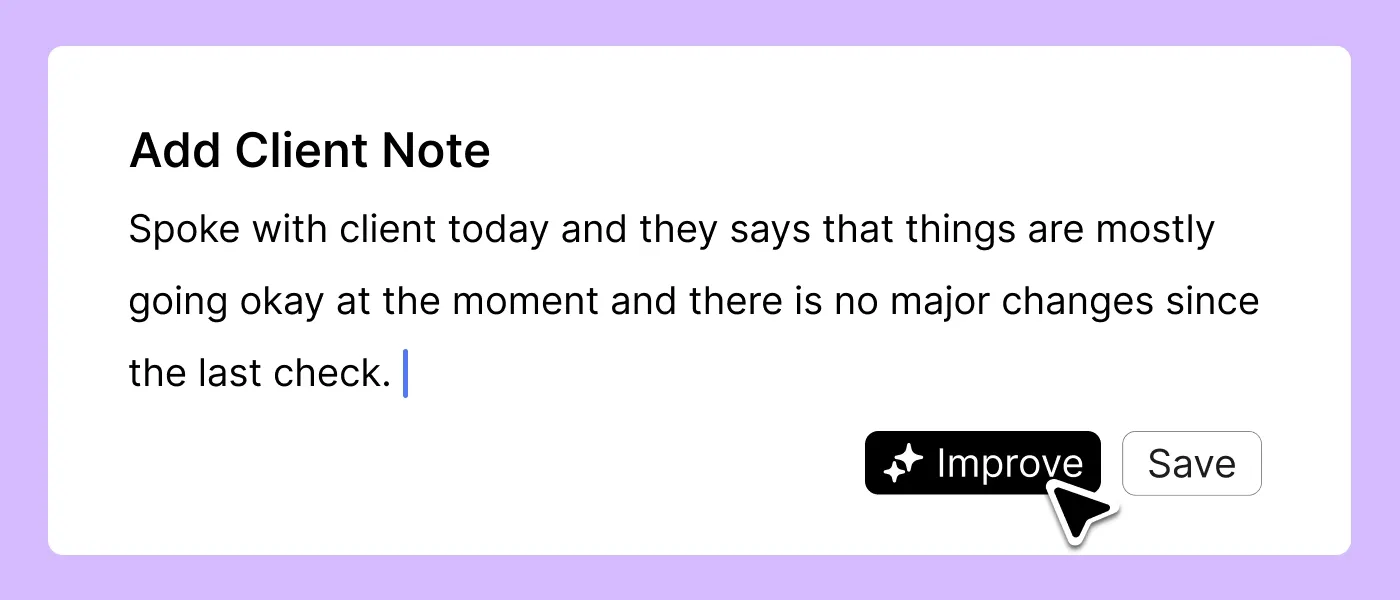
AI Note Improvement helps workers turn rough notes into clearer and more structured documentation.
It can improve wording, grammar and structure.
Staff should always review the final note before saving it.
AI Risk Identification
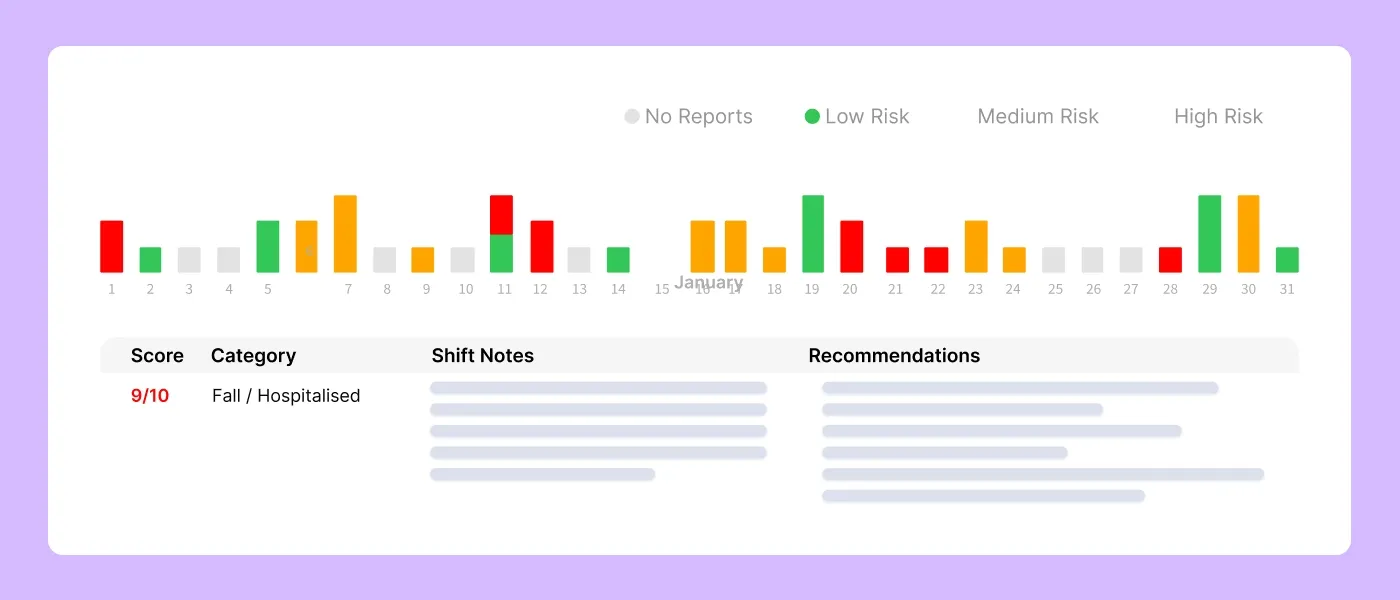
Imploy can analyse shift notes for potential risk indicators.
It provides a risk score from 0 to 10.
This can help teams identify notes that may need further attention.
AI Chatbot
Imploy also offers an AI chatbot for enterprise customers on request.
The chatbot provides role-based access to relevant company information.
This can include information relating to shifts, participants and financial data.
Why Use Imploy for NDIS Management?
NDIS providers often have several teams working across the same information, rostering needs information about workers and participants, billing relies on information from shifts and services, payroll relies on timesheets, and compliance relies on accurate records.
Managing all of this across separate systems can create extra work.
Imploy brings these workflows together.
One Platform for Daily Operations
Imploy brings key NDIS provider workflows into one system.
These include:
- Participant management
- Care management
- Rostering
- Shift notes
- Billing
- NDIS claims
- Payroll
- HR
- Compliance
- Reporting
- Mobile access
This gives teams one place to manage their core operations.
Less Repetitive Admin
Repeating the same information across multiple systems takes time.
It can also make everyday processes harder to manage.
Imploy connects information across different workflows to help reduce repetitive administration.
Better Visibility
Managers need to know what is happening across participants, workers, shifts and billing.
Imploy provides real-time information across these areas.
This gives managers a clearer view of their operations and helps them identify issues sooner.
Support as the Provider Grows
NDIS providers can have very different team sizes and operational needs.
Imploy provides tools for participant management, rostering, billing, compliance and operations across different provider sizes.
The platform can support providers as they add more participants, workers and services.
You can also explore Imploy reviews on G2 and Imploy reviews on Trustpilot to learn more about customer experiences with the platform.
- Starter Plan: Free for up to 5 users - includes essential features like care management, rostering, and mobile access
- Premium Plan: $20 per user/month - includes SCHADS Awards, Bulk Client Invoicing AI Scheduler, Human Resources Module, Accounts Module, Unlimited Users
- Enterprise Plan: Provided on request from the Sales Team
Final Thoughts
Running an NDIS provider involves a lot of moving parts.
Participant information needs to stay organised. Rosters need to work for both participants and workers. Shift notes need to be recorded. Invoices and claims need to be managed. Payroll and compliance records need to stay up to date.
Using separate systems for each task can make this work harder.
Imploy brings these core workflows together in one NDIS management platform.
Providers can manage participant information, budgets, rostering, shift notes, billing, claims, payroll, compliance and reporting from one place.
The mobile app keeps support workers connected while they are in the field. AI tools help reduce repetitive work. Real-time information gives managers better visibility across daily operations.
For NDIS providers looking to simplify their day-to-day management, Imploy provides one platform for managing more of the work in one place.
FAQs
1. What is NDIS plan management software?
NDIS plan management software helps providers manage participant information, budgets, service delivery, rostering, notes, billing, claims and other administrative tasks in one system.
2. What features should NDIS plan management software have?
Useful features include participant management, budget tracking, NDIS rostering, shift notes, invoicing, NDIS claims, payroll, compliance, reporting and mobile access.
3. Can Imploy manage participant budgets?
Yes. Imploy provides real-time visibility into participant budgets and funding usage. This helps providers monitor service delivery and billing.
4. Does Imploy support NDIS rostering?
Yes. Imploy includes a visual roster builder, recurring shifts, availability management, conflict alerts, Shift Pool and AI-powered shift matching.
5. Can support workers use Imploy on mobile?
Yes. Support workers can use the Imploy mobile app to view shifts, access participant information, clock in and out, record shift notes, record active hours and manage availability.
6. Does Imploy support NDIS invoicing?
Yes. Imploy supports bulk invoicing from shifts, travel, reimbursements and manual entries. It also supports split billing across service types.
7. Does Imploy support NDIS claims?
Yes. Imploy supports NDIS bulk claims through a PRODA-ready CSV workflow for NDIA bulk upload.
8. Does Imploy use AI?
Yes. Imploy includes AI-powered shift matching, AI Note Improvement and AI Risk Identification. An AI chatbot is also available for enterprise customers on request.
9. Can Imploy support growing NDIS providers?
Yes. Imploy provides tools for managing participants, workers, shifts, billing, compliance and reporting across different provider sizes and operational needs.