Best NDIS Compliance Software for All Sized Providers
Explore how Imploy NDIS compliance software helps providers manage incident reporting, participant records, digital forms, rostering and reporting.

NDIS compliance software helps disability service providers manage participant records, incident reports and essential documentation. Imploy brings these workflows together with care management, rostering, billing and reporting in one platform.
We built Imploy to help NDIS and home care providers manage their day-to-day operations with less repetitive administration. Our platform connects participant information, digital forms, incident tracking and service delivery workflows.
For NDIS providers, this means less reliance on disconnected systems and easier access to important business information. While software cannot guarantee compliance, it can help your team maintain organised records and support consistent processes.
What Is NDIS Compliance Software?
NDIS compliance software helps providers manage the records and processes associated with delivering NDIS-funded supports.
These tools support documentation, incident management and internal monitoring. They can also connect compliance-related tasks with participant management and daily service delivery.
Common features include:
- Incident reporting and tracking
- Participant records and care plans
- Digital forms and documentation
- Shift notes and service delivery records
- Staff rostering and mobile access
- Reporting and internal monitoring
- Billing, claims and participant budget tracking
The right platform depends on your organisation's size, services and documentation requirements. It should help your team manage essential information without creating unnecessary administrative work.
Simplify NDIS Compliance Management with Imploy
Imploy helps NDIS providers organise participant records, digital documentation and incident reports in one platform. By connecting these workflows with rostering, billing and reporting, Imploy helps reduce repetitive administration and improve visibility across day-to-day operations.
- Record incidents and track progress through custom workflow stages
- Create digital forms and reusable documentation templates
- Manage participant information and care plans
- Connect rostering with shift notes and attendance records
- Review incident activity and service delivery information
- Track participant budgets and manage invoicing
- Prepare NDIS bulk claims using PRODA-ready CSV files for NDIA portal upload
- Keep essential management workflows connected in one platform
Imploy supports organised record keeping and internal processes but does not guarantee NDIS compliance. Providers remain responsible for meeting applicable requirements and maintaining appropriate procedures. Explore Imploy to see how its features fit your organisation's needs.
Why Do NDIS Providers Need Compliance Software?
NDIS providers must maintain complete and accurate records of supports delivered, including invoices, support logs, rosters, case notes and service agreements. Read the official NDIS record-keeping requirements to understand what information providers need to maintain.
Compliance software helps providers manage these responsibilities through more consistent workflows.
1. Keep Participant Records Organised
Providers need to maintain participant information, care plans, service agreements and other relevant documents. Scattered records can make it difficult to find current information.
A centralised system gives staff a consistent place to access and manage relevant documentation. It can also help teams keep records updated when participant needs change.
2. Record and Track Incidents
NDIS providers need processes for recording incidents, reviewing reports and documenting follow-up actions. The NDIS Quality and Safeguards Commission explains its incident management requirements, including how incidents should be identified, recorded, assessed and managed.
Digital incident management helps teams organise reports and monitor their progress. Managers can then review records and identify issues that need further attention.
3. Maintain Consistent Documentation
Staff often complete similar forms and documents for different participants. Creating each document manually can lead to inconsistent records and unnecessary repetition.
Digital templates and custom forms help standardise documentation. They also make it easier for staff to follow the same process when collecting information.
4. Connect Documentation With Service Delivery
Compliance records should reflect the support delivered. Rosters, shift notes and attendance records help providers understand what happened during service delivery.
Connecting these workflows helps teams maintain clearer records. It can also reduce duplicate data entry across separate systems.
5. Improve Internal Visibility
Managers need to review records and understand activity across their organisation. Without suitable reporting, identifying issues can require time-consuming manual checks.
Reporting tools help providers review incidents, service delivery and relevant business
What Features Should You Look for in NDIS Compliance Software?
The right NDIS compliance software should help your team manage essential records and daily workflows. Look for features that support:
- Incident reporting: Record incidents and track follow-up actions.
- Digital forms: Use custom forms and templates to maintain consistent documentation.
- Participant management: Organise participant records and care plans.
- Rostering and mobile access: Connect shifts, attendance and shift notes.
- Reporting: Review incidents, service delivery and business activity.
- Billing and funding: Manage invoices, claims and participant budgets.
These features can help reduce repetitive administration and keep important information organised.
How Does Imploy Support NDIS Compliance?
Imploy combines participant management, digital documentation, incident reporting, rostering, billing and reporting in one platform. We help NDIS providers connect these workflows so their teams can manage important records alongside daily operations.
Here's how our features support the key requirements of NDIS compliance management.
1. Incident Reporting and Tracking
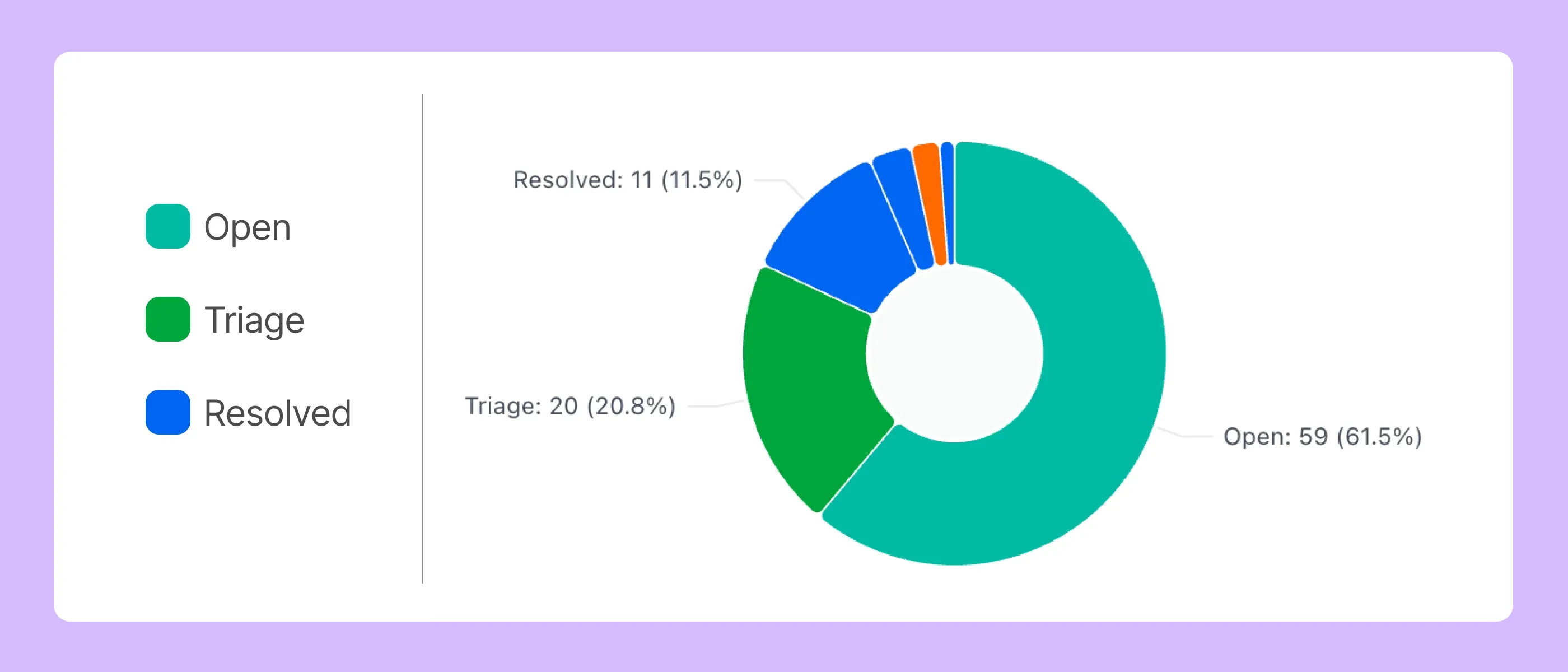
Our Incident Forms feature helps providers collect incident information through digital forms. Submissions can be converted into structured incident records and tracked through custom workflow stages.
Timestamped activity histories help teams review incident progress and changes over time. This gives managers a clearer view of reported incidents and supports consistent internal follow-up.
Imploy helps organise incident management. Providers remain responsible for determining reportability, meeting notification deadlines and following applicable NDIS requirements.
2. Digital Forms and Documentation
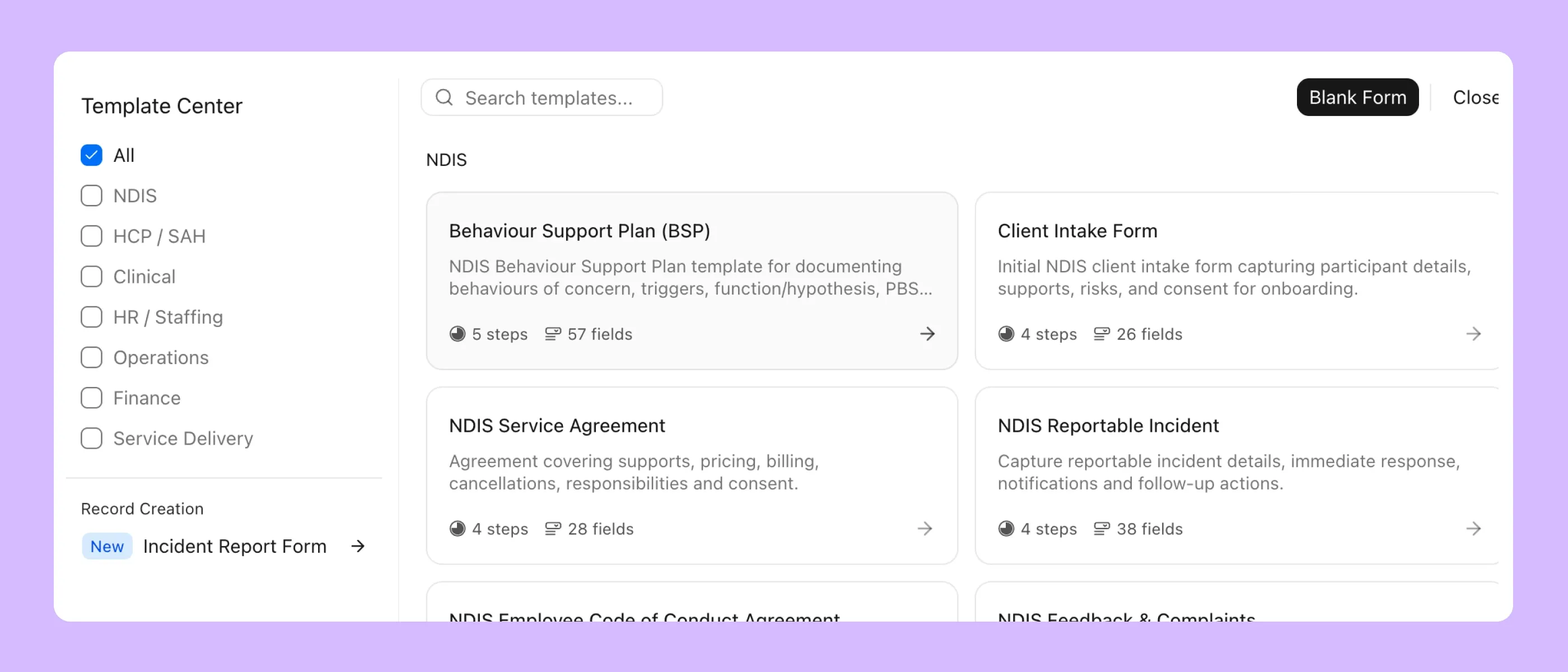
Our Custom Forms feature helps providers create consistent documentation for their workflows. Teams can use existing templates or build forms to suit their information requirements.
Templates support common documentation needs, including service agreements, care plans, assessments and shift handover notes. Conditional field visibility lets providers show or hide questions based on responses.
This helps staff collect relevant information and reduces reliance on manual paperwork.
3. Participant and Care Plan Management
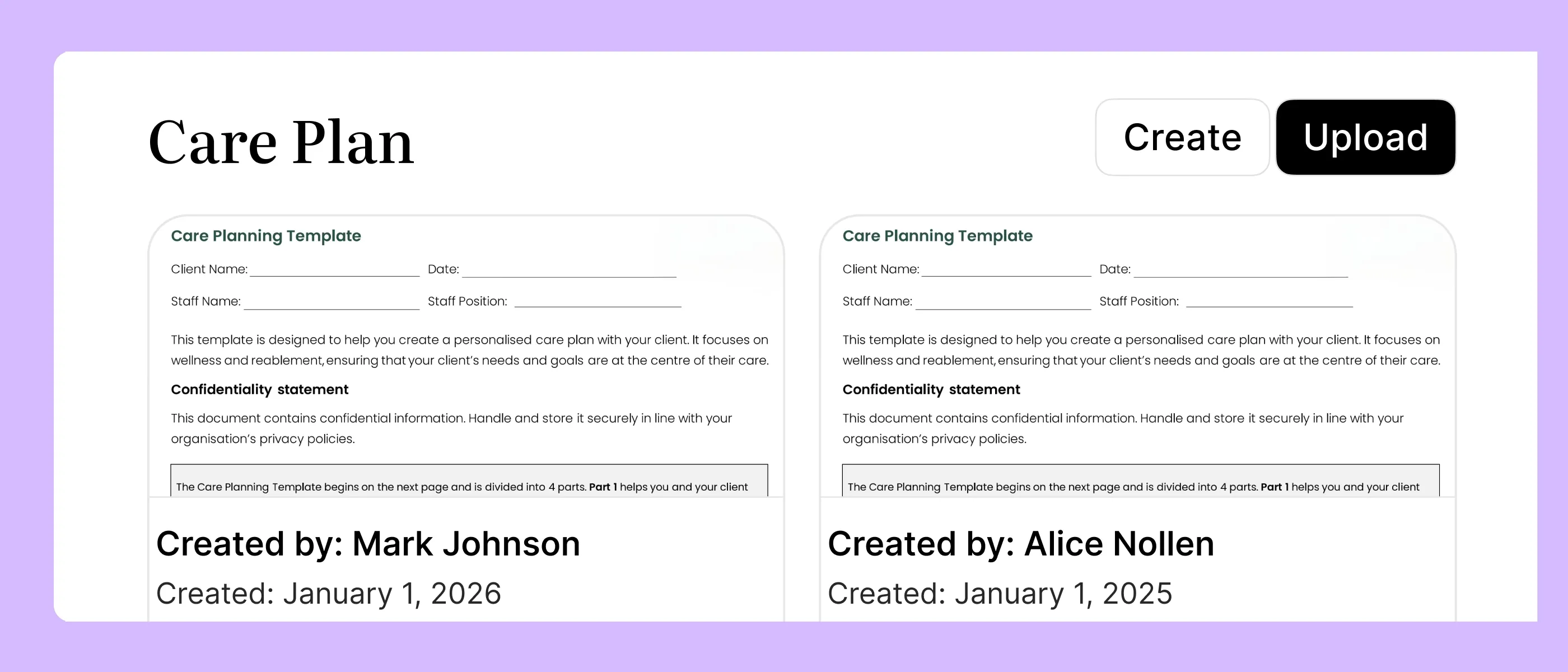
Our care management features bring participant information, funding details and care plans together within the platform. This gives teams a central place to manage information related to service delivery.
Care plans can be updated with version control. This helps staff track changes and access current documentation.
By connecting participant information with other management workflows, Imploy helps providers keep relevant records organised.
4. Rostering and Mobile Access
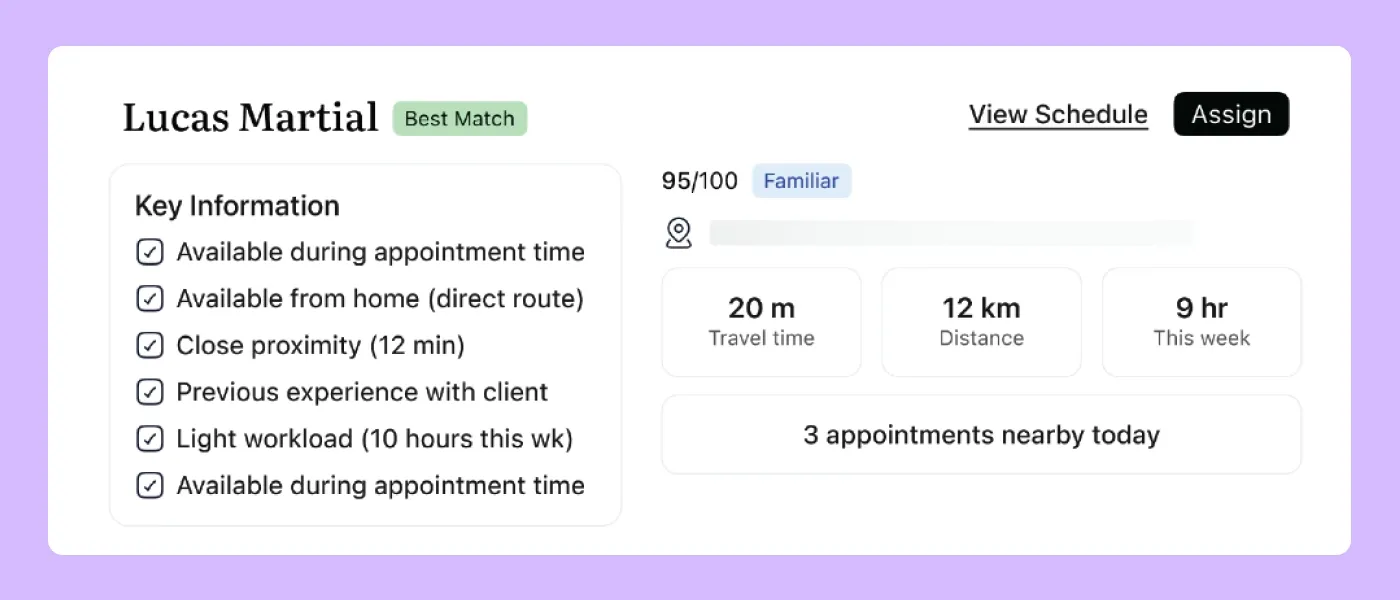
Our rostering tools help coordinators manage shifts based on worker availability, skills and participant requirements. Scheduling alerts can highlight potential conflicts that need attention.
Our mobile app allows support workers to view shifts, access relevant participant details, record shift notes and manage clock-in and clock-out activities.
These features connect planned support with day-to-day service delivery. They also help staff record attendance and shift information while working in the community.
5. Reporting and Internal Monitoring
Our reporting features help providers review activity across their organisation. Teams can access information relating to incident activity, service hours, invoice statuses and claims.
Custom dashboards let providers organise relevant information for their workflows. Managers can use these insights to identify areas that need attention and support internal reviews.
Reporting helps providers understand their operations. It does not independently confirm that a provider meets every NDIS compliance requirement.
6. Billing and Participant Funding
.webp)
Our platform connects participant budget tracking with billing and claims workflows. Providers can monitor funding utilisation and manage invoices alongside other operational information.
Imploy supports bulk invoicing and NDIS bulk claims using PRODA-ready CSV files for upload to the NDIA portal. These features help providers manage financial administration without relying entirely on manual processing.
Organised billing and funding records can also make it easier to review financial activity and investigate discrepancies.
By connecting these functions, Imploy helps providers manage documentation, service delivery and business administration within one platform. Our tools support consistent record keeping and internal processes while providers retain responsibility for meeting their NDIS obligations.
- Starter Plan: Free for up to 5 users - includes essential features like care management, rostering, and mobile access
- Premium Plan: $20 per user/month - includes SCHADS Awards, Bulk Client Invoicing AI Scheduler, Human Resources Module, Accounts Module, Unlimited Users
- Enterprise Plan: Provided on request from the Sales Team
How to Choose the Right NDIS Compliance Software?
The best platform for your organisation depends on your current workflows and future requirements. Evaluate how each option supports the tasks your team manages every day.
1. Does It Support Your Documentation Needs?
List the records your organisation maintains. Include incident reports, participant documentation, care plans and service records.
Check whether the platform supports these requirements through templates, custom forms and suitable record management features.
2. Can Your Team Access Information Easily?
Consider how managers, coordinators and support workers will access relevant information. The platform should make important records easy for authorised users to find.
Mobile access can also help staff retrieve shift information while delivering support in the community.
3. Can You Track Incidents and Follow-Up?
Review how the software handles incident submissions and workflow tracking. Ask how managers can monitor progress and review activity histories.
Also confirm that your internal procedures cover incident assessment, escalation and any required external notifications.
4. Does It Connect With Daily Operations?
Consider whether the platform connects participant management with rostering, shift documentation, billing and reporting.
Connected workflows can reduce duplicate data entry and make relevant information easier to review.
5. Can It Adapt to Your Organisation?
Your software should suit your service model and documentation processes. Custom forms, configurable workflows and relevant reporting tools can help accommodate different business needs.
Consider both your current team and the processes you may need as your organisation grows.
6. Does It Support Internal Reviews?
Look for organised records and reporting tools that help your team review relevant information. Ask how easily authorised staff can retrieve incident, participant and service delivery records.
Software can support audit preparation, but it cannot guarantee audit readiness or replace your organisation's compliance responsibilities.
Why Choose Imploy for NDIS Compliance Management?
We designed Imploy to bring essential NDIS and home care management workflows together in one platform. Our features connect participant records and documentation with rostering, billing and reporting.
With Imploy, your team can:
- Create digital forms and manage participant documentation.
- Record incidents and track them through structured workflows.
- Manage participant information and care plans.
- Connect rostering with shift notes and attendance.
- Review incident activity and service delivery information.
- Track participant budgets and manage invoicing.
- Prepare NDIS bulk claims using PRODA-ready CSV files.
- Use reporting tools to review relevant business activity.
These features help providers reduce repetitive administration and improve visibility across their operations.
The right software should fit your organisation's processes, not add unnecessary complexity. We encourage providers to explore Imploy's features and assess how they fit their documentation, service delivery and reporting requirements.
Simplify NDIS Compliance Management with Imploy
Imploy helps NDIS providers organise participant records, digital documentation and incident reports in one platform. By connecting these workflows with rostering, billing and reporting, Imploy helps reduce repetitive administration and improve visibility across day-to-day operations.
- Record incidents and track progress through custom workflow stages
- Create digital forms and reusable documentation templates
- Manage participant information and care plans
- Connect rostering with shift notes and attendance records
- Review incident activity and service delivery information
- Track participant budgets and manage invoicing
- Prepare NDIS bulk claims using PRODA-ready CSV files for NDIA portal upload
- Keep essential management workflows connected in one platform
Imploy supports organised record keeping and internal processes but does not guarantee NDIS compliance. Providers remain responsible for meeting applicable requirements and maintaining appropriate procedures. Explore Imploy to see how its features fit your organisation's needs.
Final Thoughts
NDIS compliance requires consistent documentation, effective incident management and ongoing attention to service delivery processes.
Imploy brings digital forms, participant records, incident tracking, rostering, billing and reporting together in one platform. We help providers organise these workflows and reduce repetitive administrative work.
Software cannot guarantee compliance. Providers must still follow applicable NDIS requirements and maintain appropriate internal processes.
However, the right platform can make important information easier to manage and review. If you're looking for a more connected way to manage your NDIS operations, explore Imploy and see how our features fit your organisation.
Frequently Asked Questions
1. What is NDIS compliance software?
NDIS compliance software helps providers manage participant records, incident reports, care plans and other documentation associated with NDIS-funded supports. It can also connect these tasks with rostering, billing and reporting.
2. What features should NDIS compliance software include?
Useful features include incident reporting, digital forms, participant management, care plan documentation, rostering, mobile access and reporting. Billing and participant budget tracking can also support related administrative processes.
3. How does Imploy support NDIS compliance?
Imploy brings together digital forms, incident workflows, participant records, care management, rostering, billing and reporting. These features help providers organise records and manage related workflows within one platform.
4. Does Imploy support incident reporting?
Yes. Imploy's Incident Forms feature allows providers to collect incident information digitally, create structured incident records and track progress through custom workflow stages.
5. Can Imploy help manage participant documentation?
Yes. Imploy Custom Forms supports templates and custom forms for common documentation workflows. Its care management features also help providers organise participant information and care plans.
6. Can NDIS compliance software guarantee compliance?
No. Software can support documentation, record keeping and internal reviews, but it cannot guarantee compliance. Providers remain responsible for meeting applicable NDIS requirements and maintaining appropriate processes.


.webp)