

Best Affordable NDIS Software for Small Providers (2026)
Compare the best affordable NDIS software for small providers in 2026. Explore pricing, features, pros & cons to choose the right platform for your business.

Running an NDIS service as a small provider isn’t easy. Between rostering, billing, compliance, participant management, and reporting, it can feel like there’s never enough time in the day - especially when budgets are tight. The right software, however, can be a game-changer, freeing up hours of admin so you can focus on what really matters: delivering great outcomes for your participants.
In this guide, we highlight the best affordable NDIS software options tailored for small support providers and sole traders. Each tool below balances cost, ease of use, and essential features - including rostering, scheduling, timesheets, billing, and mobile access.
What to Look for in an NDIS Software?
Choosing the right NDIS software isn’t just about price - it should reduce admin, improve compliance, and support growth. The following features should be considered by providers while choosing an NDIS software.
1. NDIS-Specific Features
The software should be built for NDIS workflows, supporting service item-based billing, participant plan tracking, SCHADS-compliant payroll, incident and compliance management, and integration with support coordination.
2. Rostering & Scheduling Simplicity
Look for tools that prevent double bookings, allow recurring shifts, provide real-time updates, and include mobile clock-in/out. Efficient scheduling saves time for participant care.
3. Billing & Payroll Integration
Integrated billing and payroll reduce errors. The system should automate invoices, support NDIS line item billing, include native payroll or integration, and work with Xero or Quickbooks.
4. Mobile App for Support Workers
A strong mobile app lets staff view shifts, submit timesheets, add shift notes, upload incidents, and get real-time updates, improving communication and accountability.
5. Scalability & Pricing Transparency
Choose software that grows with your team, offers free or low-cost entry tiers, avoids long-term contracts, and has clear pricing. This prevents costly migration later.
6. Compliance & Audit Readiness
The software should provide secure cloud storage, expiry reminders, audit-ready reporting, and incident tracking to simplify NDIS audits and renewals.
Best NDIS Software for Small Providers
1. Imploy - Best Overall NDIS Software
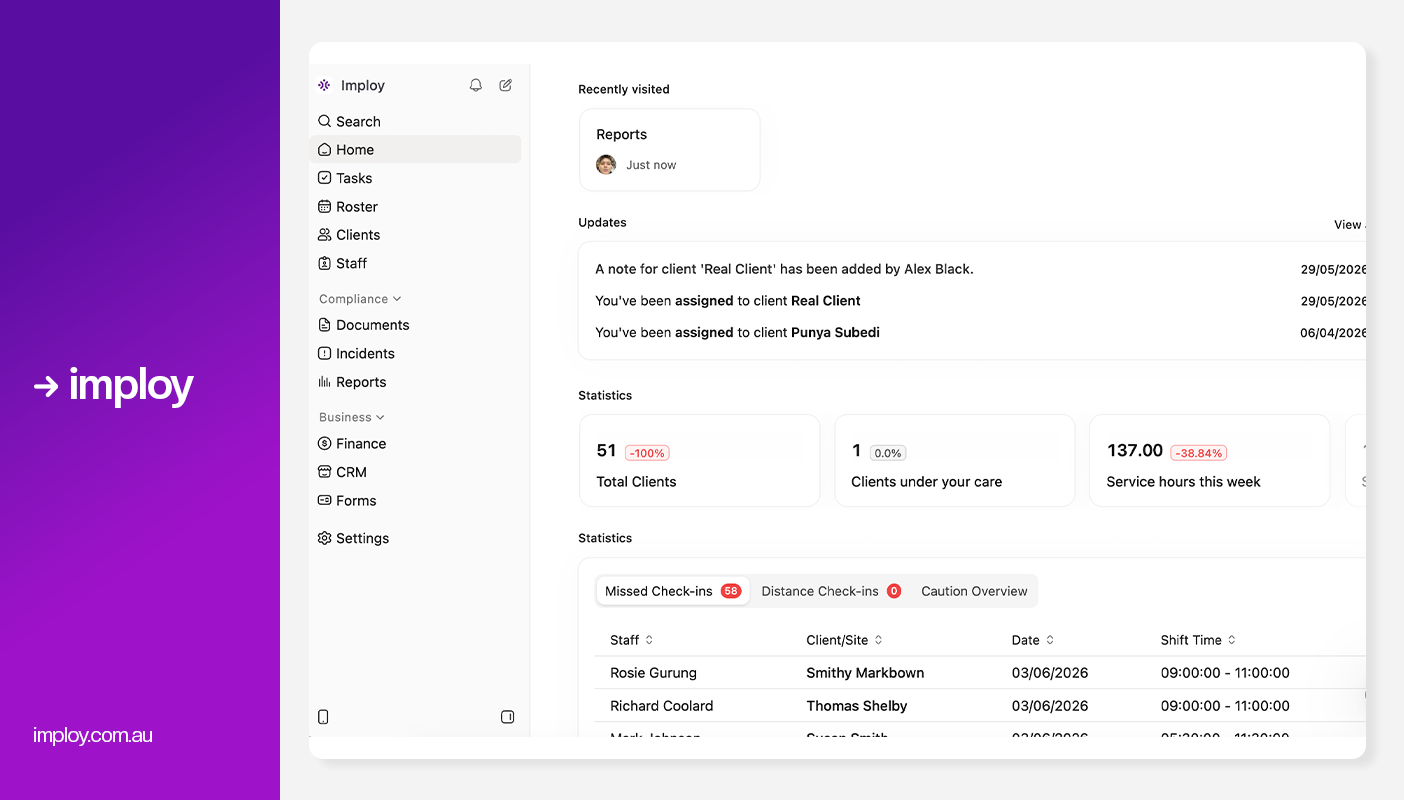
Imploy is a purpose-built workforce and rostering platform designed specifically for Australian NDIS providers. It stands out by combining scheduling with payroll,mobile access, compliance tools, and billing workflows. This all-in-one approach reduces administrative burden without sacrificing power.
Best for:
All Sized NDIS providers needing rostering plus payroll, invoicing, compliance and more.
Key Features:
- Smart Rostering: Quickly assign and adjust shifts using a visual drag-and-drop interface, with real-time availability and last-minute flexibility.
- Payroll & Invoicing: Integrated with Xero and Quickbooks for faster billing, timesheet processing, and payroll management.
- Care Management: Centralised system to store client records, update care plans, and track progress over time.
- Compliance Tools: Automatic alerts for expiring documentation, incident logging, and staff screening to maintain regulatory compliance.
- Real-Time Reporting: Interactive dashboards to monitor service delivery, track budget usage, and analyse funding in real time.
- Custom Attributes: Imploy lets providers create unlimited custom fields for clients, staff, sites, and incidents to better match their workflows and compliance requirements.
- Reporting & Compliance: Imploy's advanced reporting suite provides real-time dashboards and custom reports for service delivery, compliance, workforce performance, finances, and NDIA claims.
- E-Signature Integration: Authorise client documents directly within Imploy using built-in eSignatures - eliminating the need for third-party subscriptions and streamlining approvals.
- Custom Forms: Imploy's Custom Forms builder enables providers to create digital forms that automatically populate records, streamlining documentation and reducing manual data entry.
- Mobile app for staff and providers: Imploy’s mobile app gives support workers access to upcoming shifts, client information, clock-in/out, shift notes and active-hour recording while working in the field.
- Flexible Shift Types: Imploy supports flexible shift types, including sleepover and group shifts, making it easier to manage overnight support, multiple staff and shared client sessions within the same roster.
- Split Billing: Imploy simplifies split billing by allowing shifts to cover multiple service types, with separate billables and timesheets automatically created for each segment.
- Share Forms by Email: Imploy makes it easier to collect information by letting providers email forms directly to participants, staff or other recipients, with options to prefill details and track completion.
- AI Features:
- Smart Shift Matching: Uses AI to assign the most suitable support worker based on the client’s needs, staff location, availability, skills, and previous interactions -helping reduce travel time and boost consistency.
- Intelligent Note Enhancement: Refines rough shift notes into clear, well-structured summaries by improving tone, grammar, and extracting key insights -enhancing compliance and communication.
- AI Powered Risk Identification: Uses AI to analyze shift notes for key phrases, rating risk from 0 to 10, with plans to allow converting high-risk notes into incidents.
Pros:
- Free entry-level plan for small teams.
- Smart rostering with real-time updates.
- Replaces 4-5 other tools with one unified system.
- Advanced AI features.
- Affordable and scalable for teams of all sizes.
- Dedicated mobile app for support workers.
Cons:
- Feature-rich - some training needed for smaller teams.
- Starter Plan: Free for up to 5 users - includes essential features like care management, rostering, and mobile access.
- Premium Plan: $20 per user/month - includes SCHADS Awards, Bulk Client Invoicing, AI Scheduler, Human Resources Module, Accounts Module, Unlimited Users.
- Enterprise Plan: Provided on request from Sales Team.
2. ShiftCare
.webp)
ShiftCare is another affordable platform designed with small NDIS and disability care providers in mind.
Best for:
Small to medium NDIS providers wanting a robust care management system.
Key Features:
- Smart rostering & scheduling: Plan and organise staff shifts with conflict-free scheduling and team management tools.
- Payroll & workforce tools: Manage staff time tracking, payroll-ready timesheets, and workforce details in one place.
- Support worker mobile app: Workers can access shifts, clock-in/clock-out, view client information, and submit updates on the go.
- Integrated invoicing & billing: Automate bulk billing, claims, and NDIS-ready pricing, reducing manual admin.
- AI & automation features: Intelligent rostering, automated compliance alerts, and other AI-assisted tools to speed up admin tasks.
Pros:
- Quick and simple setup
- Well-suited for providers just starting out
- Great mobile experience
Cons:
- Can feel complex for very small providers
- Costs may increase with team size
- No advanced AI Features
Pricing:
- Basic Plan: $8 per user/month
- Professional Plan: $13 per user/month
- Premium Plan: $20 per user/month
3. CareMaster
.webp)
CareMaster is an end-to-end NDIS and aged care platform with powerful tools, though its pricing is more moderate compared to ultra-budget options.
Best for:
Small providers who need more than just rostering - including compliance, billing and participant engagement tools.
Key Features:
- Intelligent Scheduling: CareMaster offers intelligent, NDIS-compatible scheduling that aligns seamlessly with funding and compliance needs.
- Automated invoicing & billing: Bill clients and generate invoices easily with bulk claims and PRODA export support.
- Payroll & award interpretation: Integrated payroll with SCHADS award rules and sync to accounting tools.
- Real-Time Alerts: Stay compliant with real-time alerts for scheduling conflicts and non-compliance risks.
- Staff-Client Matching: Improve service quality with staff-client matching based on skills, qualifications, and location.
Pros:
- Competitive pricing.
- Mobile app for staff and clients.
- Built around NDIS workflows.
- Excellent visibility through calendar modes.
Cons:
- The UI feels outdated or complex for modern users.
- Fewer customisation options.
- Not ideal for large or high-growth organisations.
Pricing:
- Essential Plan: $16 per user/month
- Standard Plan: $26 per user/month
4. RotaWiz

RotaWiz focuses on workforce scheduling and time management, making it a popular option for providers prioritising cost control.
Best for: Micro teams that need simple and cost-effective rostering plus basic NDIS admin.
Key features:
- All-in-one rostering solution with simplified shift creation, automated assignments, and conflict-free scheduling to ensure care is delivered on time.
- Billing & invoicing features built into the platform to generate accurate invoices and manage NDIS funds.
- Incident management to record and track issues.
- Mobile app for carers and admins to access shifts, update availability, and upload notes on the go.
- Budget tracking and expense overview for better financial visibility.
Pros:
- Budget-friendly pricing
- Easy to set up and us
- Suitable for small teams and startups
Cons:
- Limited care management and compliance features
- May require additional tools as the business grows
- No AI Features
Pricing:
- Free Forever: Up to 5 users
- Basic: $6 per user/month
- Advanced: $10 per user/month
- Additional $3 per client for mobile app
Comparison Table
Why Imploy Is the Best Alternative for Small NDIS Providers
Running a small NDIS service can feel overwhelming with rostering, payroll, billing, and compliance all demanding your attention. Imploy stands out because it’s not a generic tool adapted for NDIS - it’s purpose-built for small providers and sole traders.
1. All-in-one platform: Manage rostering, timesheets, payroll, billing, compliance, and participant records in one system, eliminating spreadsheets and multiple apps.
2. Smart rostering: AI-powered scheduling matches the right worker to the right shift, preventing conflicts and saving admin time.
3. Mobile-first tools: Support workers can clock in/out, submit shift notes, track travel, and access schedules from their phones in real time.
4. Compliance-focused: Automated SCHADS calculations, and NDIS invoicing keep your business audit-ready and reduce compliance stress.
5. Affordable & scalable: Free plan for micro teams, with simple, flexible paid plans that grow as your team and client base expand.
6. Built for small providers: Designed around real workflows, frontline challenges, and the realities of running a lean NDIS service.
In a market full of generic payroll and rostering tools, Imploy delivers a purpose-built NDIS platform that combines simplicity, automation, and compliance. For small providers wanting to reduce admin, improve accuracy, and scale confidently, Imploy is the clear choice.
Final Thoughts
Choosing the right NDIS software as a small provider isn’t just about finding the cheapest option - it’s about selecting a system that reduces admin, protects compliance, and supports long-term growth. The right platform should simplify rostering, streamline billing, keep payroll accurate, and give your team the tools they need to deliver quality care.
While options like RotaWiz, ShiftCare, and CareMaster each serve different needs, providers looking for a true all-in-one solution may find Imploy offers the strongest balance of affordability, automation, and NDIS-focused functionality.
FAQs
1. What is the most affordable NDIS software for small providers?
For micro providers and sole traders, RotaWiz and Imploy both offer free entry-level plans. However, if you need an all-in-one solution with payroll, compliance, and billing included, Imploy may offer better long-term value.
2. Do small NDIS providers really need dedicated NDIS software?
Yes. Even small teams must manage SCHADS compliance, NDIS line item billing, incident reporting, and payroll accuracy. Dedicated NDIS software reduces manual errors, saves time, and helps you stay audit-ready.
3. What features should small NDIS providers prioritise?
Key features include:
- Smart rostering and scheduling
- NDIS-specific billing and invoicing
- SCHADS-compliant payroll
- Mobile app for support workers
- Compliance and incident tracking
- Integration with Xero or MYOB
4. How does NDIS software help reduce admin time?
NDIS software automates rostering, timesheets, invoicing, payroll calculations, and compliance reminders. This reduces double data entry and eliminates spreadsheets, saving hours each week.
5. Can I switch NDIS software later if my business grows?
Yes, but migration can be time-consuming. That’s why it’s important to choose scalable software from the beginning to avoid costly transitions later.



.webp)