
Best NDIS Invoicing Tools for Small and Large Providers
Compare eight NDIS invoicing tools, from focused invoice apps to connected care platforms. Review billing workflows, small-team and enterprise needs, costs and integrations.


The best NDIS invoicing tool for your organisation depends on how you deliver services, who pays your invoices and how much of the billing workflow you need to manage in one system. A sole trader preparing a few invoices has different requirements from a team reviewing thousands of service entries across multiple sites.
This guide compares eight options: Imploy, Billability, Thriday, RotaWiz, EasyAs Invoicing, FlowLogic, Zanda and SupportAbility. Some focus on creating invoices; others connect billing with care delivery, practice management or financial administration. Use the comparison to build a shortlist, then test each platform against your own billing examples.
Imploy publishes this guide. Vendor descriptions are based on the official pages linked below, reviewed on 7 November 2026. The evaluation categories are starting points for your assessment; confirm current features, pricing and inclusions directly with each vendor.
NDIS invoicing tools compared
| Platform | Evaluation focus | What to test |
|---|---|---|
| Imploy | Connected care-provider operations | Trace billable services through invoice generation and accounting status updates. |
| Billability | Focused NDIS invoicing | Create and send an invoice and service agreement using participant details. |
| Thriday | Financial administration | Test invoices, payment tracking and bookkeeping alongside your service records. |
| RotaWiz | Invoicing within provider workflows | Review billable shifts, NDIS line items and invoice creation together. |
| EasyAs Invoicing | Mobile invoicing | Create an invoice using stored participant and plan-manager information. |
| FlowLogic | Integrated provider billing | Test invoices from completed services and the configured claiming pathway. |
| Zanda | Practice and appointment billing | Check plan-manager invoices, statements and the NDIA bulk-upload export. |
| SupportAbility | Service-to-finance workflows | Follow signed-off activities through payment requests and invoice batches. |
A feature list does not show the whole billing process. In a demo, ask who reviews the service records, which system creates the invoice, how it reaches the payer and how payment or claim results return to your records.
Which type of invoicing software do you need?
- Focused invoicing: consider this when your main task is preparing, sending and following up invoices from service information you already manage elsewhere.
- Connected care operations: consider this when shifts, tasks, participant records, funding and billing need to stay connected across a provider team.
- Practice billing: consider this when appointments, practitioners, client records and plan-manager statements form the centre of your workflow.
- Financial administration: consider this when bookkeeping, transaction reconciliation and cash-flow visibility are the main problems you need to solve.
For the underlying process, including the difference between services, invoices, claims and payments, use our practical NDIS billing guide.
Eight NDIS invoicing tools to evaluate
1. Imploy
Imploy’s NDIS invoicing software connects billable services from shifts, tasks, travel, reimbursements and manual entries with bulk invoice generation through a connected accounting system. Invoice status updates are reflected in the linked billable records.
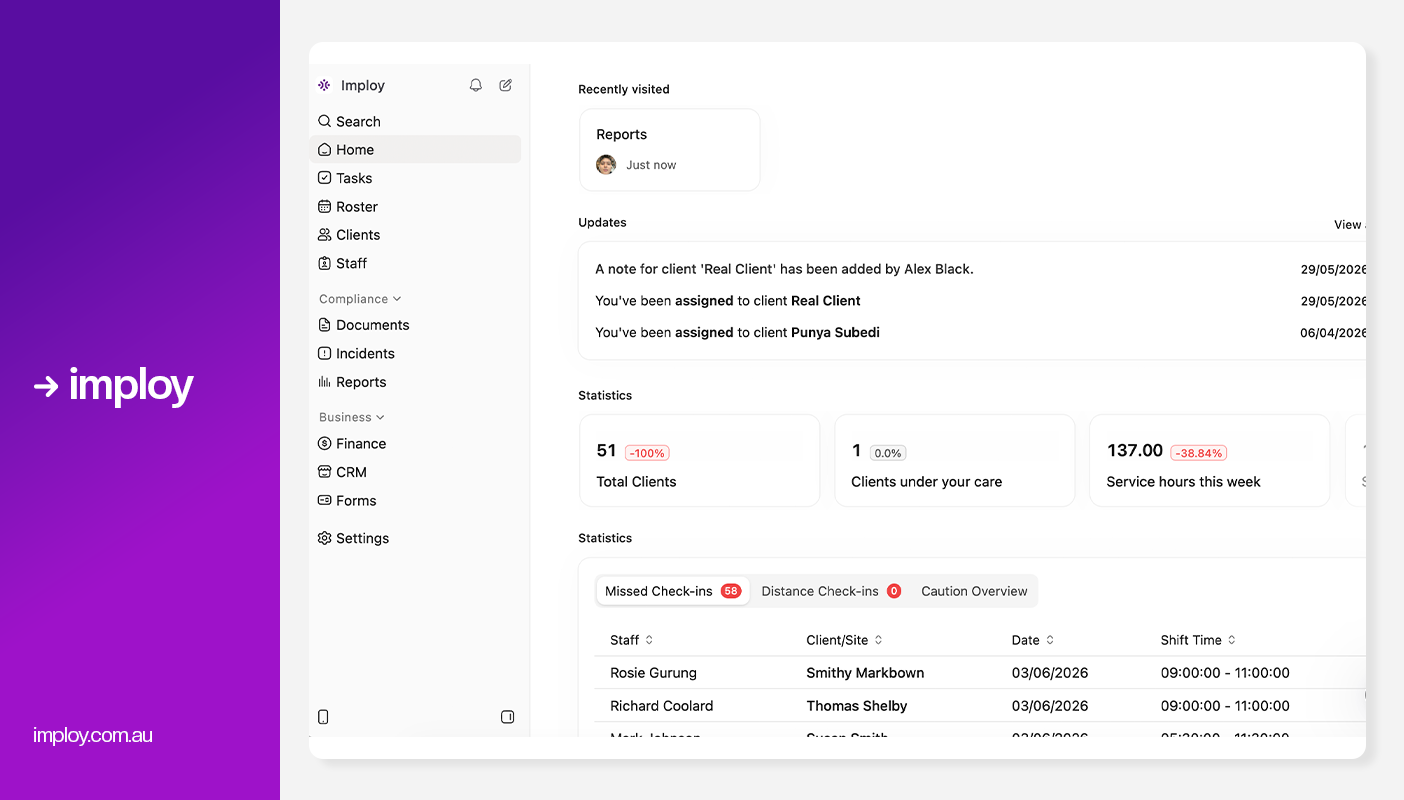
What to test: review a billing run, create draft invoices, check which entries are reserved against an invoice and follow a status change from Xero or QuickBooks. Include a changed service and a group allocation in your example.
Claiming and cost: NDIS bulk claims use a reviewed CSV export for upload. Confirm the plan and accounting connection you need using current Imploy pricing. For broader operations, explore Imploy’s NDIS provider software.
2. Billability
Billability focuses on participant information, NDIS invoices and service agreements. Its published workflow covers creating a participant, preparing documents with the NDIS pricing catalogue, sending them and monitoring progress.

What to test: create an invoice for a participant, choose the recipient and send it to a plan manager. Check service-agreement handling, import options, payment tracking and the access available to other team members.
Scope check: confirm how it fits alongside the systems you use for service records, workforce scheduling and accounts. Compare the current subscription terms with the number of people who need access.
3. Thriday
Thriday presents financial administration tools for NDIS carers, including professional invoicing, transaction reconciliation, accounting and cash-flow visibility. Its focus is the business’s financial administration.

What to test: prepare an invoice, record or reconcile a payment and check how the transaction appears in your business records. Ask how you will enter participant information, support descriptions and any NDIS-specific details you need.
Scope check: assess the service-record and claiming steps separately. Confirm which billing tasks remain in another system and review the current account and subscription terms.
4. RotaWiz
RotaWiz describes invoicing linked to billable shifts and expenses, with NDIS line-item pricing, invoice review and reporting. Its help centre also documents funding setup and invoice workflows.

What to test: take a completed shift into an invoice, review the participant’s plan and line item, add any supported expense and follow the resulting record. Check how changes affect budgets and invoice information.
Scope check: confirm current free-plan terms, user limits, optional modules and the exact export or submission process for your claiming workflow.
5. EasyAs Invoicing
EasyAs Invoicing is an invoicing platform for NDIS support workers and providers. It describes preloaded NDIS items and pricing, invoice templates, participant and plan-manager information, and PDF invoices.

What to test: prepare an invoice on the device you use after a service, select a participant and recipient, review the service details and send the finished document. Test a correction and a repeat invoice.
Scope check: confirm current subscription inclusions, access for additional users, exports and the bookkeeping or care-management systems you will use alongside it.
6. FlowLogic
FlowLogic describes invoice generation from completed service bookings, multiple funding pathways, price-guide updates and bulk claims. Its published invoicing page also describes direct PRODA integration.
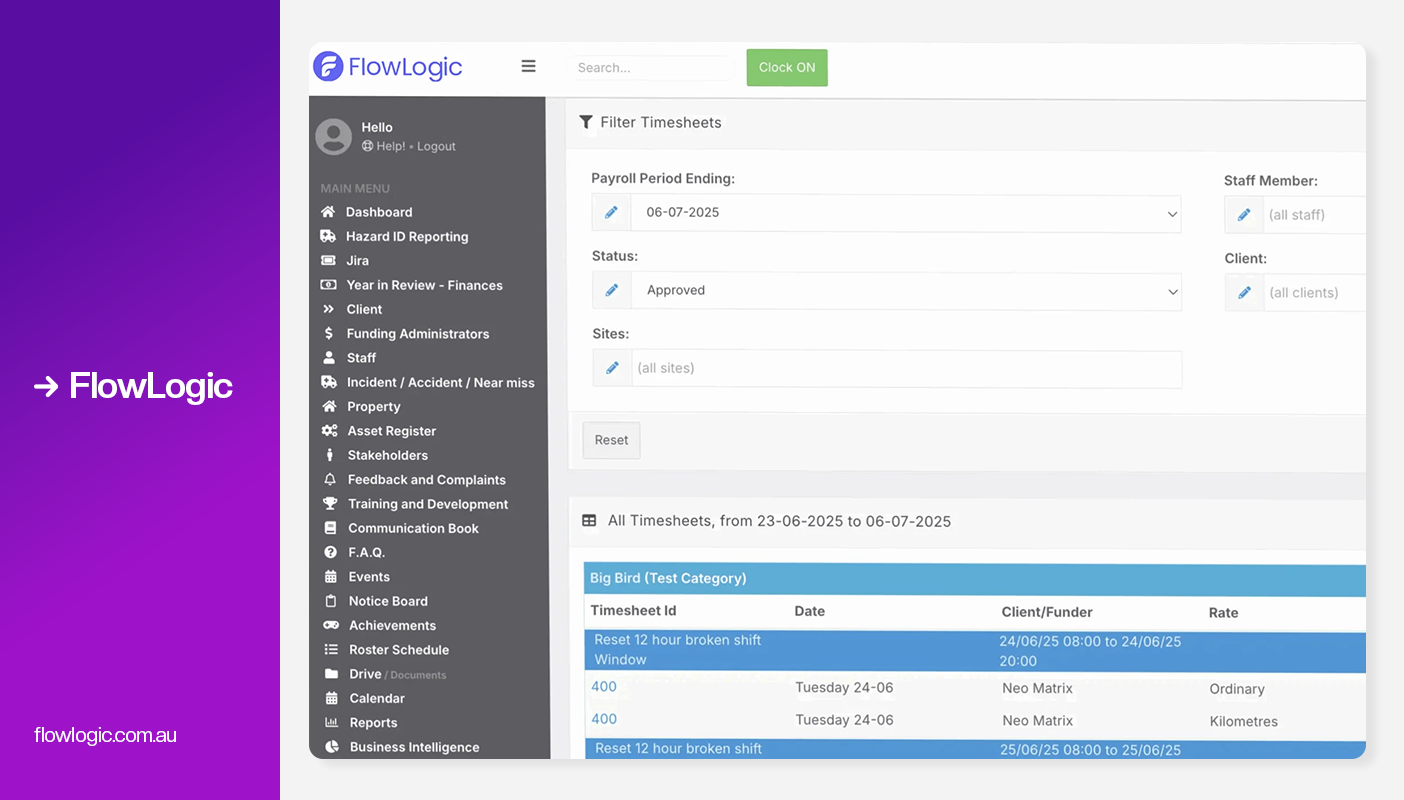
What to test: run the same completed service through plan-manager invoicing and the relevant NDIA claiming pathway. Review a rejected or corrected item and follow the result into your finance records.
Scope check: confirm the exact connection available for your organisation, accounting-system compatibility, required modules and implementation support. Include high-volume review and exception handling in the demonstration.
7. Zanda
Zanda supports NDIS billing within a practice-management workflow. Its documentation covers client NDIS details, plan-manager invoices and statements, plan time or budget tracking, and an NDIA bulk-upload report.

What to test: create an invoice from an appointment, bill the appropriate plan manager and review a statement containing multiple invoices. For NDIA-managed services, test the CSV bulk-upload report and the separate portal-upload step.
Scope check: check the fit for your practitioner and appointment model, required setup and current plan inclusions.
8. SupportAbility
SupportAbility documents a service-to-finance workflow in which participant funding and support allocations are linked to activities. Activity sign-off prepares those records for payment requests and invoice batches.

What to test: follow a signed-off activity into a bulk payment request, upload the results file and review accepted or rejected allocations. Check how invoice batches and exports connect with your finance system.
Scope check: confirm staff permissions, support-allocation setup, review responsibilities and the full claiming and reconciliation process for your organisation.
Choosing a tool for sole traders and small providers
Start with a normal billing week. Count the participants, services, invoices and people who need access. Test how quickly you can find a participant, select the correct service details, send an invoice and check whether it has been paid.
- Check setup and import effort, including participant and payer details.
- Review repeat invoices, corrections, reminders and payment tracking.
- Compare the total cost, including user limits, required modules and accounting subscriptions.
- Confirm how records can be exported if you change systems.
If invoicing is part of a wider operational problem, review NDIS software for small providers or the sole-trader product page alongside the focused invoicing options.
Choosing software for growing and large providers
Use a realistic high-volume billing run. Include more than one coordinator or finance reviewer, different payers, multiple service types, shared supports and records that need correction. Assess the review work as well as the speed of generating invoices.
- Test approval roles, permissions and an audit trail of changes.
- Review group allocations, split services, travel and supported adjustments.
- Trace accepted, rejected, corrected and unpaid items through the workflow.
- Check accounting sync direction, status updates, duplicate prevention and reconciliation.
- Agree on migration, training, exception ownership and support arrangements.
For Imploy’s wider multi-team operations, see NDIS software for large providers.
Keep invoices, claims and payments separate in your evaluation
Generating an invoice, sending a payment request and recording a payment are different steps. Ask every vendor to show which actions happen in its platform, which use an export or integration, and which require work in another system.
Include a plan-managed example and an NDIA-managed example if you deliver both. Check the records available to support review and follow-up, and confirm how corrections and claim results are handled. Preparing a CSV file is one step in a claiming process; it does not by itself confirm that a request was submitted or paid.
Five scenarios to use in every invoicing demo
- A routine service: start with the service record and follow it through invoice creation, delivery and payment tracking.
- A grouped billing run: create invoices for several participants and review the totals before finalising them.
- A shared or split service: check participant allocations and the records each payer receives.
- A correction: change an entry after an invoice has been prepared and review the approval and accounting steps.
- An exception: investigate a rejected claim or unpaid invoice and check how staff resolve and record the outcome.
Use the same examples for each vendor. Record the manual steps, required integrations, permissions and unresolved exceptions, then compare the complete quote.
Compare the full cost and plan the rollout
Request current pricing for the same scope: user access, modules, invoice or transaction limits, setup, migration, training, integrations and ongoing support. Distinguish a free trial from an ongoing free plan and confirm any limits before relying on it.
Pilot a representative billing run before moving the entire organisation. Confirm participant and payer details, service items, opening records, access controls and the connection to accounting. Give a named team member responsibility for reviewing the results.
Explore Imploy’s invoicing workflow
If you want to connect service delivery with invoice generation and billing oversight, explore Imploy’s bulk-invoicing product page or book a demo using your own billing scenarios. Use the NDIS billing guide for the process itself and NDIS bulk claims for the CSV claims workflow.
Frequently asked questions
Which NDIS invoicing tool should a small provider choose?
Compare the tasks you need to complete each week: participant and payer details, invoice preparation, delivery, corrections and payment tracking. Focused invoicing tools may suit a narrow requirement; a connected care platform may fit when rostering and service records also need to feed billing. Test your own examples and compare the total cost.

How should large providers compare invoicing software?
Use a realistic high-volume billing run with different payers, service types and reviewers. Test permissions, approvals, group allocations, accounting connections, rejected claims, corrections and reconciliation. Include migration, training and ongoing support in the written quote.
What is the difference between invoicing and submitting an NDIS claim?
Invoice generation creates a billing document or record. Claim preparation and submission are separate steps that depend on the funding arrangement and platform workflow. Ask which system exports or submits the payment request and how the result is recorded. A CSV export does not by itself confirm submission or payment.
How do I compare pricing, free plans and integrations?
Check current vendor terms for user access, required modules, invoice or transaction limits, setup, training and support. A free trial and an ongoing free plan have different limits. Ask which integrations are included, the direction of data transfer and what requires manual export or review.